Account emails
The invitation email: when your app writes to someone on another person's word
Invite-a-teammate is the one email an app sends to a person who never gave it their address. Whose name goes where, what the invited person needs to see, how the link should behave, and the limits that keep the feature from becoming someone's spam tool.
Every other email your app sends goes to someone who typed their own address into your form. The sign-in code, the receipt, the password reset: the person on the other end asked for it, or at least knows who you are.
The invitation is the exception. A user types somebody else's address into a box, presses Invite, and your app writes to a stranger. Three things follow from that, and most of what's below is one of them looked at closely.
- The reader has no reason to trust it. They've never heard of your app. An email from an unknown sender with a big button is exactly what they've been taught to delete.
- You're lending your sender to anyone who signs up. Whatever name your mail goes out under, an account made two minutes ago can now aim it at any address in the world.
- Someone else writes part of your email. The inviter's name, the team name, a personal note: text your user typed, delivered under your name.
Whose name goes where
It's tempting to make the email look as if it came from the inviter: "Dana Reyes" in the From line, so it feels personal. Don't. Dana didn't send it; your app did, from your app's address. A From name the recipient recognises on top of an address they don't is the shape of a phishing email, and mail apps that show the address beside the name make the mismatch obvious.
| Field | What goes in it | Why |
|---|---|---|
| From | Your app. "Northwind", from Northwind's sending address. | It's true, and it's the same sender every other email of yours comes from. |
| Subject | "Dana Reyes invited you to Harbour Coffee on Northwind" | The inviter's name is the only part the reader might recognise. Lead with it. Then the team, then the app. |
| First line of the body | Dana's name and Dana's email address. | A name is whatever someone typed. The address is the one thing about the inviter you've checked. |
| Reply-To | Your support inbox, or the inviter's address if you already show it in the body. | The natural reply is "who is this?", and it should reach someone who can answer. More in Reply-to on a no-reply sender. |
What the invited person needs to see
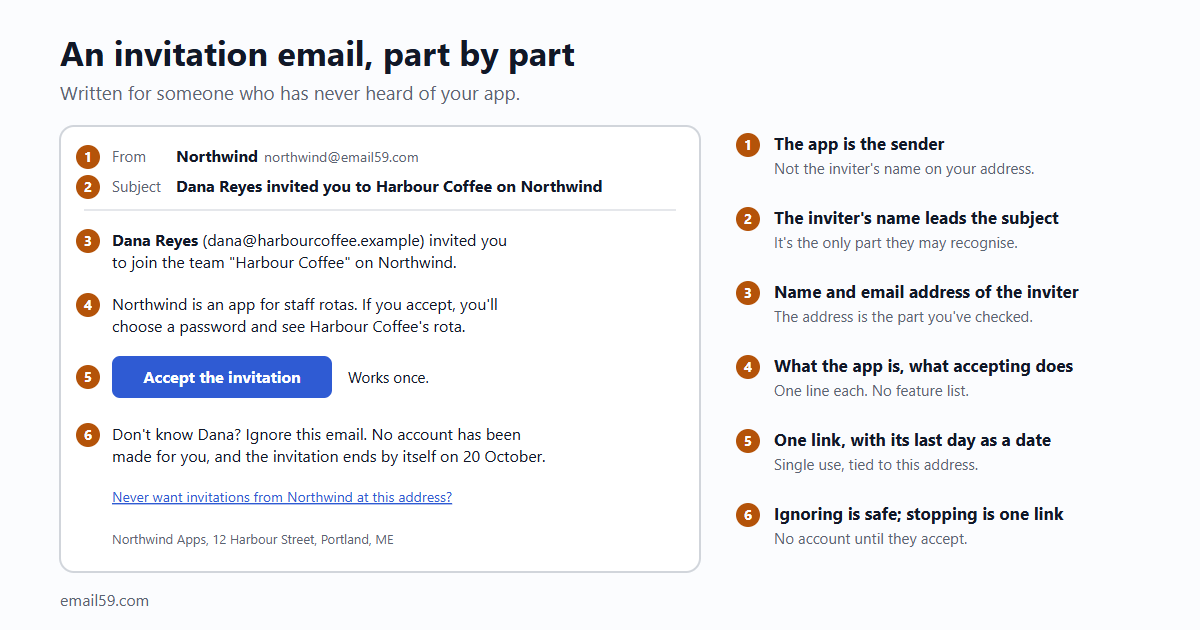
Here is the whole email as plain text. The HTML version says the same with a button (and should travel with this one).
Subject: Dana Reyes invited you to Harbour Coffee on Northwind

Dana Reyes (dana@harbourcoffee.example) invited you to join the team
"Harbour Coffee" on Northwind.

Northwind is an app for staff rotas. If you accept, you'll choose a
password and see Harbour Coffee's rota.

Accept the invitation:
https://northwind.example/invite/9f2c61d07ab34e55a1c08e7d2b6f4410

The link works once.

Don't know Dana? Ignore this email. No account has been made for you,
and the invitation ends by itself on 20 October.

Never want invitations from Northwind at this address?
https://northwind.example/no-invites/7c1e

Northwind Apps, 12 Harbour Street, Portland, ME- Who, with something checkable. Name and address of the person who invited them. If the reader knows Dana, that's the whole trust question answered.
- What it is, in one line. The reader hasn't seen your home page. "An app for staff rotas" is enough. This is not the place for three feature bullets and a testimonial; an invitation that reads like an advert gets treated like one.
- What pressing the link does. "You'll choose a password and see the rota." People hesitate before a link that might sign them up for something. Tell them what's on the other side.
- Until when, as a date, said once where it reassures: the invitation ends by itself. "Expires in 7 days" means nothing to someone who opens the email on day five.
- What happens if they do nothing. Nothing. And make that true: don't create an account for an invited address, and don't add it to any list, until the person accepts.
- A way to stop it for good. One link that stops all future invitations from your app to this address. It protects the person, and it's the earliest warning you'll get that someone is misusing the feature.
The link
An invitation link is a key someone else ordered for a door the recipient hasn't seen. OWASP's list for password-reset tokens is the right starting point. Tokens should be:
- "Randomly generated using a cryptographically safe algorithm."
- "Sufficiently long to protect against brute-force attacks."
- "Stored securely."
- "Single use and expire after an appropriate period."
In practice: 32 random bytes, only a hash of them in your table, gone the moment it's used. Invitations add a few rules of their own.
- Pick an expiry and show it. GitHub's organization invitations lapse after seven days. Slack keeps an email invitation "active for 30 days after you send it". For a small app, seven days is plenty: an invitation is usually answered the day it arrives or not at all, and an old one sitting in a mailbox is a key to a team the person may no longer be wanted in.
- The invitation belongs to the address it was sent to. Emails get forwarded. Whoever opens the link should have to join as that address: a new account is created with it, and someone already signed in under another address is told the invitation is for a different one. GitHub does the same: an invitation sent to an email address can only be accepted by an account with that address verified.
- Opening the link accepts nothing. Mail filters open links before people do; that's how magic links get used up. The link shows a page. A button on the page, pressed by a person, does the accepting.
- The link carries a token and nothing else. Team, role and invited address live in your table, looked up by the token. A link with
?role=adminin it is a link someone will edit. - It doesn't sign anyone in to an existing account. If the address already has an account with you, the page asks them to sign in the usual way first, then shows the invitation.
- The inviter can take it back. A list of pending invitations with a Cancel beside each. Sending again makes a new token and ends the old one.
- One thing you get for free. Someone who accepts through the link has shown they can read mail at that address. You can treat the address as confirmed and skip the "verify your email" step for them.
No free-text note from a new account
"Add a personal message" looks like kindness. It's also a box where a stranger types anything, and your app delivers it to any address with your good name on the envelope.
The note isn't the only such box. The developer Josh Sherman describes how it goes with the organization name, a field nobody thinks of as message text: people "set the organization name to something like 'Text 1-800-555-1212 for a good time'", and the platform mails it out as an invitation. His summary: "If your system doesn't meter the number of invites, you have yourself a certified spam cannon!" A Discourse user made the same point about custom invite messages back in 2016: a sender "could totally subvert the message, maybe even use it for spamming."
So treat every word a user can put into this email as untrusted.
- No note at all until the account has earned it. Paying, or a few weeks old with invitations that were accepted. Most invited people don't need a note; the inviter's name does the work.
- When there is a note: plain text, a couple of hundred characters, no links, set apart and labelled as "Dana wrote:" so it can't pass for your words.
- Names get rules too. A person's name and a team name that end up in a subject line should be short, with no web addresses and no phone numbers. Forty characters covers nearly every real team.
- Escape everything on its way into the HTML part. A team called
<a href=...>is an old trick.
Limits, on both ends
Limits on the inviter are the obvious half. GitHub publishes its own: "To prevent abuse, you can only create 50 organization invitations within a 24-hour period", rising to 500 for organizations older than a month or on a paid plan. The pattern is worth copying: a low number for new accounts, more with age or payment.
| Limit | A starting number | What it stops |
|---|---|---|
| Invitations per account per day, new account | 10 | A fresh sign-up mailing a list. |
| The same, after a month or a payment | 50 | Still a ceiling, high enough for a real team. |
| Invitations sent per team, all time, while unpaid | 100 | Deleting pending invitations to make room for more. Count sends, not what's pending. |
| Emails to one address from one team | The invitation and one reminder, then nothing for 30 days | Nagging. |
| Invitations to one address from all teams | 3 a week | Your app as a tool for flooding one person's inbox. |
The numbers are ours, to be argued with; the rows are the point. The last two are the ones that get forgotten, because they protect someone who isn't your user.
Then four things that aren't limits but belong in the same place:
- Check the stop list before every invitation. An address that pressed "never invite me" gets no invitation from any team, and the inviter is told plainly: "This address doesn't accept invitations from Northwind."
- Tell the inviter about a bounce. Invited addresses are typed by someone else, from memory, so typos are common. "We couldn't deliver to sam@harbourcofee.example" on the team page fixes it in a minute. Invitations to addresses that don't exist count against your sender like any other.
- One reminder at most, a few days in, never after expiry, never after a stop.
- Watch who hits the limits. Sherman again: "Spammers usually won't write in to let you know they hit some limit." A real team that needs sixty seats on day one writes to support. An account that hits the ceiling daily with nobody accepting doesn't. Have the app tell you about the second kind.
The table
create table invitations (
  id            bigserial primary key,
  team_id       bigint not null references teams(id),
  invited_email text not null,              -- trimmed, lower case
  role          text not null default 'member',
  invited_by    bigint not null references users(id),
  token_hash    text not null unique,       -- sha256 of the token; the token itself is only in the email
  created_at    timestamptz not null default now(),
  expires_at    timestamptz not null,
  emails_sent   int not null default 1,     -- invitation + reminder
  accepted_at   timestamptz,
  revoked_at    timestamptz
);
-- one open invitation per address per team
create unique index invitations_open on invitations (team_id, invited_email)
  where accepted_at is null and revoked_at is null;

create table invitation_stops (email text primary key, stopped_at timestamptz not null default now());
Accepting is one statement, so two presses of the button can't both win:
update invitations set accepted_at = now()
 where token_hash = $1 and accepted_at is null and revoked_at is null and expires_at > now()
returning team_id, invited_email, role;
No row back means used, cancelled, expired or never existed. Say the same thing for all four: "This invitation is no longer valid. Ask the person who invited you for a new one."
With email59
email59 is an email router: one HTTPS call and the message goes out through a provider we manage, from an address at email59.com with your app's name in front of the @.
curl https://email59.com/v1/send \
  -H "Authorization: Bearer $EMAIL59_KEY" -H "Content-Type: application/json" \
  -d '{"from": "northwind", "to": "sam@harbourcoffee.example",
       "reply_to": "help@northwind.example",
       "subject": "Dana Reyes invited you to Harbour Coffee on Northwind",
"text": "Dana Reyes (dana@harbourcoffee.example) invited you to join ..."}'- The sender is your app by construction.
fromis the name before the @ and nothing more, so there's no way to dress the email up as coming from the inviter. The inviter goes in the subject and the first line, where this article puts them anyway. - Mistyped addresses come back at once. A bad format, a domain with no mail server or a throwaway inbox is refused with
422 recipient_rejectedand averdictbefore anything is sent. Show that to the inviter while they're still on the page. - The stop list can live in the API. Add the address to your blocklist when someone presses "never invite me", and every later send to it is refused, whichever part of your code tried.
reply_topoints answers at your support inbox, and that email leaves out the "no replies will be received" line.- Try the whole flow with a test key. Invitations are stored instead of delivered, so you can press Invite fifty times against your own limits without writing to anyone.
The short version
- The invitation is the one email you send to someone who didn't ask. Write it for a stranger.
- From is your app. The inviter's name leads the subject; their name and email address open the body.
- Say what the app is in one line, what the link does, the date it stops working, and that ignoring it is fine.
- The link: random, stored as a hash, single use, seven days, tied to the invited address, accepted by a button and not by opening it.
- No personal note from new accounts. Short names without links. Everything a user typed is untrusted.
- Limit invitations per inviter, per team and per invited address, keep a "never invite me" list, and have the app tell you who keeps hitting the ceiling.
Sources
- Josh Sherman: Invite systems are an open relay (the organization-name example, caps on pending and daily invites, watching who hits limits)
- GitHub Docs: inviting users to join your organization (seven-day expiry, 50 and 500 invitations in 24 hours, verified email address)
- Slack help: invite new members to your workspace (invitations active for 30 days)
- OWASP Forgot Password Cheat Sheet (the four properties of a token)
- Discourse Meta: customize invite email message (the 2016 discussion of free-form invite text)
- email59 docs: send, reply_to, blocklist and test keys