Writing email
Every HTML email needs a plain-text twin
An app's email can carry two bodies: HTML and plain text. Who ends up reading the text one, what a stripped-tags version does to a sign-in link, and how to write the text part by hand in ten minutes.
You built the sign-in email in HTML. Logo, a big code, a blue button. You looked at it in Gmail and on your phone, and it was fine.
The same email also went to a man who set his mail app to plain text years ago, to a help desk that turns every incoming message into a ticket, and to a filter that reads mail before any person does. None of them saw your button. What they got was decided by a field most send calls leave empty.
One email, two bodies
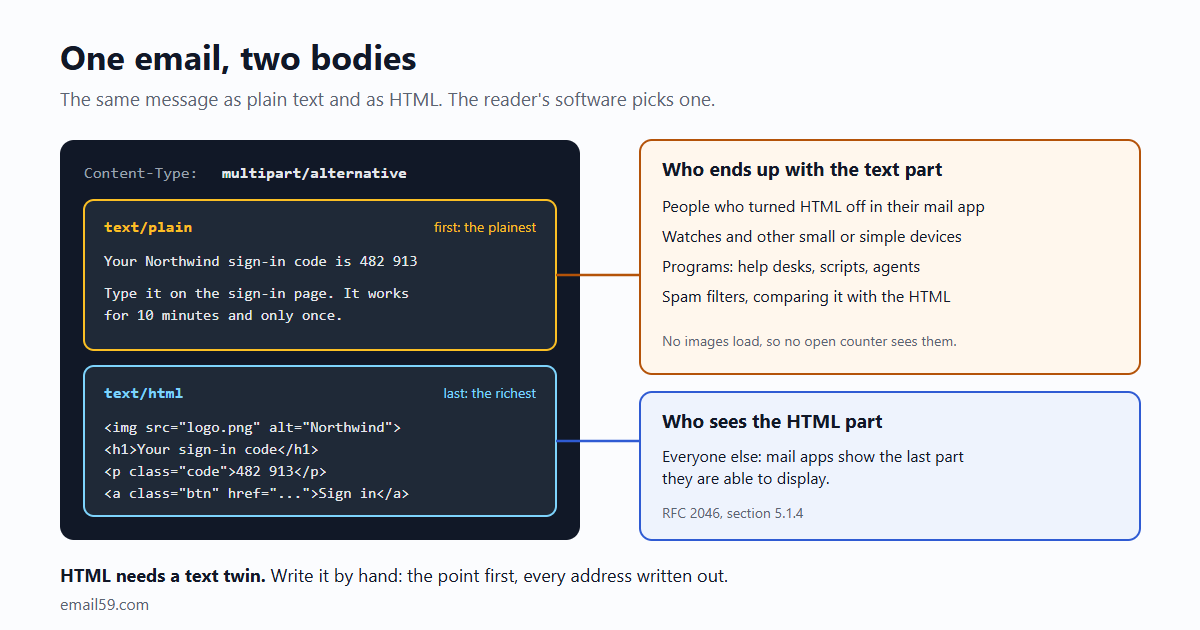
An email body doesn't have to be one thing. The MIME standard has a wrapper called multipart/alternative that holds the same message in more than one format. This is the top of a real one, built with Python's standard library:
Subject: 482 913 is your Northwind sign-in code
MIME-Version: 1.0
Content-Type: multipart/alternative; boundary="===============58004=="

--===============58004==
Content-Type: text/plain; charset="utf-8"

Your Northwind sign-in code is 482 913

Type it on the sign-in page. It works for 10 minutes and only once.
...
--===============58004==
Content-Type: text/html; charset="utf-8"

<html><head><style>.btn{background:#2f5bd3;color:#fff}</style>...
The order isn't an accident. RFC 2046, which defines the wrapper, says the alternatives appear "in an order of increasing faithfulness to the original content", and that receiving software "should pick and display the last format they are capable of displaying". Plain text goes first, HTML last. Any library that takes a text and an html argument does this for you.
So a modern mail app shows the HTML and the person never knows a second body was there. The text part is for everyone and everything else.
Who reads the text part
- People who turned HTML off. Some do it for privacy (no remote images, no tracking pixels), some for speed on a poor connection, some because they read mail in a terminal. A few people who use a screen reader or very large type prefer it too, though screen readers handle well-made HTML fine these days. It's a small group. It's also a group that notices.
- Small screens and odd devices. Litmus, which tests email for a living, puts it this way: "Smart watches, gaming devices, and voice assistants are all likely to use plain text emails over HTML." The same article says a well-written text part "will work much better on Apple Watches than the HTML equivalent". Devices change from year to year; the habit of reaching for the simpler part doesn't.
- Programs. Help desks that file email as tickets, CRMs that log it, the script somebody wrote to forward alerts into a chat channel, an agent that signs in with a code it reads out of its inbox. Software that reads mail takes the text part when there is one, because the other choice is parsing your table layout.
- Spam filters. SpamAssassin, the open-source filter behind a lot of smaller mail hosts, has a rule named
MIME_HTML_ONLY("Message only has text/html MIME parts") and another,MPART_ALT_DIFF("HTML and text parts are different"). Neither sinks a message alone. They're points on a score, and a sign-in email wants none. - Previews, sometimes. The line under the subject in a message list, or on a lock screen, is made by each app from whichever part it prefers. You can't know which. So the first sentence should be the same, and useful, in both.
How many of your users is that? Nobody can tell you, because a text reader loads no images and trips no open counter. For a newsletter you might shrug at a few percent. For a sign-in code, a few percent of people who can't get in is a support queue.
What goes wrong when it's missing
If you send HTML only, the text reader gets one of three things, depending on their software: raw markup, a blank message, or the app's own rough conversion. All three are out of your hands.
The more common trouble is a text part that exists and is bad. Many frameworks and sending services will make one for you by stripping the tags out of the HTML. Here is the sign-in email from above after the classic one-line strip, re.sub(r"<[^>]+>", "", html):
.btn{background:#2f5bd3;color:#fff}
Your Northwind sign-in code is inside.

Your sign-in code
Type this code on the sign-in page:
482 913
Or click here to sign in.
It works for 10 minutes. Didn't ask for it? Ignore this email.
Four things happened, and each one turns up in real mail:
- The link is gone. "Click here" survived; the address lived in an
hrefand was thrown away with the tag. For a magic link or a password reset, that's the whole email. - The stylesheet came along. The tags around the CSS were removed and the CSS itself stayed, as the first line.
- The hidden preview line is now visible. It was written to sit unseen under the subject. Here it's the opening sentence, and it says the code "is inside" to someone already inside.
- The logo left nothing. Harmless here. Less so when the image was the only place a price or a chart appeared.
Better converters keep the link addresses and drop the CSS. They still can't know what matters. A draft made from markup keeps the order of the layout: logo, heading, pleasantries, and the one thing the person opened the email for somewhere in the middle.
Write it by hand. It takes ten minutes.
An app sends maybe six kinds of email: a code, a welcome, a receipt, a reset, an invitation, a notice. Each has a template. Writing the text version of a template is a one-time job, and it's short because the email is short.
Your Northwind sign-in code is 482 913

Type it on the sign-in page. It works for 10 minutes and only once.

Or open this link on the device where you want to sign in:
https://northwind.example/in/9f2c61d0

Didn't ask for a code? Ignore this email. Nobody can sign in without it.

Northwind Apps, 12 Harbour Street, Portland, ME
What makes it work:
- The point is the first line. A watch face or a preview shows about one line. If it reads "Your Northwind sign-in code is 482 913", many people never need to open the email. (The same goes for the HTML version of a code email.)
- Every address is written out, on a line to itself. Say what it does on the line above. Mail apps turn a bare address into a link without help, and one alone on a line is easy to tap and easy to copy. Never "click here": there's nothing to click.
- Use the short, real address. In HTML a 300-character tracking link hides behind a button. In text the reader sees every character of it, and it looks like the phishing they were warned about. If your links are wrapped for click tracking, leave the text part's links unwrapped.
- Things people copy stand alone. A code, an order number, an amount: give each a spot where a double-click or a long press selects exactly that.
- Blank lines are your only layout. One between thoughts. A heading, when a long email needs one, is a short line in capitals. Skip rows of asterisks and equals signs; a screen reader reads each one aloud.
- Don't break lines yourself. Advice to wrap at 60 or 70 characters is from the days of fixed-width terminals. Mail apps wrap text to the screen now, and a hard-wrapped paragraph on a narrow phone turns into alternating long and short lines. (The standard's own limits, 998 characters as the maximum and 78 as the recommendation, are about the encoded message. Your sending library takes care of those.)
- Say the same thing. Not a shorter email, not "view this in a browser". Same facts, same links, same offer of a way out. A filter that compares the parts, and a person who compares them, should find one message.
- Keep the footer. Who sent it, and the unsubscribe address written out where the email has one.
Keeping two versions from drifting
The fair objection to hand-writing is that there are now two templates, and someone will change the price in one of them. Three habits deal with that.
- Keep them side by side. One file, or one folder, per kind of email:
receipt.htmlandreceipt.txt, filled from the same data. A change to one shows up in review right next to the other, untouched. - Test for the facts. You can't test that the wording matches. You can test that everything a person acts on is in both:
def test_receipt_parts_agree():
    html, text = render("receipt", order)
    for fact in [order.number, order.total, order.receipt_url, settings.SUPPORT_EMAIL]:
        assert fact in html, fact
        assert fact in text, fact
assert "<" not in text.replace("<http", "") # no markup leaked in- Read the text part when you add a kind of email. Send it to yourself, switch your mail app to plain text for a minute, and look. Or keep sends in a capture inbox during development, where both parts sit next to each other.
For a first draft of the text, or to check a pair you already have, paste the HTML into the plain-text twin tool. It writes out the links, drops the hidden and decorative parts, and then lists every link, code and amount in the HTML with a mark for whether your text still has it.
It only runs one way
HTML needs a text twin. Text doesn't need an HTML twin.
A sign-in code, a server alert, a "your export is ready" note: a text-only email is a complete, respectable email. It's read the same everywhere and takes ten minutes to get right. If you're putting off sending email from your app because designing a template feels like a project, send text now and add HTML the day you have a reason to.
With email59
email59 is an email router: one HTTPS call and the message goes out through a provider we manage. The send call takes both bodies side by side:
curl https://email59.com/v1/send \
  -H "Authorization: Bearer $EMAIL59_KEY" -H "Content-Type: application/json" \
  -d '{"from": "northwind", "to": "sam@example.org",
       "subject": "482 913 is your Northwind sign-in code",
       "text": "Your Northwind sign-in code is 482 913\n\nType it on the sign-in page. It works for 10 minutes and only once.",
"html": "<p>Your Northwind sign-in code is <b>482 913</b></p><p>Type it on the sign-in page. It works for 10 minutes and only once.</p>"}'- It sends what you give it.
htmlandtexttogether go out as one two-part email.textalone goes out as a text email.htmlalone goes out as HTML only: email59 doesn't write a text part from your markup, for the reasons above. - The footer is added to each part in its own form. The unsubscribe link is a link in the HTML and a written-out address in the text.
- You can look at both before anyone gets them. A test key runs every check of a real send and stores the message instead of delivering it. Read it back and you see the
htmland thetextexactly as they would have left.
The short version
- An email can hold the same message as text and as HTML. Mail apps show the last part they can display, so text goes first and HTML last.
- The text part is read by people who turned HTML off, by small devices, by programs, and by filters.
- Stripping tags loses the links and keeps the junk. Write the text part by hand, once per template.
- First line is the point. Addresses written out on their own lines. Short real links. Blank lines for layout. No hard wrapping.
- Keep the two templates together and test that every link, code and amount is in both.
- Text-only is a fine email. HTML-only is half of one.
Sources
- RFC 2046, section 5.1.4: the multipart/alternative subtype (order of the parts, which one is shown)
- RFC 5322, section 2.1.1: line length limits (998 and 78 characters)
- Litmus: best practices for plain text emails (who uses the text part, watches included; line breaks, links and whitespace), updated 2022
- Apache SpamAssassin rules file: MIME_HTML_ONLY and MPART_ALT_DIFF
- Python standard library: EmailMessage.set_content and add_alternative (used for the example message)
- email59 docs: sending an email with html and text