Sign-in codes
Six digits, ten minutes: what a sign-in code email needs to get typed in
It's the one email people sit and wait for. How long the code is, how long it lives, how many guesses it allows and where it sits in the message decide whether they get in.
Of all the email your app sends, the sign-in code is the one people actually wait for. They've typed their address, switched to their inbox, and they're staring at it. If the code takes a minute, they press "resend". If it's buried under a logo and three paragraphs, they squint. If it expired while they were looking for it, they leave.
Here's what goes into a code email that arrives, gets found and gets typed, with the numbers behind each choice.
The numbers to start from
- At least six digits. NIST's digital identity guidelines (SP 800-63B) ask for codes of "at least six decimal digits" from a proper random generator. Six is also what people expect and what phone autofill looks for.
- Ten minutes. The same guidelines treat a sign-in as failed unless it's finished within 10 minutes. Long enough to find the email, short enough that an old code lying in an inbox is useless.
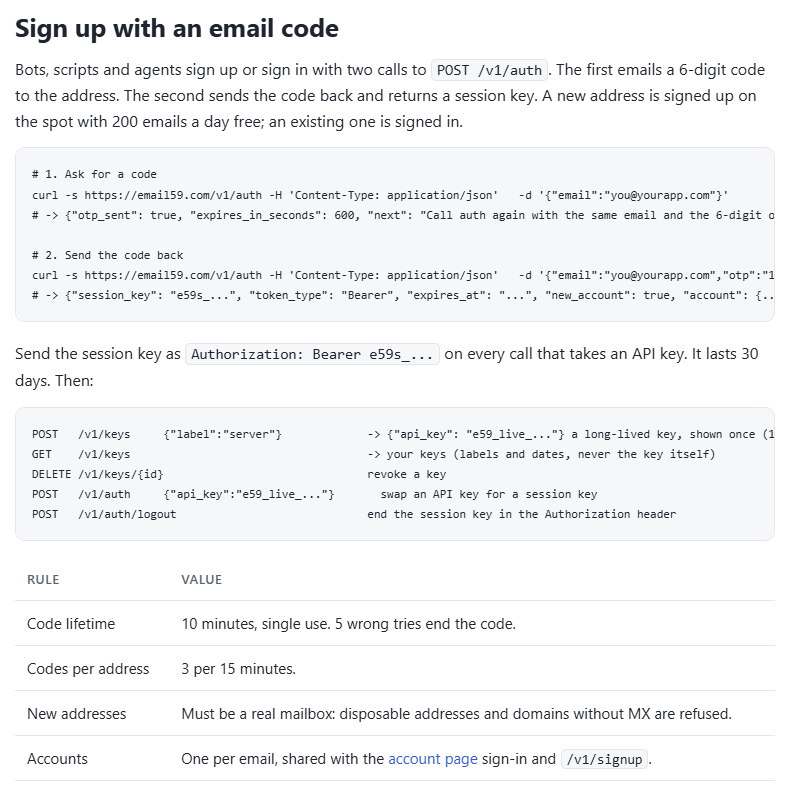
- Few guesses. NIST's ceiling is 100 failures in a row before the authenticator is disabled. Apps usually go much lower per code. email59's own sign-in for bots, for example: 5 wrong tries end the code, and an address can ask for 3 codes per 15 minutes.
- One honest caveat. NIST says email "SHALL NOT" be used as an out-of-band second factor, because mail can be read by anyone with the mailbox password. An email code proves someone can read that inbox. That's exactly what a sign-up or passwordless sign-in needs; just don't sell it as bank-grade two-factor.
The limit that matters is per day, not per code
Five tries at a six-digit code is a 1 in 200,000 chance for someone guessing. That sounds safe until you notice they can ask for a new code. If your form hands out a fresh code every five minutes, that's 288 codes and 1,440 guesses a day: about a 0.14% chance per day, and roughly 4% over a month against one account that nobody is watching. Cap codes at 10 a day per address and the month drops to about 0.15%.
Try your own settings:
So besides tries per code, limit codes per address per day, tell the account owner when someone keeps asking, and limit by the address being mailed, not only by the IP asking. A per-IP limit alone also lets someone use your form to flood a stranger's inbox from many machines.
Getting it there in seconds
- Send it as transactional mail, apart from newsletters and promotions, so a complaint about your newsletter never slows down a sign-in. More on that line: transactional or marketing?
- Send from the request, or from the front of the queue. A code that sits behind a batch of 5,000 welcome emails arrives after the person gave up.
- Plain and light. Short text, a simple HTML version, no images, no tracking pixel. Every extra part is something for a filter to weigh.
- No links, or one link to a confirm page. Company mail scanners open links on arrival, which kills one-time links: your magic link was clicked before your user saw it. A code has nothing for them to open.
- Plan for "resend". If a new code cancels the old one, the first email can arrive late with a dead code, which looks like your bug. Either resend the same code while it's still valid, or accept the last two.
Getting it found and typed
- Phones read these emails now. Since iOS 17, Safari can fill in a code that arrives in Apple Mail. Gmail's Android and iOS apps have started showing a "Copy code" button on emails that carry a verification code. Help them: one code, close to the words "code" or "verification code", and no other long numbers nearby (order numbers, dates, phone numbers).
- The code in the subject? "482913 is your Tallyho code" means people can read it from the notification without opening anything. It also shows on a locked screen. Fine for a low-risk sign-in; leave it out of the subject for anything that moves money.
- One input box, not six. Six separate boxes break paste and autofill more often than they help. Use
<input autocomplete="one-time-code" inputmode="numeric" maxlength="7">and strip spaces and dashes before checking. - Digits only. If you must use letters, drop the ones people confuse: 0 and O, 1, I and L.
What the email says
Subject: 482913 is your Tallyho sign-in code

Your Tallyho sign-in code is 482913

It works once, for 10 minutes. Requested from Chrome on Windows at 14:02 UTC.

Didn't ask for it? You can ignore this email. Nobody can sign in without the code.
We will never ask you for this code by phone, chat or email.
That's all it needs. The time and browser help someone spot a request that wasn't theirs. The last line is there because "read me the code you just got" is how most account takeovers by phone work.
The server side, briefly
import hashlib, hmac, os, secrets, time, requests

def new_code(email):
    code = f"{secrets.randbelow(10**6):06d}"            # crypto random, keeps leading zeros
    save(email, sha256(code), expires=time.time() + 600, tries_left=5)   # store a hash, not the code
    requests.post("https://email59.com/v1/send", timeout=10,
        headers={"Authorization": f"Bearer {os.environ['EMAIL59_KEY']}"},
        json={"from": "yourapp", "to": email,
              "subject": f"{code} is your Tallyho sign-in code",
              "text": f"Your Tallyho sign-in code is {code}\n\nIt works once, for 10 minutes."})

def check(email, typed):
    row = load(email)
    if not row or row.expires < time.time() or row.tries_left <= 0:
        return False
    decrement_tries(email)                                # count the try before comparing
    if hmac.compare_digest(row.hash, sha256(typed.replace(" ", "").replace("-", ""))):
        delete(email)                                     # single use
        return True
    return False

def sha256(s): return hashlib.sha256(s.encode()).hexdigest()secrets, notrandom(orcrypto.randomIntin Node). Codes from an ordinary random generator can be predicted.- Store a hash so a leaked table or log doesn't hand out live codes, and compare in constant time.
- Delete on success, and count a failed try before you compare, so two requests at once can't both use the last try.
The send in that sketch is one HTTPS call with a bearer key, from yourapp@email59.com, with no domain to verify first. That's what email59 is for: get a free key in two minutes, and test your flow with the free deep email check to catch dead and throwaway addresses before you send them a code.
Sources
- NIST SP 800-63B: six-digit minimum, 10-minute window, 100-failure limit, email not allowed as an out-of-band authenticator
- Techlicious: Safari fills in verification codes from Mail (iOS 17)
- Android Central: Gmail shows a Copy code button on verification emails
- MDN: the autocomplete attribute (one-time-code)
- Python docs: the secrets module
- email59 docs: sign up with an email code