Sign-in links
Your magic link was clicked before your user saw it
A sign-in link that works for every Gmail tester and fails for the first customer at a bank. It isn't your expiry timer. A security scanner opened it first.
A support ticket comes in: "The sign-in link says it expired. I clicked it the second it arrived." You check the logs. The token was used three seconds after the email went out, from an IP address in a cloud data centre, by something calling itself Chrome. The person who wrote the ticket clicked forty seconds later and got your "link expired" page.
Nobody stole anything. A mail security scanner at the reader's company opened the link to see whether it was dangerous, and your app treated that visit as the sign-in.
Who opens your links before your users do
- Company mail gateways. Microsoft Defender for Office 365 (Safe Links), Proofpoint, Mimecast, Barracuda and others check links in incoming mail. Microsoft's own documentation says that with Safe Links on, URLs are scanned before the message is delivered, links without a known reputation are "detonated asynchronously in the background", and the recommended setting holds the message until scanning finishes.
- How they visit varies. Some send a
HEADrequest, some a fullGET, some load the page in a headless browser that runs your JavaScript. Some come back again when the person clicks. - It's mostly work and school addresses. Your own Gmail tests pass, which is why this bug ships. It shows up when your first customer at a bank, a hospital or a university tries to sign in.
- It's common enough to have its own docs page. Supabase has a troubleshooting article for
otp_expirederrors that names email prefetching as the most common cause. The Ghost and Bubble forums have threads about magic links that die in Outlook.
Why the link breaks: a GET that changes something
HTTP calls GET a safe method: fetching a URL isn't supposed to change anything on the server (RFC 9110, section 9.2.1). Scanners, link previews and browser prefetching all rely on that promise. A sign-in link that logs someone in, confirms an address or resets a password the moment it's fetched breaks the promise, and single use makes it final: whoever fetches first wins.
The scanner doesn't get anything useful out of it. The session cookie lands in a throwaway browser in a data centre. But the real person is locked out, and they blame your app, not their IT department.
Fix 1: the link opens a page, and a button does the work
Let the link show a page and change nothing. The token is spent only when the person presses a button, which sends a POST. Scanners fetch pages; they don't press buttons on them.
// GET: look, don't touch. The token is still unused after this.
app.get("/auth/confirm", (req, res) => {
  const t = tokens.peek(req.query.token);          // no "used" flag set here
  if (!t) return res.status(410).send(expiredPage());
  res.send(`<form method="post" action="/auth/confirm">
    <input type="hidden" name="token" value="${escapeHtml(req.query.token)}">
    <button>Sign in as ${escapeHtml(t.email)}</button>
  </form>`);
});

// POST: this is the sign-in. Single use happens here.
app.post("/auth/confirm", (req, res) => {
  const t = tokens.consume(req.body.token);        // marks it used, atomically
  if (!t) return res.status(410).send(expiredPage());
  startSession(res, t.userId);
  res.redirect("/");
});
We do the same thing on email59's unsubscribe links. Opening the link shows who the mail was for and one button; nothing is recorded until the button is pressed, so a scanner can't unsubscribe anyone:
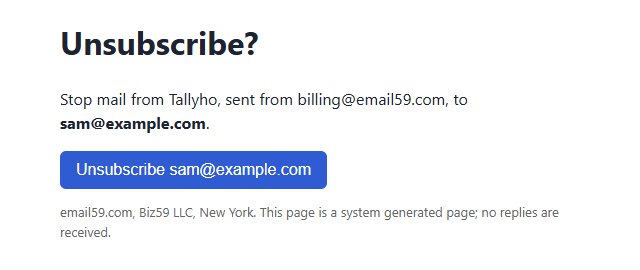
GET only shows it; the button sends the POST.- Don't auto-submit the form with JavaScript. It's tempting to "save a click". It hands the sign-in straight back to any scanner that runs scripts.
- Make the page say what will happen: which account, which action. It also helps someone who got a link they didn't ask for.
- Answer
HEADwithout side effects too. Most frameworks routeHEADto theGEThandler, so the rule above covers it, but check yours.
Fix 2: send a code the person types
Scanners can't type. A six-digit code entered into the tab that asked for it is immune to link checking, and it works when someone reads mail on their phone but signs in on a laptop. Supabase's own advice for this error is the same: put the code ({{ .Token }}) in the template, or point the link at your own confirm page with the token hash. You can send both: a code for people who switch devices, and a link that opens the confirm page.
Codes have their own small print (length, expiry, how many guesses). We wrote that up separately: Six digits, ten minutes: what a sign-in code email needs to get typed in.
Fix 3, optional: tie the link to the browser that asked
When someone asks for a link, set a short-lived cookie in their browser with a random value, and store the same value with the token. On confirm, if the cookie isn't there, don't sign in: ask for the code instead, or say "open this on the device where you asked for it". A scanner never has the cookie, and neither does someone who was forwarded the email. The cost is that people who switch devices get one extra step, so pair it with a code rather than a dead end.
What doesn't fix it
- A longer expiry. The token is gone after the first fetch, however long it was meant to live.
- Spotting scanners by user agent or IP. Many send a normal browser user agent from ordinary cloud addresses. Fine as an extra signal in your logs, not as the fix.
- Asking each customer's IT to allow-list your domain. Safe Links has a "Do not rewrite the following URLs" list, but Microsoft notes those links can still be checked at click time, and you can't ask every company that has a user on your app.
- Letting a token work several times for a few minutes. It does stop the lockout, but for those minutes the link also works for anyone else who sees it. If you do it, keep the window short and bind it to the browser (fix 3).
Check your own app in five minutes
- Search your code for every handler that verifies or consumes a token, and note its HTTP method. Anything on
GETis a candidate. - Request a fresh link, run
curl -s -o /dev/null "<link>"on it, then click it in a browser. If the browser says expired, scanners will do the same to your users. - The same goes for email confirmation, invitations, "approve this login" and unsubscribe links.
- Log the user agent and IP on every token use for a week. Uses within seconds of sending, from data-centre ranges, are scanners.
email59 sends your sign-in codes and confirm-page links over plain HTTPS and JSON, from yourapp@email59.com, with no domain to set up first. Bots that sign up to email59 themselves get a six-digit code, not a link.
Sources
- Microsoft Learn: Safe Links overview (URLs scanned before delivery, background detonation, wait-for-scan setting, do-not-rewrite list)
- Supabase troubleshooting: 'token has expired' or otp_expired errors (email prefetching)
- RFC 9110, section 9.2.1: safe methods
- Ghost forum: magic links don't work when Outlook Safe Links are enabled
- Microsoft Tech Community: Defender scanning and clicking links