Development
Test emails that never reach a real person: catching mail in development
Sooner or later a staging server emails real customers. Three fences that stop it: a local catch-all inbox, an allowlist in one send function, and test addresses that can't belong to anyone.
The story is always the same. Someone copies the production database to staging to chase a bug. Staging has the same code, the same nightly job and, because nobody thought about it, the same mail key. At 2 a.m. four thousand real people get "Your invoice is overdue" from a server that was never supposed to talk to anyone.
Nobody plans that. It happens because sending real email is the default and not sending is the thing you have to build. So turn it round: make "reaches nobody" the default, and make real delivery something an environment has to be given on purpose.
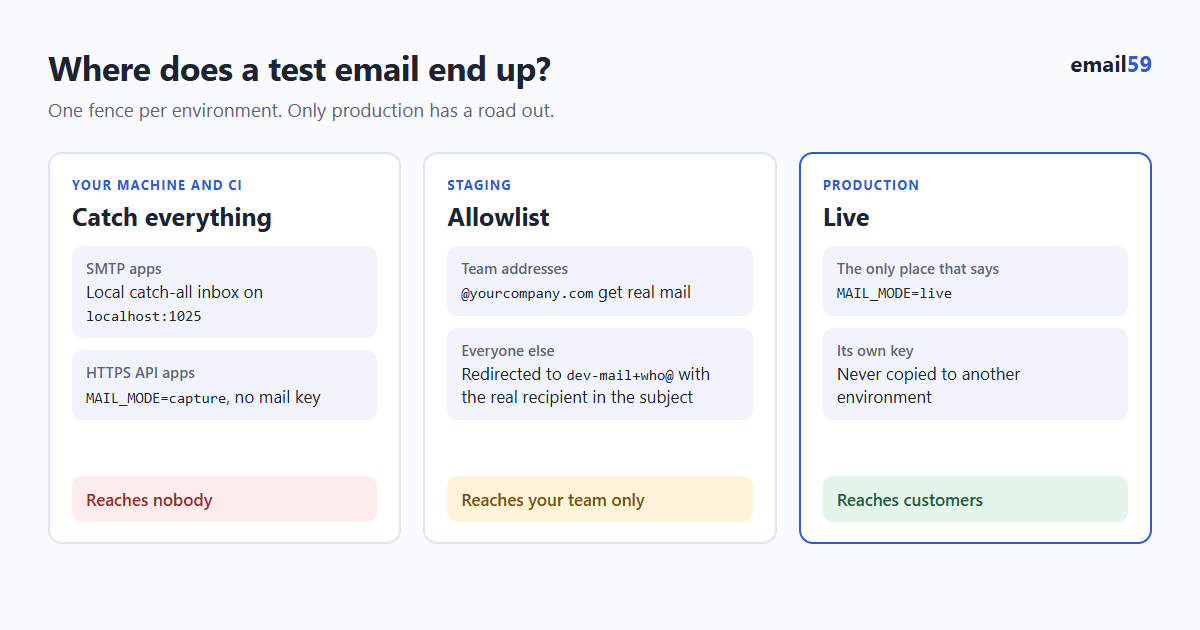
Fence 1: on your machine, mail has nowhere to go
If your app sends over SMTP, point it at a catch-all inbox running on your own machine. Mailpit is the one most people use now: one small program that accepts any email on an SMTP port and shows it in a web page. It took over from MailHog, which is no longer maintained.
docker run -d --name mailpit -p 8025:8025 -p 1025:1025 axllent/mailpit

# in your app's dev settings
SMTP_HOST=localhost
SMTP_PORT=1025        # no username, no password, no TLS
Open http://localhost:8025 and every email your app "sends" is sitting there, whoever it was addressed to. Things worth knowing:
- It checks your work. Each message has an HTML check (which mail clients will break your layout), a link check and, if you wire it up, a SpamAssassin score.
- It keeps the latest 500 messages by default and drops older ones, so it doesn't fill a disk.
- It has an API, so a test can ask "did the welcome email go out, and what's the link in it?"
- It can let chosen mail through. A message can be released to a real SMTP server by hand, and
--smtp-relay-matchingforwards only recipients that match a pattern. Leave--smtp-relay-allalone: that turns your catch-all into an ordinary mail server with a copy.
A test that reads the inbox instead of trusting a mock:
import re, requests

def test_signup_sends_a_working_link(client):
    requests.delete("http://localhost:8025/api/v1/messages")           # empty the inbox
    client.post("/signup", data={"email": "new.user@example.test"})

    found = requests.get("http://localhost:8025/api/v1/search",
                         params={"query": "to:new.user@example.test"}).json()
    assert found["messages_count"] == 1
    msg = requests.get(f"http://localhost:8025/api/v1/message/{found['messages'][0]['ID']}").json()
    link = re.search(r"https?://\S+/confirm\S+", msg["Text"]).group(0)
    assert client.get(link).status_code == 200
Fence 2: one send function, and it fails closed
Mailpit only catches SMTP. If your app sends through an HTTPS API (email59, or any provider's REST endpoint), nothing local sits in the way: the request goes straight out to the internet. The fence has to be in your code, and it only works if every email goes through one function.
import os, re, requests

MODE  = os.environ.get("MAIL_MODE", "capture")           # capture | allowlist | live
ALLOW = re.compile(os.environ.get("MAIL_ALLOW", r"^$"))  # e.g. @yourcompany\.com$
CATCH = os.environ.get("MAIL_CATCH", "")                 # e.g. dev-mail@yourcompany.com

def send_email(to, subject, text):
    if MODE not in ("allowlist", "live"):                # dev, CI, a misspelt mode, anything not configured
        print(f"[mail not sent] to={to} subject={subject!r}\n{text}\n")
        return
    if MODE == "allowlist" and not ALLOW.search(to):     # staging
        if not CATCH:
            return
        user, domain = CATCH.split("@")
        tag = re.sub(r"[^a-z0-9]+", "-", to.lower()).strip("-")[:40]
        subject, to = f"[staging, was for {to}] {subject}", f"{user}+{tag}@{domain}"
    requests.post("https://email59.com/v1/send", timeout=10,
        headers={"Authorization": f"Bearer {os.environ['EMAIL59_KEY']}"},
        json={"from": "yourapp", "to": to, "subject": subject, "text": text}).raise_for_status()
The dev mail fence builds this function for your own domain and catch inbox in Python, JavaScript, PHP, C# or Go. Three details carry the weight:
- The default is
capture. A new laptop, a CI runner or a forgotten preview deployment has noMAIL_MODEset, so it prints and sends nothing. Production is the only place that sayslive. If the default werelive, every mistake would end in someone's inbox. - Staging redirects instead of dropping. Mail for anyone outside the allowlist goes to one team inbox, with the original recipient in the subject and in the plus tag (
dev-mail+jo-example-org@yourcompany.com), so testers still see that the email went out and can filter by who it was for. - The key isn't there at all in development. Don't put the production mail key in
.env.example, in the shared dev.envor in CI. A send that can't authenticate can't reach anyone.
Then grep the codebase for any other place that talks to a mail server or a mail API. Password resets written two years ago and the cron job a contractor added are the usual holes.
Fence 3: test data that can't belong to anyone
- Use reserved domains in fixtures and seeds.
example.com,example.org,example.netand anything ending in.test,.exampleor.invalidare set aside by RFC 2606 and will never be registered to a person.test@test.comandasdf@gmail.comare real mailboxes that get a remarkable amount of other people's test mail. - Reserved doesn't mean free to send to. Real mail to
someone@example.combounces, and a pile of bounces counts against whoever sent it. Reserved addresses are safe because the first two fences stop them from leaving. They're the backstop, not the plan. - Scrub production copies before anything else runs. If a dump has to go to staging, rewrite the addresses as part of the restore, not as a step someone remembers:
UPDATE users SET email = 'user' || id || '@example.test' WHERE email NOT LIKE '%@yourcompany.com'; - For the real end-to-end check, use plus addresses on your own mailbox.
you+signup1@gmail.comandyou+signup2@gmail.comare two accounts to your app and one inbox to you. Gmail, Outlook.com, Fastmail and iCloud support it; it's an optional feature (RFC 5233 describes it), so some company mail servers don't. And check that your own sign-up form accepts a+. Plenty reject it with a homemade regex.
What a provider's sandbox does and doesn't give you
Several senders have a test mode. They're useful, and they answer a narrower question than people expect.
| Sender | Test mode | What you learn |
|---|---|---|
| Postmark | A sandbox server, or the token POSTMARK_API_TEST | The API accepted your request. Nothing is delivered. |
| Amazon SES | New accounts start in a sandbox that only mails verified addresses; a mailbox simulator (success@, bounce@, complaint@simulator.amazonses.com) | How your code handles a delivery, a bounce and a complaint. |
| Resend | Test addresses: delivered@, bounced@, complained@resend.dev | The same three outcomes, including webhooks. |
A sandbox tells you the call is well formed and your bounce handling runs. It doesn't show you the email, doesn't stop a staging server that holds the live key, and doesn't know which of your recipients are real. You still want the fences.
With email59
email59 is an email router with one small HTTPS API, so fence 2 is where it plugs in. To be straight about it: there is no sandbox switch on /v1/send today. An accepted call is a sent email. What you do have:
- A key per environment. Create one key labelled
productionand one labelledstagingon the account page; revoke the staging one without touching production. Development gets no key. - A separate account for staging (bots and scripts can sign up on their own with an email code), so staging's test sends are counted apart from production's and a runaway loop on staging can't use up what production needs.
- The deep email check never sends anything.
GET /v1/checkreads DNS only, so it's safe to call from any environment, including against real addresses.
When you get to the part of testing that does need real inboxes, two things from earlier posts are worth checking with your plus addresses: that a sign-in code email arrives in seconds, and that a company mail filter doesn't open your one-time link before the person does. The link scanner test shows you that second one in a couple of minutes.
The short version
- Development: SMTP to Mailpit, or
MAIL_MODE=capture. No mail key on the machine. - CI: same as development; tests read the captured mail.
- Staging: its own key, allowlist of team addresses, everything else redirected to one inbox with the original recipient in the subject.
- Production: the only environment that says
live. - Fixtures and scrubbed dumps use
@example.test. Real end-to-end tests use plus addresses you own.
Sources
- Mailpit docs: features, default retention, API
- Mailpit docs: message release and relay options
- RFC 2606: reserved top-level and example domain names
- RFC 5233: subaddressing (user+detail@domain)
- Postmark: sandbox mode
- Amazon SES: sending test emails with the mailbox simulator
- Resend: what email addresses to use for testing
- email59 docs: keys, /v1/send and /v1/check