Bounces
A bounce is a to-do item: hard and soft bounces, and when to stop mailing an address
Every bounce is a receiving server telling you something in three digits. What 4xx and 5xx mean for an app's sign-up and notice emails, when to wait, when to stop for good, and why mailing dead addresses costs more than the email.
Someone signs up as jo@gmial.com. Your app says "Check your inbox". Jo checks, waits, presses Resend, waits again, and leaves.
Meanwhile a mail server answered within a second and said exactly what was wrong. The answer went to a place no person reads, and your app sent the second code into the same hole.
That answer is a bounce. It isn't noise from the mail system. It's a short, precise message about one address, and each one asks you to do something: wait, stop, or fix something on your side.
What a bounce is made of
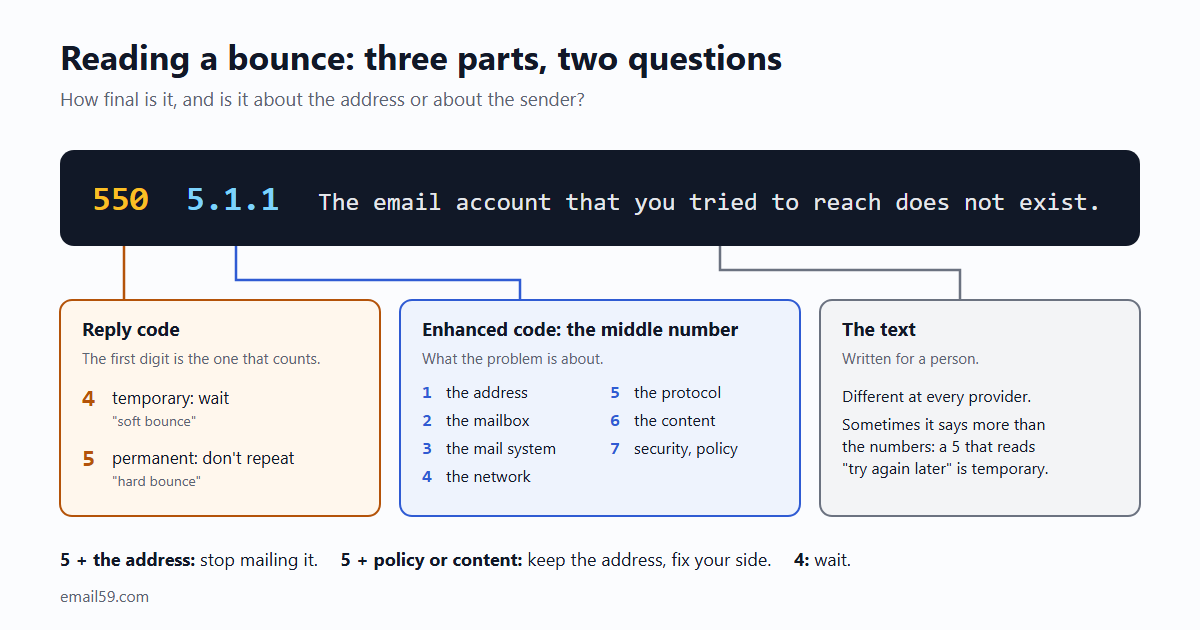
When your email arrives at the other side, the receiving server replies with a line like this one from Gmail:
550 5.1.1 The email account that you tried to reach does not exist.- The reply code (
550). The first digit is the one that counts. The SMTP standard, RFC 5321, defines4yzas "the error condition is temporary, and the action may be requested again", and5yzas a failure where the sender "SHOULD NOT repeat the exact request". - The enhanced code (
5.1.1). Its first number repeats the class. The middle number, from RFC 3463, says what the problem is about: 1 is the address, 2 the mailbox, 3 the mail system, 4 the network, 5 the protocol, 6 the content, 7 security or policy. - The text. Written by the receiving system for a person. It differs from one provider to the next and sometimes says more than the numbers do.
"Hard bounce" and "soft bounce" aren't in either standard. They're the email trade's nicknames: hard for a permanent failure, soft for a temporary one. Sending services each draw the line in a slightly different place, which is one reason to read the code yourself now and then.
Sometimes the refusal comes later, as a separate email sent back to the envelope sender, the Return-Path. Same codes, wrapped in a report. When you send through a service, it catches both kinds. Most pass them on to you as events or in a log.
The two questions that matter
Most bounce handling asks one question: 4 or 5? You need a second one: is this about the address, or about me?
Here are real replies from Gmail's published list, sorted by both:
| Reply | Gmail's text | About | What to do |
|---|---|---|---|
550 5.1.1 | "The email account that you tried to reach does not exist." | The address | Stop mailing it. Once is enough. |
550 5.2.1 | "The email account that you tried to reach is inactive." | The address | Stop mailing it. |
452 4.2.2 | "The recipient's inbox is out of storage space." | The mailbox, for now | Let it retry. Count it. |
552 5.2.2 | "The recipient's inbox is out of storage space and inactive." | The mailbox, for a long time | Stop after it repeats over a few weeks. |
450 4.2.1 | "The user you are trying to contact is receiving email at a rate that prevents additional messages from being delivered." | The mailbox, right now | Wait. |
421 4.7.28 | "Gmail has detected an unusual rate of email. To protect our users from spam, email has been temporarily rate limited." | You | Slow down. The address is fine. |
550 5.7.26 | "This email has been blocked because the sender is unauthenticated." | You | Fix SPF or DKIM. The address is fine. |
550 5.7.1 | "This message is likely unsolicited email. To reduce the amount of spam sent to Gmail, this message has been blocked." | You, or this message | Find out why. The address is fine. |
Look at the last two. They start with 5, so plenty of code files them as hard bounces and suppresses the address. But nothing is wrong with the address. The receiving server refused you. If a DKIM key breaks on a Tuesday and your handler works that way, by Wednesday it has marked every Gmail customer you mailed as dead, and fixing the key won't bring them back.
The rule that follows:
- 5, about the address (
5.1.x,5.2.1): stop mailing that address. - 5, about you or the message (
5.7.x,5.6.x,5.5.x, too-large in5.2.3and5.3.4): keep the address, raise an alarm for yourself. - 4, anything: wait. If it says
4.7.x, also slow down.
And read the text when the numbers look odd. Gmail also sends 550 5.2.1 with the "receiving email at a rate" wording: a permanent-looking code for a mailbox that's simply busy today. Paste any reply into the bounce reader to see how it sorts.
When to retry
Usually you don't. The service that sends for you already retries temporary failures; that queue is most of what a mail server is. RFC 5321 suggests waiting at least 30 minutes between tries and says the give-up time "generally needs to be at least 4-5 days".
Four to five days is right for an invoice and useless for some of what an app sends:
| If it's delayed | |
|---|---|
| Sign-in code, magic link | A retry after the code expired delivers a dead code. Tell the person on the waiting screen that the email is held up, and offer another way in if you have one. |
| Password reset | Same. The link should still work when it lands, or it shouldn't land. |
| Receipt, invoice, missed-payment notice | Late is fine. Let the queue do its work. |
| Alert ("your server is down") | Worth nothing tomorrow. If it's deferred, send it another way. |
The one thing not to do is send again from your own code while the first copy is still queued. When the mailbox comes back, the person gets both.
If the deferral is about you, back off properly. For 4.7.28 Google's sender guidelines say not to send for at least 10 minutes, then start again from a single connection.
When to stop
| What came back | Stop mailing the address |
|---|---|
| Address doesn't exist, account disabled, domain doesn't take mail | Now. One bounce. |
| Mailbox full | After three in a row spread over two weeks or more. |
| Other temporary failures on the same address | After they've outlasted the retries three or four times running. One delivered email resets the count. |
| Refused for policy, authentication or content | Never, for this reason. Fix the cause. |
| The person pressed "report spam" | Now, for everything they can live without. |
The numbers in rows two and three are ours, not a standard. Google's guidelines say only to "automatically unsubscribe recipients who have multiple bounced messages". Pick numbers, write them down, and apply them the same way every time.
Why one dead address isn't harmless
An email to a mailbox that doesn't exist costs a fraction of a cent, so it's tempting to shrug. The cost is somewhere else.
- Mailbox providers count. A sender who keeps knocking on doors that aren't there looks like a sender who bought or guessed its list. Amazon's documentation for its own email service says it plainly: providers "interpret a high bounce rate as a sign that a sender isn't properly managing their recipient list, and that the sender might be sending unsolicited email."
- Sending services count too. The same page gives Amazon's lines: an account goes under review at a 5% hard-bounce rate and may have its sending paused at 10%. Soft bounces aren't in that sum. Other services have their own thresholds and are just as serious about them.
- You share the road. Unless you run your own servers, your email leaves from addresses that other customers use as well. The reputation that gets your sign-in code into an inbox in two seconds was built by everyone on that sender behaving. Your dead addresses are charged to the group.
- Dead addresses get a second life. Anti-spam organisations run spam traps, which Amazon's page describes as dormant addresses used only to catch unwanted mail. A sender still writing to an address years after it stopped answering is exactly what they're built to find.
For a small app the sums are unforgiving. Send 300 sign-up emails in a week with 20 typos among them and you're at 6.7%, past the first of those lines, without one bad intention.
A suppression list is a table and one if
create table email_suppressions (
  email       text primary key,     -- trimmed, lower case
  reason      text not null,        -- 'no_such_address', 'mailbox_full', 'complaint'
  detail      text,                 -- the reply line, as received
  soft_count  int not null default 0,
  first_seen  timestamptz not null default now(),
  last_seen   timestamptz not null default now(),
  suppressed  boolean not null default false
);
ABOUT_ADDRESS = {"5.1.1", "5.1.2", "5.1.3", "5.1.6", "5.1.10", "5.2.1"}
def after_bounce(email, enhanced, line):
"""What to do with one bounce. `enhanced` is the x.y.z code, `line` the whole reply."""
cls, subject = enhanced.split(".")[:2]
busy = "rate" in line.lower() or "try again" in line.lower()
if enhanced in ABOUT_ADDRESS and not busy:
return suppress(email, "no_such_address", line) # stop now
if subject == "7" or enhanced in {"5.2.3", "5.3.4"} or subject in {"5", "6"}:
return alert_me(line) # about us or the message: keep the address
if enhanced.endswith(".2.2"):
return count_soft(email, "mailbox_full", line, limit=3, over_days=14)
if cls == "4" or busy:
return count_soft(email, "temporary", line, limit=4, over_days=14)
return alert_me(line) # a 5 we don't recognise: a person should lookThen one check in the function that sends, before the call goes out. The details that make it work:
- Suppressing isn't deleting. The account stays. Only the sending stops, and the reason is kept so support can answer "why didn't I get my receipt?" in one query.
- Show it in the app. This is the to-do item. A banner on the next visit: "We couldn't deliver email to jo@gmial.com. Is that address right?" For a sign-up, show it on the waiting screen if you learn of the bounce in time. One typed correction saves the customer.
- The person can lift it, a program can't. If someone types the same address again and asks you to try, try once. A code they then type back proves the mailbox works, and that's the moment to clear the row. No timer should clear a "no such address" by itself.
- Sign-in codes go through the list too. It's tempting to exempt them as important. A code sent to a dead mailbox doesn't sign anyone in; it only adds to the count.
- Keep the reply line. In six months "suppressed: hard bounce" tells you nothing. The original line tells you everything.
- Catch the typo before it bounces. A check on the address when it's typed finds domains that can't receive mail at all, which is where a good share of first-email bounces come from.
With email59
email59 is an email router: one HTTPS call, and the message goes out through a provider we manage, from an address on email59.com. That makes the "you share the road" paragraph literal, so here is what the router does about it, and what it leaves to you.
- Before sending,
/v1/sendrefuses addresses that can't work: bad format, a domain with no mail server, throwaway inboxes. The answer is422 recipient_rejectedwith averdict, and it doesn't count against your day. Show that to the person who typed it. - Your own stop list lives in the API. Add an address with the reason, and every later send to it is refused before it leaves:
curl https://email59.com/v1/blocklist \
  -H "Authorization: Bearer $EMAIL59_KEY" -H "Content-Type: application/json" \
-d '{"kind": "email", "value": "jo@gmial.com", "reason": "bounced"}'- Checking first:
/v1/checkfor one address, and the list check for up to 1,000 at a time when you bring in addresses from somewhere else. - What it doesn't do yet: email59 doesn't pass bounce events back to your app. A send that was accepted and later bounced looks, from your side, like a send. Until that exists, use the signal you already have: a sign-in code that was sent and never typed, twice in a row, is an address worth asking about on screen.
The short version
- A bounce is a reply with a reason. First digit 4: temporary. First digit 5: permanent.
- Then ask what it's about. The address: stop mailing it. You or your message: keep the address and fix the cause.
- Don't retry from your own code; the sending service already does. For codes and alerts, a late email is a useless one, so tell the person on screen.
- No such address: stop after one. Mailbox full: stop after three over a couple of weeks.
- Keep a suppression table, check it before every send, store the reply line, and let the person fix the address in the app.
- Dead addresses are counted against you and against everyone who sends beside you.
Sources
- RFC 5321, section 4.2.1 (4yz and 5yz replies) and section 4.5.4.1 (retry interval and give-up time)
- RFC 3463: enhanced mail system status codes (class, subject, detail)
- Google Workspace: Gmail SMTP errors and codes (the reply texts quoted above)
- Google: Email sender guidelines (recipients with multiple bounces; what to do on 4.7.28)
- Amazon SES: reputation metrics messages (5% and 10% bounce-rate lines, hard bounces only, spam traps)
- email59 docs: blocklist, check and list check