Billing emails
The missed-payment email: what to say so people actually update their card
Most people whose payment failed never decided to leave. Their card expired. When to write, what to say, and the one link that gets it fixed, without guilt and without turning a notice into an advert.
A renewal fails. Nothing dramatic happened: the bank issued a new card after a fraud scare, the old one ran out last month, or there wasn't quite enough in the account on the 1st. The person still wants your app. They just don't know anything is wrong, and the only way they'll find out is an email from you.
The trade calls these dunning emails, an old word for chasing a debt, and too many of them still read that way. This one has a simpler job: tell someone what happened and give them one easy thing to do.
First, let the retries do their part
Your payment processor retries a failed renewal on its own. On Stripe, Smart Retries picks the times, and the recommended setting is 8 tries within 2 weeks; if you'd rather set the schedule yourself you get up to three retries. A fair share of failures clear this way without the customer doing anything, because money arrived or the bank changed its mind.
Some never will. Stripe lists the decline codes it can't retry until there's a new payment method:
incorrect_number,lost_card,stolen_card,pickup_cardauthentication_required(the bank wants the customer to approve the charge)transaction_not_allowed,highest_risk_levelrevocation_of_authorization,revocation_of_all_authorizations(the customer told the bank to stop)
So the email matters most exactly where retries are useless. An expired card is often the same story: banks pass some replacement card details along to processors, but when they don't, no retry fixes a card that no longer exists.
When to write
| When | What it says | |
|---|---|---|
| A month before the card expires | Heads-up | "The card ending 4242 expires in November." One link. Many people fix it here and never see the rest. |
| First failure, within the hour | Notice | What failed, how much, when you'll try again, how to update the card. |
| Day 3 to 4 | Reminder | Same facts, shorter. Still no deadline pressure. |
| Three days before access changes | Date | "On 24 October your workspace switches to read-only." A real date, a real consequence. |
| The day it changes | Paused | What's paused, that nothing is deleted, and that the same link brings it back. |
| The moment a payment succeeds | Sorted | "Payment received, thanks. Nothing else to do." |
- Four emails for one failed invoice is plenty. Don't send one per retry. With eight retries in two weeks, a setting like "email after each failed payment" turns into eight near-identical emails, and by the fourth people have stopped opening them.
- Check the invoice right before each send. The worst email in this whole flow is "your payment failed" arriving an hour after the customer paid. Look up the status when the email is about to go, not when it was scheduled.
- If the bank wants approval (
authentication_required), say that. The fix is "confirm this payment", not "update your card", and the link should go to the confirmation step. - Give more room than you think. Two weeks from first failure to anything being switched off is normal. People travel, and replacement cards take a week to arrive.
What it says
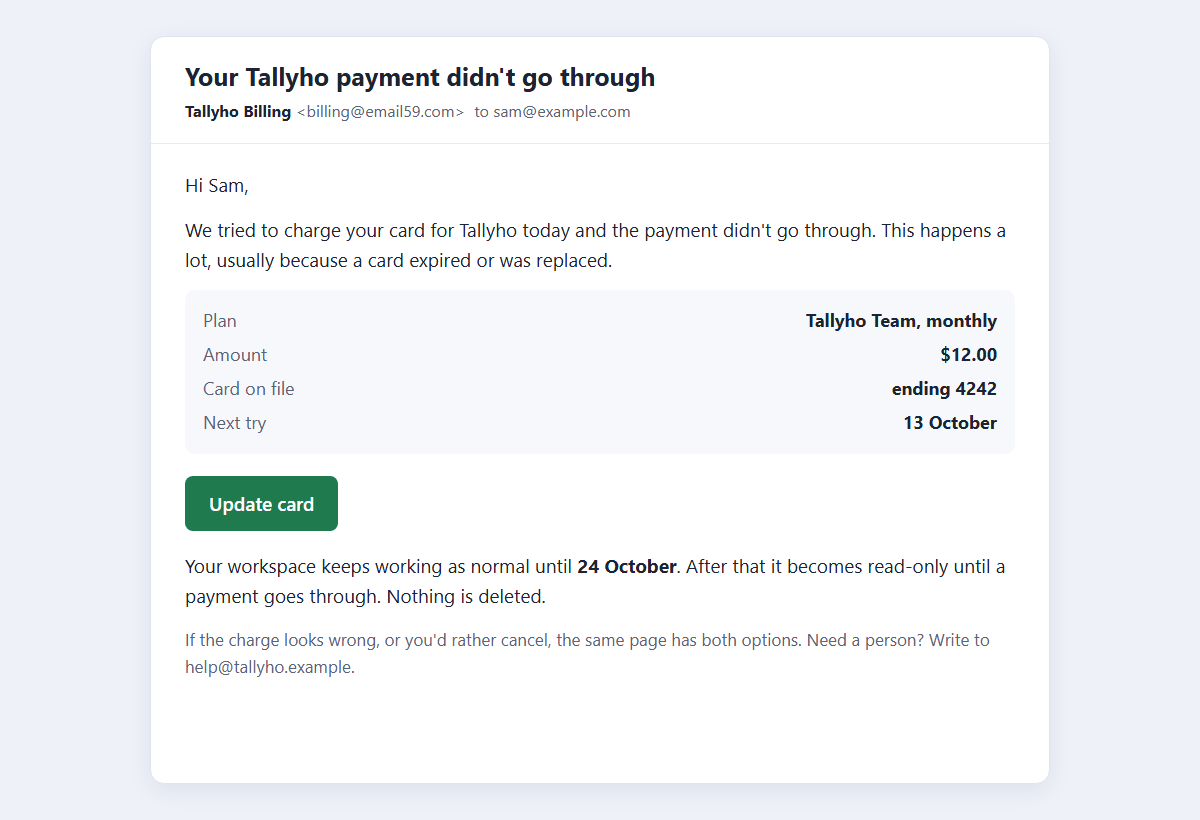
Subject: Your Tallyho payment didn't go through

Hi Sam,

We tried to charge $12.00 for your Tallyho Team plan today and the
payment didn't go through. The card on file ends in 4242.

This happens a lot, usually because a card expired or was replaced.

    Update your card:  https://tallyho.example/billing/update?t=...

We'll try again on 13 October. Your workspace keeps working as normal
until 24 October; after that it becomes read-only until a payment goes
through. Nothing is deleted.

If the charge looks wrong, or you'd rather cancel, the same page has
both options. Need a person? Write to help@tallyho.example.- Subject: the app's name and what happened. No "URGENT", no "Action required!!", no "Uh oh". Those are what phishing looks like, and a billing email is exactly what phishers copy. Plain words from a name people know get opened.
- The facts someone needs to believe it: amount, plan, the card's last four digits, the date. Without them it could be anyone's scam.
- No guilt. "Your payment failed" blames nobody; "you failed to pay" and "your account is delinquent" pick a fight with someone who did nothing wrong.
- Say what happens and when, including what doesn't. "Nothing is deleted" removes the panic that makes people ignore the email.
- Don't repeat the bank's reason. "Insufficient funds" in an email is embarrassing, and for
lost_card,stolen_cardand suspected fraud Stripe's own guidance is not to report the specific reason to the customer at all. "Didn't go through" covers every case. - Let people cancel from the same page. Hiding the exit doesn't recover revenue. It produces a chargeback, which costs more than the plan.
- One link. No "see what's new", no upgrade offer, no social icons. Every extra link is a way to click something that doesn't fix the card.
The one link
"Log in and go to Settings, then Billing" loses people at the password. The link in the email should land on the card form.
- Don't paste a billing-portal URL into the email. Stripe's Customer Portal sessions are short-lived, so a link created when the email was sent is dead by the time it's read two days later. Link to your own endpoint with a signed token, and create the portal session when someone arrives:
@app.get("/billing/update") def billing_update(t: str): customer_id = verify_signed_token(t, max_age_days=21) # HMAC over customer id + expiry session = stripe.billing_portal.Session.create( customer=customer_id, return_url="https://tallyho.example/billing/done", flow_data={"type": "payment_method_update"}) return RedirectResponse(session.url, status_code=303) - The token opens the card form and nothing else. It isn't a sign-in. Whoever holds the email can add a card to pay for the account, which is a risk you can live with.
- It survives link scanners. Company mail filters open links before the person does. Opening this one only creates a portal session nobody uses, so nothing breaks, unlike a one-time sign-in link. Background: your magic link was clicked before your user saw it.
- Or let Stripe host it. Its own failed-payment emails carry a link to a hosted page where the customer updates the payment method and pays what's outstanding. Less to build, less control over the words and the timing.
Sending it
Stripe sends invoice.payment_failed on the first failure and on every failed retry, with attempt_count and (unless you use its automations) next_payment_attempt on the invoice.
SEND_ON = {1: "notice", 3: "reminder"}       # by attempt; or go by days since the first failure

@app.post("/stripe/webhook")
async def stripe_webhook(request: Request):
    event = stripe.Webhook.construct_event(await request.body(),
                request.headers["stripe-signature"], WEBHOOK_SECRET)
    if event["type"] == "invoice.payment_failed":
        inv = event["data"]["object"]
        kind = SEND_ON.get(inv["attempt_count"])
        if kind and first_time(f"{inv['id']}:{kind}"):     # webhooks can arrive twice
            send_billing_email(kind, inv)
    elif event["type"] == "invoice.paid":
        cancel_pending_billing_emails(event["data"]["object"]["id"])
    return {"ok": True}

def send_billing_email(kind, inv):
    requests.post("https://email59.com/v1/send", timeout=10,
        headers={"Authorization": f"Bearer {os.environ['EMAIL59_KEY']}"},
        json={"from": "billing", "to": inv["customer_email"],
              "subject": "Your Tallyho payment didn't go through",
"text": render(kind, inv, link=update_link(inv["customer"]))}).raise_for_status()- Send it as transactional mail, on the same path as receipts and sign-in codes, not through the newsletter tool. Someone who unsubscribed from your product updates still needs to hear that their plan is about to pause. The line between the two: transactional or marketing?
- Keep it transactional. In the US, the CAN-SPAM Act treats a message as transactional when its main purpose is to complete a transaction the person already agreed to or to tell them about their account, and the FTC reads that narrowly. A discount banner or "while you're here, try Pro" can change what the message mainly is.
- Give people somewhere to answer. Billing emails get replies: "I cancelled in March", "wrong card". If your sender is a no-reply address (email59 sends from
yourname@email59.comand doesn't receive replies), put a help address or a form link in the body, as the sample does. - Plain text is fine. A short text email with one link looks like a note from a small company, which is what it is.
How to know it's working
Recovery numbers quoted around the web range from a tenth to over half of failed payments, mostly from companies selling recovery tools, so measure your own. Three counts a month are enough:
- Invoices that failed at least once.
- Of those, how many were paid in the end, and whether it was a retry or a new card that did it.
- For new cards: which email they clicked from. If nearly all come from the first notice, the later ones may be noise. If the "date" email does the work, people needed a deadline to be real.
That's a spreadsheet, not a product. And the sending side is one HTTPS call: email59 is an email router with a small API for exactly this kind of mail, sign-in codes, alerts and missed-payment notices, from yourapp@email59.com with no domain setup. Get a key and send the sample above to yourself first.
Sources
- Stripe docs: automate payment retries (Smart Retries default, custom schedules, hard decline codes, webhook fields)
- Stripe docs: automate customer emails (failed payment and expiring card emails, hosted page)
- Stripe docs: decline codes and what to tell the customer
- Stripe docs: customer portal deep links (payment_method_update flow)
- FTC: CAN-SPAM Act compliance guide (transactional or relationship messages)
- email59 docs: /v1/send