Replies
Reply-to on a no-reply sender: where replies to your app's email should go
People press Reply on receipts, alerts and sign-in codes whether you invite it or not. Three addresses decide where that reply lands, four ways to handle it, and which one fits which email.
Your app sends from noreply@ because nobody is going to sit and read a mailbox for a password-reset robot. Fair enough. Then look at what people actually write back to app emails:
- "This isn't me, I never signed up."
- "The amount is wrong, I was on the smaller plan."
- "Please cancel my account."
- "STOP"
- "Thanks!"
Four of those five are things you want to know. The third one is the expensive kind: the person believes they've cancelled. If that reply went nowhere, the next thing you hear about it is a charge disputed with their bank.
A reply to a dead address ends one of two ways. It bounces, and your email now looks broken. Or it disappears without a sound, which is worse, because the sender thinks the message arrived.
Three addresses, and only one is for people
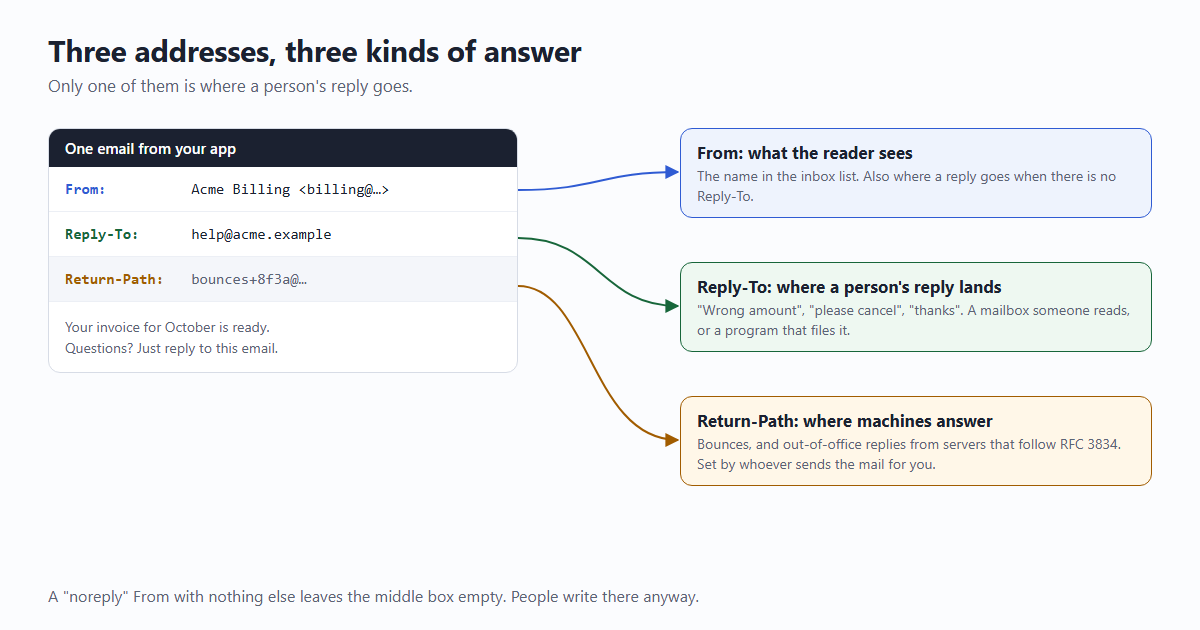
| Address | Who sees it | What comes back to it |
|---|---|---|
From | The reader, as the sender's name | A person's reply, but only when there is no Reply-To |
Reply-To | The reader, after pressing Reply | A person's reply |
Return-Path (the envelope sender) | Nobody, unless they open the raw message | Bounces, and automatic replies from servers that follow the rules |
The mail format standard (RFC 5322) puts it in one sentence: when Reply-To is present it "indicates the address(es) to which the author of the message suggests that replies be sent", and without it replies go to From. So you can keep a system address in From and still give replies a home. The two fields are separate decisions.
The third address explains something people get wrong. Out-of-office messages and other automatic replies are not supposed to go to Reply-To at all. RFC 3834 says they "SHOULD be sent to the Return-Path", which belongs to whoever sends the mail for you and is read by a program. Not every mail system follows that, so a real Reply-To inbox will see the odd "I'm on holiday until the 14th".
Four places a reply can go
1. To an inbox somebody reads
Reply-To: help@yourapp.example, pointing at a shared mailbox or a help desk. The least clever option and usually the right one for anything about money or an account. Two things make it work better:
- Carry the context in the address.
help+inv-1042@yourapp.exampletells whoever opens the reply which invoice it's about before they read a word. Plus addresses work on Google Workspace, Microsoft 365 and Fastmail mailboxes. - Say so in the email. "Questions? Just reply to this email." People have been trained by a thousand no-reply notices not to try.
2. To a program
The reply goes to an address your code reads, and the reply does something. GitHub is the example everybody has used: answer a notification email and your text becomes a comment on the issue. Its docs describe how: "the reply-to address on each email notification identifies the thread and the account that the comment will be posted from."
That sentence is also the warning. The address is the proof of who is replying, so it has to be long and unguessable, tied to one person and one thread, and you can't trust the reply's From line for anything, since anyone can type any name there. You also inherit the chore of stripping signatures and quoted text. Worth it for a product built on conversation; too much for a receipt.
3. Nowhere, with a signpost
No reply address, and the email says so where people will see it, with the way back right next to it:
Don't reply to this email, nobody will see it.
To reach us about this invoice: https://yourapp.example/help?ref=inv-1042- Put it near the top or right under the main content, in normal-sized text. Grey six-point type under the footer doesn't count as telling anyone.
- Carry the reference in the link so the form opens already knowing which invoice, order or alert this is about.
- Make the form work without signing in. Half the people writing are writing because they can't get in.
4. To an auto-responder
The no-reply mailbox exists and answers every message with "This mailbox isn't read. Here's how to reach us." Better than silence, and cheap. Two rules keep it from becoming a nuisance, both from RFC 3834: never answer a message that carries an Auto-Submitted header (anything but no) or that is itself a bounce, and answer any one sender at most once every few days. Break the first rule and your responder ends up in a conversation with somebody's out-of-office that neither side will ever end.
The one thing not on the list: an address that bounces. If noreply@yourapp.example isn't a mailbox, replies come back as "address not found", and to the person reading that, your company's email is broken.
Which one for which email
| What people reply with | Send replies to | |
|---|---|---|
| Sign-in code, magic link, password reset | Almost nothing. Sometimes the code itself, to a scammer who asked for it | Nowhere, with a signpost. Add "we'll never ask you for this code" |
| Receipt, invoice, missed payment | Disputes, "please cancel", questions about the amount | An inbox somebody reads |
| Welcome email | First questions; the best feedback you'll ever get | An inbox somebody reads, ideally a founder's for the first few hundred users |
| Comment or mention notification | The answer to the comment | A program, or a signpost with a link straight to the thread |
| Monitoring alert, report, export ready | Out-of-office messages, mostly | Nowhere, with a signpost, or an auto-responder |
| Newsletter | "Unsubscribe", and real replies | An inbox somebody reads |
Details that bite later
- Mark machine mail as machine mail. Add
Auto-Submitted: auto-generatedto alerts and notices. Well-behaved responders won't answer a message that has it. Exchange and Microsoft 365 also honourX-Auto-Response-Suppress: OOF, AutoReply, which switches off out-of-office and other auto-replies for that one message. - "Stop" in a reply is still a request. If replies reach a person, someone who writes "unsubscribe" has told you. Take them off. The proper route is an unsubscribe link that works in one press, but people use the route in front of them.
- Don't act on a reply alone. "Cancel my account" from an address that matches a customer isn't proof it's the customer. Answer with a link they confirm while signed in, or reply to the address on file and wait for a yes.
- A different domain in Reply-To is allowed. SPF, DKIM and DMARC check the envelope and the
Fromline; none of them looks atReply-To. But "From a company, replies to a free mailbox" is also the shape of an invoice scam, so readers and filters look twice. If you have a domain, put the reply address on it. - Give the sender a name. A message from "noreply" in the inbox list reads like nobody.
Acme Billingas the display name costs nothing, whatever the address behind it is. - About "replies help your deliverability". You'll read that mailbox providers reward senders people reply to, and that a no-reply address therefore hurts inbox placement. It's repeated widely and comes mostly from companies that sell email software; none of the big mailbox providers publishes it as a rule for app email. Pick where replies go for the sake of the person replying. That reason holds up without the other one.
With email59
email59 is an email router: one HTTPS call, and the message goes out from an address on email59.com. You choose the part before the @. To be straight about the reply side: /v1/send takes no reply-to field today, a reply to that address doesn't reach you, and each email carries a line saying it is system generated and replies aren't received.
That makes it the third option, already half done. Your part is the signpost, and a sender name that says who you are:
curl https://email59.com/v1/send \
  -H "Authorization: Bearer $EMAIL59_KEY" -H "Content-Type: application/json" \
  -d '{
    "from": "acme-billing",
    "to": "jo@example.org",
    "subject": "Your Acme invoice for October",
    "text": "Hi Jo,\n\nYour invoice INV-1042 for $12.00 is ready:\nhttps://acme.example/invoices/1042\n\nSomething wrong with it? Tell us here, no sign-in needed:\nhttps://acme.example/help?ref=inv-1042\n(Replies to this email are not read.)"
  }'
That fits sign-in codes, alerts and notices well, which is what most apps send first. When you reach the emails where people genuinely need to write back (billing disputes, a support thread), put the help link at the top of the message rather than the bottom, and make sure someone reads what comes through it.
If you're wiring this up for the first time, the dev mail fence gives you the send function with staging kept away from real inboxes, and transactional or marketing? covers which of your emails need an unsubscribe link as well.
The short version
- People reply to app email. Decide where that goes; don't let it bounce or vanish.
Fromis the name,Reply-Tois where a person's answer lands,Return-Pathis where bounces and automatic replies go.- Money and accounts: an inbox somebody reads. Codes and alerts: no replies, with a clear line and a link that carries the reference.
- Mark automatic mail with
Auto-Submitted: auto-generated, and never let a responder answer another responder. - Don't cancel, refund or change anything on the strength of a reply's From line.
Sources
- RFC 5322, section 3.6.2: the From, Sender and Reply-To fields
- RFC 3834: recommendations for automatic responses to email (Return-Path, Auto-Submitted)
- Microsoft [MS-OXCMAIL]: the X-Auto-Response-Suppress header and its values
- GitHub docs: replying to notification emails
- email59 docs: /v1/send and the system line on every email