Sign-up abuse
Someone is signing up strangers to your app: email bombing through sign-up forms
Your sign-up form emails any address typed into it, so it can be used to bury someone else's inbox. Why per-IP limits miss it, and the four checks that take your app out of the attack.
You notice it sideways. A few dozen sign-ups overnight that never confirmed. The addresses aren't throwaway ones; they look like real people at real companies and government offices. Nobody opened the app. A week later one of them writes, not politely, to ask why you emailed them.
They didn't sign up. Someone typed their address into your form, and into a few thousand other forms in the same hour. Your "confirm your email" message was one drop in a flood, and the flood was the product.
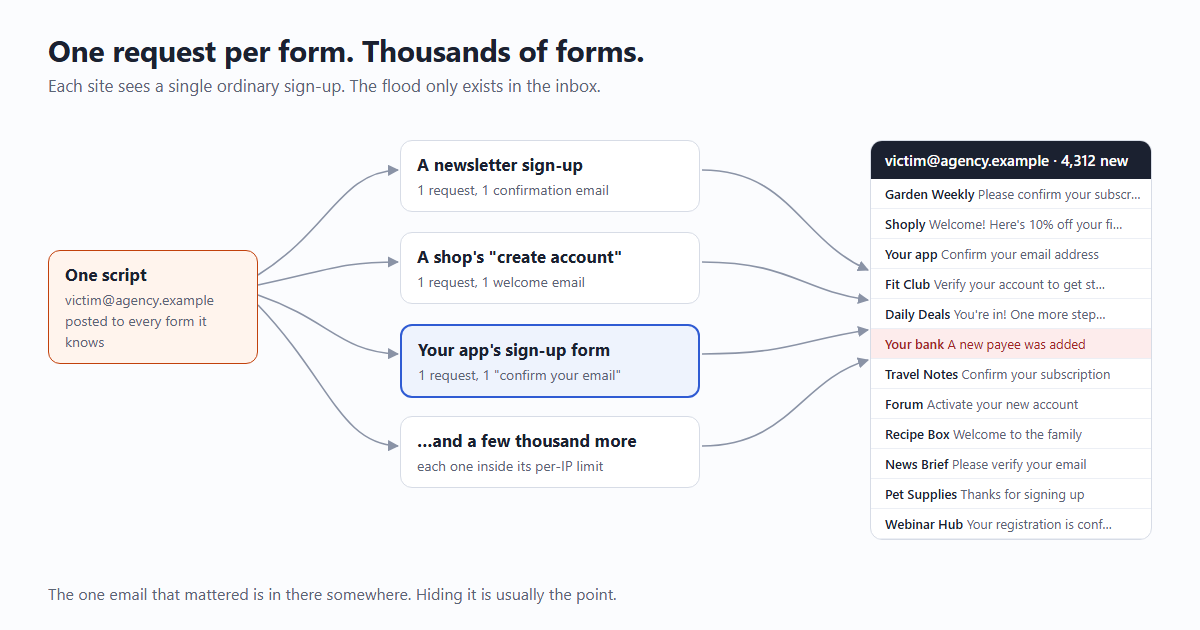
What the flood is for
- Hiding one email. The attacker has already got into the person's bank, shop or airline account. The bank is about to send "a new payee was added" or "your password was changed". Four thousand welcome emails arrive first, and the alert goes by unread.
- Setting up a phone call. Since 2024 the flood has also been an opening move against companies. Microsoft described a group it tracks as Storm-1811 signing an employee's address up to piles of subscription services, then phoning as "IT support" with an offer to fix the spam problem, and asking for remote access. The ransomware came after.
- Plain harassment. An inbox that gets a message every two seconds is unusable. That's enough for some people.
None of this is new. In August 2016, more than 100 government addresses were pushed through sign-up forms by bots making over 1,000 requests a minute. Spamhaus counted one company that took 9,000 sign-ups for nine addresses in two weeks and sent 81,000 emails as a result. Brian Krebs, who was one of the targets, got a message every two or three seconds for a weekend. The senders weren't spammers. They were ordinary sites with a form.
What changed is that mailbox providers now look for it. Microsoft switched on a "mail bombing" detection in Defender for Office 365 in mid-2025 that moves the flood to Junk. Good for the victim. For you it means that if your form is part of floods often enough, your real confirmation emails start sharing a folder with them.
Why your form is useful to them
An attacker wants forms with four properties, and most sign-up forms have all four:
- It emails an address nobody has proved they own. That's what a confirmation email is.
- It sends right away, with no person in the loop.
- It can be posted to by a script: no challenge, or one that a headless browser passes.
- The email comes from a sender with a good name, so it lands in the inbox and not in spam.
Sign-up isn't the only one. Check every place in your app where a visitor types an address and a message goes out:
| Form | What it sends to a stranger |
|---|---|
| Sign-up, waiting list, newsletter box | A confirmation or a welcome |
| "Email me a sign-in link" or code | A link or a code, each time it's pressed |
| Password reset | A reset link if the account exists; in some apps a "no account here" note if it doesn't |
| Invite a teammate, share with a friend | An invitation, with the attacker's own text in it if you allow a note |
| Contact form with "send me a copy" | Whatever the attacker typed, from your address |
The last two are the worst, because the attacker also chooses some of the words. A free-text note that goes to an unverified address is a way to send anyone's message under your name.
Why the per-IP limit never fires
Most apps have exactly one defence here: "no more than N sign-ups per IP per hour". It stops someone creating a thousand accounts on your site. It does nothing for this, for two reasons.
- The attack is spread across sites, not across requests. The script visits your form once for this victim. One request, one address, one IP. Your limiter is counting a thing that isn't happening.
- When it is aimed at you alone, the IPs change. The other version is a loop on your reset or sign-in-code endpoint for one address, through rented proxies. Every request comes from a fresh IP. The only thing the requests have in common is the recipient.
So the counter has to be on the thing that's being attacked. That's the address in the form, not the connection that carried it.
Check 1: count per address, not per visitor
Before any email goes to an address that hasn't been confirmed, ask how many you've sent to it lately. Past a small number, stop, whoever is asking.
CREATE TABLE mail_sends (address text NOT NULL, sent_at timestamptz NOT NULL DEFAULT now());
CREATE INDEX ON mail_sends (address, sent_at);
from datetime import timedelta
LIMITS = [(timedelta(minutes=15), 3), (timedelta(days=1), 6)] # per address, all forms together
def counter_key(email):
local, _, domain = email.strip().lower().rpartition("@")
local = local.split("+", 1)[0] # jo+anything@ is still jo@
if domain in ("gmail.com", "googlemail.com"):
local, domain = local.replace(".", ""), "gmail.com" # Gmail ignores dots
return f"{local}@{domain}"
def may_send(db, email):
key = counter_key(email)
for window, limit in LIMITS:
sent = db.execute("SELECT count(*) FROM mail_sends WHERE address = %s AND sent_at > now() - %s",
(key, window)).fetchone()[0]
if sent >= limit:
return False
db.execute("INSERT INTO mail_sends (address) VALUES (%s)", (key,))
return True
# in the sign-up, reset and sign-in handlers:
if may_send(db, email):
send_email(email, subject, text)
return "Check your inbox." # the same answer either wayWhat matters in those few lines:
- One counter for every form. Three from sign-up plus three from reset plus three from "resend" is nine emails to a person who asked for none.
- The key is a tidied copy of the address. Without it,
jo+1@,jo+2@andj.o@gmail.comare three counters for one inbox. Use the tidy version only for counting; send to the address as it was typed. - The answer doesn't change when the limit is hit. "Check your inbox" both times. A different message tells the script it should move on to its next proxy, and tells anyone curious whether that address has an account.
- A real person rarely needs more than three. Somebody pressing "resend" a fourth time in a quarter of an hour has a different problem (usually a spam folder), and a fourth copy won't solve it.
The same numbers decide how safe an emailed code is against guessing; the sign-in code odds calculator shows how much "codes per hour" moves that.
Check 2: make the form expensive for a script
Spamhaus's advice after 2016 was blunt: a CAPTCHA is "the single best thing that can be done to secure a form", with confirmation on top. You don't have to start with picking out traffic lights. In rising order of annoyance:
- A hidden field no person fills in. Bots that fill every input give themselves away. Free, invisible, and gets the laziest scripts.
- Time on page. Stamp the form when it's served (signed, so it can't be made up). A sign-up that comes back in under two seconds, or with no stamp, wasn't typed.
- A background challenge such as Cloudflare Turnstile or reCAPTCHA, which most visitors never see.
- A visible challenge, only when something is off: the hidden field was filled, the address has hit its limit elsewhere today, or unconfirmed sign-ups in the last hour are ten times your normal.
None of these is airtight; people are paid to solve CAPTCHAs. The aim is smaller. A list of a few thousand easy forms is what makes a flood cheap, and you want to stop being on it.
Check 3: an unconfirmed address gets one email, then silence
Confirmed opt-in is where most advice stops, and on its own it makes things worse: the confirmation is the bomb. What protects the stranger is what you do around it.
- Nothing else until they confirm. No welcome series, no "getting started" tips, no product news. If the first message is ignored, that's the last one.
- No reminders. "You haven't confirmed yet" on day 2 and day 5 turns one unwanted email into three. If they wanted the account, they'll come back and ask again.
- Delete unconfirmed sign-ups after a week or two, so the address isn't sitting in a table that some future campaign selects from.
- Invitations and shares: limit them per account per day, don't let the sender add free text until the account has some history, and count them against the recipient's address like everything else.
Check 4: write the email for the person who didn't ask
Assume some of the people who open your confirmation have never heard of you. Three lines do the job:
Subject: Confirm your email for Acme

Someone entered this address to create an Acme account.

If that was you:  https://acme.example/confirm/9f2c...
If it wasn't, ignore this email. Nothing happens, and we won't write again.- Say who you are and what happened in the subject and the first line. In a flood, that's all anyone reads.
- Promise silence, and keep it. "We won't write again" is only true if check 3 is in place.
- Keep it short and plain. A 200 KB welcome with six images is a heavier thing to be hit with.
- Optional and kind: a "never email this address" link that puts it on your own block list. Use a page with a button, not a link that acts on a GET, or a mail scanner will press it for them.
How to tell it's already happening
| What you see | What it suggests |
|---|---|
| Share of sign-ups that never confirm jumps, with no campaign running | Addresses are being entered by someone other than their owners |
Unconfirmed addresses at .gov, banks, big companies, for a hobby app | A target list, not your audience |
| Sign-up posts with no page load before them, or from hosting networks | A script, not a browser |
| The same address requested again and again from different IPs | The single-site loop; the per-address counter is what stops it |
| Spam complaints on confirmation emails | People who didn't ask, telling their provider so |
Throwaway addresses are a different problem with a different fix (blocking them at sign-up). A bombing victim's address is as real as they come, which is why checking that an address exists doesn't help here. It only keeps you from mailing typos.
With email59
email59 is an email router: your app calls /v1/send and the message goes out. It sends what you ask it to, so the per-address counter above belongs in your app, in front of the call. No sender can know that the fourth "confirm your email" in ten minutes wasn't wanted.
Where email59 itself emails an address nobody has confirmed, which is its own sign-up by email code, it follows the same rules: at most 3 codes per address in 15 minutes, a daily cap per IP on top, and throwaway domains and domains with no mail server are refused before the first code goes. And the deep email check never sends anything, so you can run it on a typed address before deciding to email it.
The short version
- Any form that emails an unconfirmed address can be used against a third person. List yours: sign-up, sign-in link, reset, invite, "send me a copy".
- Per-IP limits don't see it. Count emails per recipient address, across all forms: about 3 in 15 minutes and 6 a day, then stop quietly.
- Hidden field and time-on-page for everyone; a challenge when something looks off.
- One confirmation, no reminders, nothing else until they confirm, and delete what's never confirmed.
- Write the confirmation for someone who never asked for it.
Sources
- Spamhaus: Subscription bombing, COI, CAPTCHA and the next generation of mail bombs (2016)
- Krebs on Security: Massive email bombs target .gov addresses (2016)
- Microsoft Threat Intelligence: Storm-1811, email bombing followed by fake IT support calls (2024)
- Microsoft 365 message center MC1096885: Mail Bombing Detection in Defender for Office 365 (2025)
- OWASP Forgot Password Cheat Sheet: per-account rate limits, the same answer for every address
- Google: Dots don't matter in Gmail addresses
- email59 docs: sign-up by email code and its limits