Account emails
The password reset email: one link, a short life, and the same answer for every address
"Forgot password?" is the most used sign-in screen after the sign-in itself, and the email behind it is a key to the account sent over the open internet. Small apps get the email right and the plumbing wrong: a link that works for days, a token stored as it was sent, and a form that tells a stranger which addresses have an account. Here is the whole flow for a small app, with the defaults four popular frameworks ship and the few lines of code that matter.
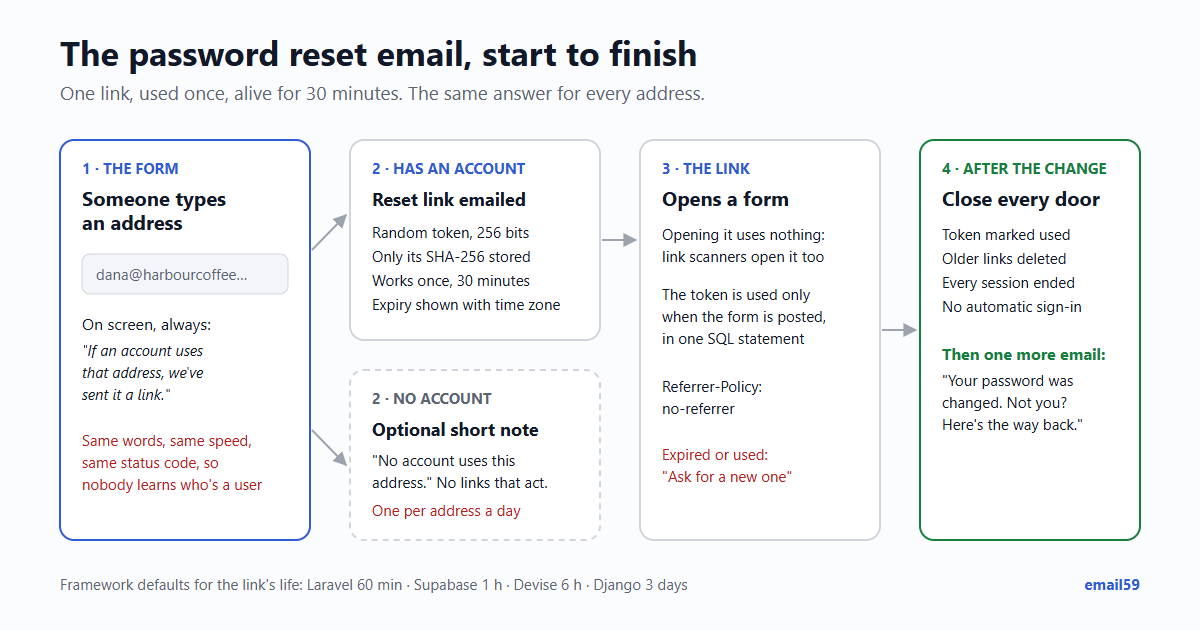
The short answer: a long random token, used once, alive for 30 to 60 minutes, stored only as a hash. The same words on screen whether the address has an account or not. When the password changes, every other link and every session ends, and a "password changed" email goes out.
What the frameworks do out of the box
If your app uses one of these, most of the flow is already written. The defaults are not all the same, and two of them tell a visitor whether an address is registered unless you change a setting or a message.
| Framework | Link works for | What is stored | Unknown address, by default |
|---|---|---|---|
| Laravel | 60 minutes (expire in config/auth.php); a new link at most every 60 seconds (throttle) | A hash of the token, with the email and the time | Says so: "We can't find a user with that email address." |
| Supabase Auth | 1 hour (3,600 seconds), one setting shared by every email link and code | Not stated in the docs we read | Same answer either way |
| Devise (Rails) | 6 hours (reset_password_within) | A digest of the token | Says so, unless config.paranoid = true |
| Django | 3 days (PASSWORD_RESET_TIMEOUT = 259,200 seconds) | Nothing: the token is a signature over the user's password hash, last sign-in and the time, so it stops working once either changes | The same "we've emailed you" page either way |
Two settings worth changing on day one: Django's three days is long for a key to an account (an hour is plenty: PASSWORD_RESET_TIMEOUT = 3600), and Laravel's and Devise's messages should be replaced with one sentence that doesn't depend on the address. Devise also signs the person in straight after a reset (sign_in_after_reset_password defaults to true); OWASP's advice is not to, and to send them through the normal sign-in instead.
The token: long, random, used once, stored as a hash
If you write it yourself, the whole thing is about twenty lines. In Python:
import hashlib, secrets
from datetime import datetime, timedelta, timezone

SAME_ANSWER = ("If an account uses that address, we've sent it a link. "
               "It works once, for 30 minutes. Check your spam folder too.")

def start_reset(email):
    email = email.strip().lower()
    user = db.user_by_email(email)
    if user:
        token = secrets.token_urlsafe(32)              # 32 random bytes, 43 characters
        db.insert_reset(user.id, sha256(token),
                        expires=datetime.now(timezone.utc) + timedelta(minutes=30))
        queue.send_reset_email(user.email, f"https://app.example/reset?t={token}")
    else:
        queue.send_no_account_email(email)             # rate limited, see below
    return SAME_ANSWER                                  # same words, same speed

def sha256(token):
    return hashlib.sha256(token.encode()).hexdigest()
And the step that uses it, as one SQL statement so two clicks can't both win:
UPDATE password_resets
   SET used_at = now()
 WHERE token_hash = $1 AND used_at IS NULL AND expires_at > now()
RETURNING user_id;
No row back means expired, used or never real, and they all get the same message: "This link has expired or has already been used. Ask for a new one." With a row back:
- save the new password (hashed the way your sign-in does it);
- delete every other reset row for that user, so an older email in the inbox is dead too;
- end every session for that user, on every device, including any an attacker had;
- send the "your password was changed" email to the account's address;
- send them to the sign-in page rather than signing them in.
Why these sizes. token_urlsafe(32) is 256 random bits. A thief trying a billion links a second against an app with a thousand live links would need around 1057 years to expect a hit (2256 ÷ 1012 guesses a second). Compare a 6-digit code: 1,000,000 possibilities, so an unthrottled endpoint taking 1,000 guesses a second runs through all of them in about 17 minutes. That's why codes need an attempt limit (5 tries leaves 1 chance in 200,000) and long links don't, though rate limiting the reset page costs nothing and OWASP asks for it.
Why a hash, and why a fast one is fine. If a database backup leaks, stored tokens are working keys until they expire; stored hashes are not. Passwords need a slow hash because people pick guessable ones. A 256-bit random token can't be guessed, so a plain SHA-256 is enough and lets you look the row up by its hash. (Laravel runs it through its password hasher, which works too.)
Why 30 to 60 minutes. Most people click within a few minutes of asking. The link sits in a mailbox that may be open on a shared computer, synced to an old phone or forwarded. An hour covers a slow inbox; three days also covers someone who gets into the mailbox on Thursday.
The same answer for every address
If the form says "No account with that address", anyone can test a list of addresses against your app. For a dating app, a clinic's booking system or a debt adviser, the fact that someone has an account is the secret. Even for a to-do app, a confirmed list of users is where phishing starts.
- Same words. One sentence for both cases, like
SAME_ANSWERabove. - Same speed. If the real-account path waits for an email API and the other path returns at once, the response time gives it away. Put both emails on a queue (as above) so the page answers before either is sent.
- Same status code. A 200 for both in your API, not 200 for one and 404 for the other.
- Mind the other doors. If your sign-up form says "That email is already registered", the reset form's care is wasted. On sign-up, accept the form and email the address instead: "You already have an account; sign in or reset your password."
The email to an address with no account
Should the "no account" case send anything at all? A short note helps the real person who has two addresses and typed the other one, which is a common reason a reset email "never arrives". But it's also an email your app sends to any address a stranger types, so it must be capped.
Subject: Password reset for Northwind: no account with this address

Someone asked to reset a Northwind password for
sam@harbourcoffee.example, but no account uses this address.

If it was you, you may have signed up with another address.
Try that one, or create an account: https://app.example/signup

If it wasn't you, you can ignore this email. Nothing has changed.- At most one per address per day, and a cap per visitor IP. Without it your form becomes a way to send email to strangers; email bombing through sign-up forms shows what that turns into.
- No link that acts on anything, no marketing, no "join now" banner.
- If you'd rather not send it, that's a fair choice too. Then the on-screen sentence should add "Check that it's the address you signed up with."
The reset email itself
Subject: Reset your Northwind password

Someone, hopefully you, asked to reset the password for the
Northwind account dana@harbourcoffee.example.

Choose a new password:
https://app.example/reset?t=Jm9oU2c4...   (43 characters)

The link works once, until 09:42 UTC (30 minutes after the request).
If you didn't ask, ignore this email. Your password hasn't changed.- The app's name in the subject, and the account's address in the body, so someone with three accounts knows which one.
- The expiry as a time with its zone, not only "30 minutes", because the email may be read later.
- "Ignore this email" for the person who didn't ask. Nothing changes until the link is used, and saying so saves a worried reply to support.
- Never a password, old or new. And never a link that changes anything just by being opened.
That last point matters more than it looks. Company mail filters and some mail apps open links before the person does, to check them for malware. If opening the link uses the token, the scanner uses it and your user gets "link expired". Let the link open a page with the new-password form, and use the token only when the form is posted. The details, with the scanners that do it: Your magic link was clicked before your user saw it.
Two more lines from OWASP for the page the link opens: build the link from a fixed address (https://app.example), never from the incoming request's Host header, which an attacker can set; and send Referrer-Policy: no-referrer on that page so the token in its address isn't handed to anything it loads.
After the change
| What | Why |
|---|---|
| Mark the token used, delete the others | An older reset email still in the inbox shouldn't work tomorrow. |
| End every session | If the reset was because someone else got in, their session is the one you want gone. Keep the current device signed in if you must, never the others. |
| Revoke "remember me" cookies and app tokens | Same reason, longer life. |
| Send "your password was changed" | The real owner hears about it even if someone else did the reset. It carries a way back in that doesn't need the new password. |
| Don't sign them in | One normal sign-in proves the new password works and goes through your second step if there is one. |
Sending both emails with email59
A reset email is one transactional email to one person: one call. The notice template gives it a heading and one button, and the text part is built for you.
curl -s https://email59.com/v1/send \
  -H "Authorization: Bearer $EMAIL59_KEY" -H 'Content-Type: application/json' \
  -d '{"from":"northwind","to":"dana@harbourcoffee.example",
       "subject":"Reset your Northwind password",
       "template":"notice","heading":"Choose a new password",
       "text":"Someone, hopefully you, asked to reset the password for dana@harbourcoffee.example. The link works once, until 09:42 UTC. If you did not ask, ignore this email.",
"button_text":"Choose a new password","button_url":"https://app.example/reset?t=..."}'- Check the answer. Anything but a
201is worth a log line and one retry from your queue; the person is waiting at the screen. - Try it without mailing anyone. A test key runs the same checks and keeps the email for you to read instead of delivering it.
- Catch typos before the reset. Many "I never got the email" tickets are an address mistyped at sign-up: gmial.com and friends.
The short version
- Token:
secrets.token_urlsafe(32)or your language's equivalent; store its SHA-256; 30 to 60 minutes; used once, in one SQL statement. - Screen: one sentence for every address, same speed, same status code. Sign-up doesn't give it away either.
- No-account email: optional, one per address per day, no links that act.
- Reset email: app name, the account, a time with its zone, "ignore it if it wasn't you", no password, the link opens a form.
- After: other links dead, every session ended, "password changed" email, normal sign-in.
- On a framework: shorten Django's 3 days, replace Laravel's and Devise's "can't find" message, turn off Devise's sign-in after reset.
Sources
- OWASP Forgot Password Cheat Sheet (consistent message and timing, single use, expiry, Host header, no-referrer, no automatic sign-in, sessions)
- Laravel 12: DatabaseTokenRepository (token is HMAC-SHA256 over 40 random characters, stored through the hasher)
- Laravel 12: password reset messages ("We can't find a user with that email address.")
- Laravel config/auth.php (expire 60 minutes, throttle 60 seconds)
- Supabase CLI config: auth.email.otp_expiry, default 3600 seconds
- Devise initializer template (reset_password_within = 6.hours, paranoid, sign_in_after_reset_password)
- Django 5.2 settings: PASSWORD_RESET_TIMEOUT, default 259200 (3 days)
- Django: contrib/auth/tokens.py (what the token signs, how the timeout is checked)
- Python docs: secrets.token_urlsafe
- email59 docs: /v1/send, templates, test keys