Account emails
Was this you? The new-device and password-changed emails people actually read
Nobody asks for these emails, and they're the ones that save an account. What to put in the subject, which details help and which mislead, the one link that belongs in them, and why they must never be optional.
Most of what an app sends is something the person asked for: the sign-in code, the receipt, the invitation they're expecting. The security notice is the opposite. It arrives uninvited, about something that already happened, and it's read by one of two people. One of them did the thing and wants to get on with their day. The other didn't, and has a few minutes before it gets worse.
The same email has to serve both. For the first reader it should take three seconds and ask nothing. For the second it should make the next step impossible to miss. Most of the choices below follow from that.
Which events get one
The test is simple: would the owner want to know if someone else had done this? For a small app the list is short.
| Event | Goes to | Note |
|---|---|---|
| Sign-in from a device you haven't seen | The account's address | Only when new. More on "new" below. |
| Password changed, or reset through "forgot password" | The account's address | Every time. OWASP's reset checklist: "Send the user an email informing them that their password has been reset (do not send the password in the email!)." |
| Email address changed | The old address | The new one belongs to whoever made the change. The whole flow is in Changing an account's email without handing the account away. |
| A second sign-in step added or removed; a passkey added | The account's address | Removing one is the more worrying of the two. |
| An API key or access token created | The account's address | A key outlives the session that made it. |
If you'd like a standard to point at: NIST's digital identity guideline (SP 800-63B, revision 4) says events such as adding a sign-in method or recovering an account "require the subscriber or someone designated by them to be independently notified", and asks that the notice "provide clear instructions, including contact information, in case the recipient repudiates the event". "Repudiates" is the standard's word for "that wasn't me".
The subject says what happened
In the inbox list the subject is all there is, so put the event in it.
| Instead of | Write |
|---|---|
| Security alert | New sign-in to Northwind from Chrome on Windows |
| Important: action required! | Your Northwind password was changed |
| Was this you? | Your Northwind email address was changed to d•••@harbourcoffee.example |
| Account update | A new API key was created on your Northwind account |
- The app's name, always. People have forty accounts. "Your password was changed" with no name is a riddle.
- No alarm words, no capitals, no exclamation mark. Nine times in ten the reader did it themselves. And "URGENT: verify your account" is how the fakes are written; you don't want to look like them.
- "Was this you?" belongs in the body. As a whole subject it says nothing about which of the five events happened.
Details that help
- Which account. The address or username, in the first lines. Someone with a work and a personal account needs to know which one you mean.
- When, with the time zone written out. "14 October 2026, 09:12 (UTC)", or the account's own time zone if you know it. A bare "09:12" is wrong for most of the planet.
- The device in words. "Chrome on Windows", "Safari on iPhone". Not the raw browser string, which is eighty characters that mean nothing to the reader.
- A rough place, called rough. "Near Lyon, France (approximate, from the internet address)".
Details that mislead
The place is where these emails go wrong most often, because the app only knows an internet address, and the map from address to town is a guess. MaxMind, one of the widely used databases for this, puts its own accuracy at 99.8% for the country, "around an 80% accuracy at the state/region level" and 66% for cities "within a 50km radius", for US addresses. It also says that "IP addresses used in mobile networks may be used by mobile phones across a large distance".
Take the city figure at face value and about one honest sign-in in three shows a town more than 50 km from the person. A person at home in Leeds reads "Sign-in from London", gets a fright, changes their password, and learns that your notices cry wolf. The third time, they stop opening them. The fright is the small cost. The indifference it trains is the large one.
- Lead with the country. It's the part that's nearly always right. Add the town with "near" in front and "approximate" behind, or leave it out.
- No map picture, no street, no coordinates. They claim a precision you don't have. MaxMind again: the data "is never precise enough to identify or locate a specific household, individual, or street address."
- Don't trust the device name too far either. Safari on an iPad introduces itself as a Mac. Chrome reports Windows 11 as Windows 10. "Chrome on Windows" is honest; "Chrome on Windows 10" is one of those things an owner reads and says "I don't have that".
- The raw internet address helps your support desk and almost nobody else. Small print at the bottom, if at all.
Two readers, two sentences, one link
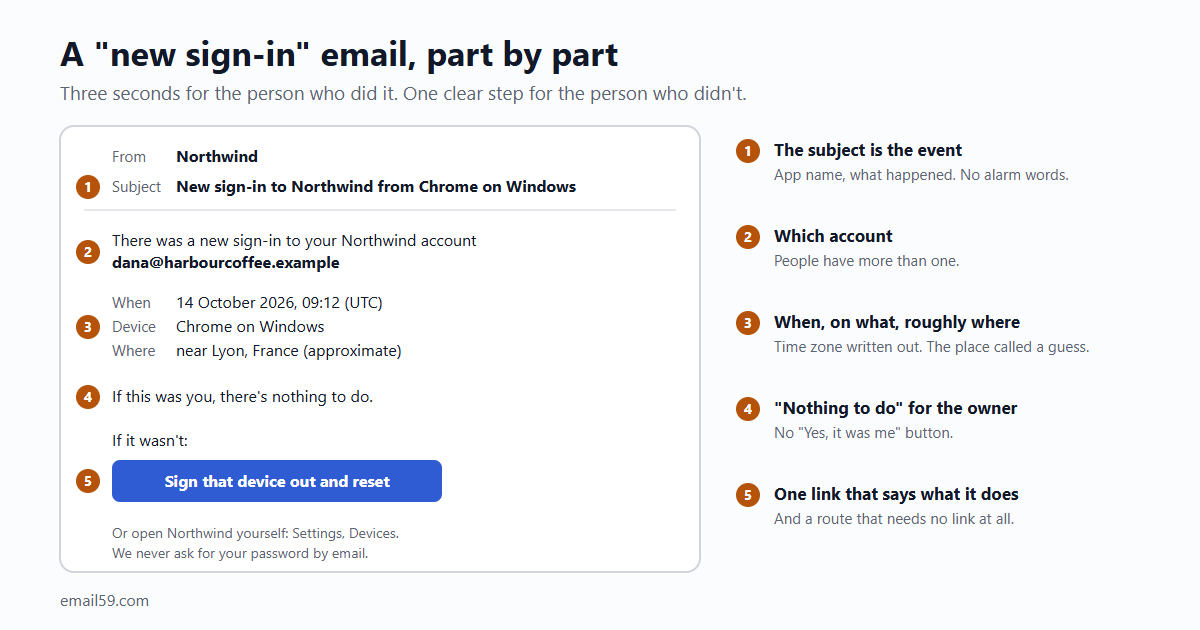
Here's the whole email for a new sign-in, as plain text. The HTML version says the same with a button, and should travel with this one.
Subject: New sign-in to Northwind from Chrome on Windows

There was a new sign-in to your Northwind account
dana@harbourcoffee.example.

When:    14 October 2026, 09:12 (UTC)
Device:  Chrome on Windows
Where:   near Lyon, France (approximate, from the internet address)

If this was you, there's nothing to do.

If it wasn't, sign that device out and choose a new password:
https://northwind.example/secure/4be19c70a2d84f0e9d3371c5a86e02fb

You can also open Northwind yourself and look under
Settings, Devices. We never ask for your password by email.
Questions: help@northwind.example

Northwind Apps, 12 Harbour Street, Portland, ME- "If this was you, there's nothing to do." Say it in those words. Don't ask people to confirm that it was them: a "Yes, it was me" button is a second thing to press, and it teaches people to press buttons in security emails.
- One link, and it says what it does. "Sign that device out and choose a new password." Not "Review activity", not "Learn more", not three buttons.
- A way that needs no link. "Open Northwind yourself and look under Settings, Devices." The careful reader, the one who has been told never to press links in emails about their account, gets a route too. It's also the habit you want them to have the day a fake one arrives.
- What you'll never ask. One line. It costs nothing and it's the line a forged copy has to contradict.
- Somewhere to write. An address a person answers, for the reader who is locked out and for whom the link didn't work.
And the password one, which is shorter because there's less to know:
Subject: Your Northwind password was changed

The password for your Northwind account dana@harbourcoffee.example
was changed on 14 October 2026 at 09:12 (UTC), from Chrome on
Windows near Lyon, France (approximate).

If this was you, there's nothing to do.

If it wasn't, take the account back:
https://northwind.example/secure/91d0c3b7e5f24a68b0c2d47a1e9f3350

This link works for 7 days. We never ask for your password by email.
Questions: help@northwind.example

Northwind Apps, 12 Harbour Street, Portland, ME
What the link has to do
Think about who presses it. In the password case it's the owner of an account whose password someone else has just changed. They can't sign in. A link that opens your sign-in page is no use to them at all.
- It works without the password. The link carries its own one-time token: random, long, only a hash of it stored, the same care as a password-reset link.
- It does the safe thing first. Signs out every session, cancels the change where it can (the new password stops working), and starts a password reset to this address. The mailbox is the one thing the owner demonstrably still has.
- It lives longer than a sign-in link. A reset link expires within the hour because the person is waiting for it. Nobody is waiting for this one; it may be read after a weekend. Days, not minutes. Seven is our suggestion, not a standard.
- Opening it changes nothing. Mail filters open links before people do (that's how magic links get used up). The link shows a page that says what's about to happen; a button on the page does it.
- It points at your own domain. No click-tracking redirect in front of it. A security email whose link begins with somebody else's domain looks exactly like the fake.
Never optional, never dropped
- No setting switches them off. These aren't marketing and they don't belong on the notification preferences page. Whoever breaks into an account would switch them off first. If you do offer a setting for the new-sign-in notice, changing it should send one last email saying so.
- No unsubscribe decides them. A person who unsubscribed from your newsletter still gets told their password changed. Keep the two lists apart in your code, so a marketing opt-out can't reach these.
- Sent at once. Not in a digest, not at the next quarter hour. The second reader's head start is measured in minutes.
- Ahead of the queue. If your app caps how many emails it sends an hour, sign-in codes and security notices are counted last and dropped never. Collapsing duplicates is fine (the same new device signing in five times in a minute is one email). Silently skipping the sixth event of the day is not.
- A failed send is your problem. If the notice bounces or the send call fails, log it and try again. This is the one email where "we tried" isn't enough.
And not too many
The other way to make these useless is to send one for every sign-in. Thirty "new sign-in" emails a month from the same laptop teach the same indifference as the wrong town does.
- "New" means a browser you haven't marked. After a sign-in, set a long-lived cookie that says "this browser has signed in to this account before". No cookie, new device, one email.
- Not "a new internet address". A phone changes address between the kitchen and the bus stop.
- The sign-in that follows a sign-up needs none. They've only just arrived.
- If people sign in by email code, be honest with yourself about what the notice adds: whoever signed in could already read that mailbox. It still helps the owner who reads mail on another device and sees a code they didn't ask for followed by a sign-in they didn't make. One email, not two.
Sending them with email59
A security notice is ordinary transactional mail: one recipient, one call.
curl -s https://email59.com/v1/send \
  -H "Authorization: Bearer $EMAIL59_KEY" -H 'Content-Type: application/json' \
  -d '{"from":"northwind","to":"dana@harbourcoffee.example",
       "subject":"Your Northwind password was changed",
       "text":"The password for your Northwind account ...",
"html":"<p>The password for your Northwind account ...</p>"}'- Opt-outs don't stop it. email59 adds an unsubscribe link to mail sent through
/v1/send, and pressing it stops campaigns from you to that address. Transactional mail still goes, so a newsletter opt-out can't silence a password notice. - Send both bodies.
/v1/sendpasseshtmlandtexton as given and doesn't make one from the other. The text part is where the link is read in full by the careful reader. - Count them in. Each one is one email of the day's sending. Leave room for them when you plan a busy day of other mail, and check the answer to the call: anything but a
201for one of these is worth a retry and a log line. - Try the wording without mailing anyone. A test key runs the same checks and stores the email instead of delivering it.
The short version
- Send one for a new device, a changed password or email address, a changed second step, a new API key.
- The subject names the app and the event. No alarm words.
- Account, time with its zone, device in words, country. The town only with "near" and "approximate".
- "If this was you, there's nothing to do." Then one link for when it wasn't, and a route that needs no link.
- The link works without the password, signs everything out, and changes nothing until a button is pressed.
- No setting, opt-out or hourly cap ever stops one. And only for devices that really are new.
Sources
- NIST SP 800-63B-4, Digital Identity Guidelines: section 4.6, account notifications (independent notice, clear instructions for a recipient who repudiates the event)
- OWASP Forgot Password Cheat Sheet (email after a reset, no password in the email, sessions)
- OWASP Authentication Cheat Sheet (changing a registered email address: notice to the current address)
- MaxMind: geolocation accuracy (country, region and city figures, mobile networks, never a household)
- Google Account Help: security alerts ("device type, time, and location"; "No, secure account")
- email59 docs: /v1/send, unsubscribe lists, test keys