Account emails
Changing an account's email without handing the account away
The email on an account resets every other key it has. A change-email form that switches it in one step is the quietest way to lose an account. The flow in six steps, the two emails, and what each one says.
Most apps build the change-email form on a slow afternoon. One field, one UPDATE users SET email = ..., a green tick. It works, and nobody looks at it again.
Now picture the form used by someone who shouldn't be there: a colleague at an unlocked laptop, somebody holding a stolen session cookie, or a stranger who tried a password leaked from another site. They type their own address and press Save. Then they press "Forgot password".
From that second, every reset link, sign-in code and receipt goes to them. The real owner tries "Forgot password" too and is told there is no such account. Nothing was broken into, in the usual sense. Your form did what it was built to do.
The same form also hurts honest people. Someone types jo@gmial.com, the app switches at once, and they've locked themselves out with one typo.
Both problems have the same fix: the new address proves itself before anything changes, and the old address is told, with a way to say no.
The flow, in six steps
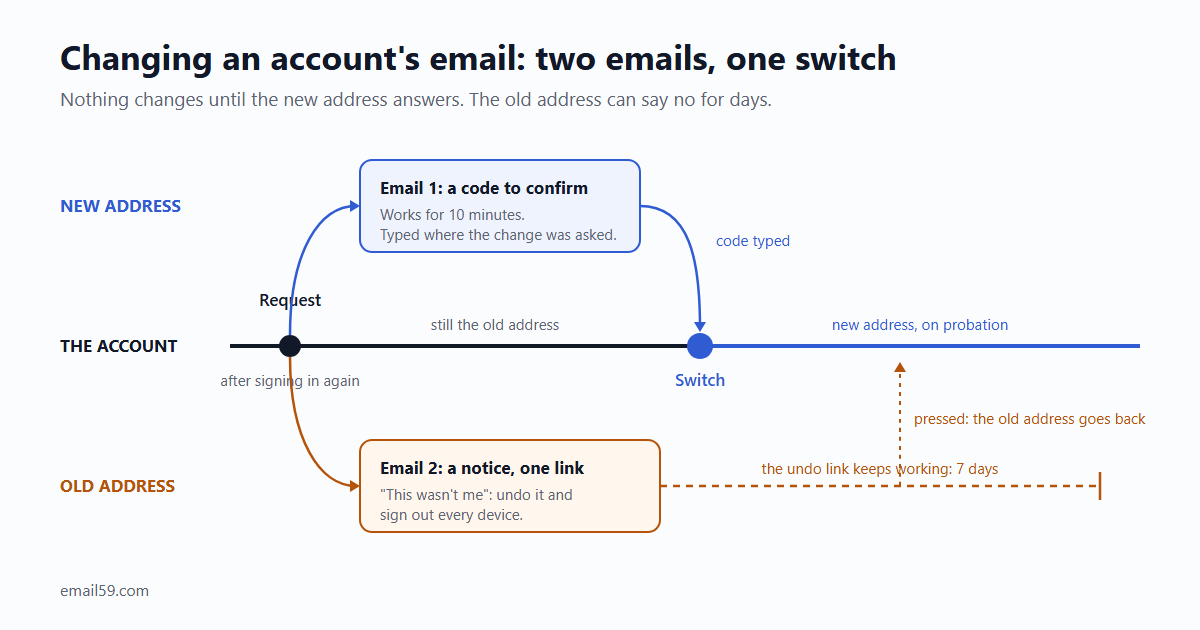
- Ask who they are, again. A session that's been open for three weeks isn't proof of much. Ask for the password. If your app has no passwords, send a sign-in code to the current address and ask for that. If they have a second factor, use it.
- Store the new address as pending. A separate column or table. Sign-in, resets and notices keep using the old one.
- Email the new address a code or link to confirm it.
- Email the old address a notice, with one link: "this wasn't me".
- Switch only when the new address confirms. In the same transaction, cancel every reset link and sign-in code still waiting to be used, since they were issued for the old address.
- Keep the undo link alive for days after the switch.
This is close to what OWASP recommends for the same form: check the session, ask for the password or second factor, hold the new address as "proposed", and send two emails, one to each address. The differences are in how long things live and what happens to sessions, and both are below.
Email one: to the new address
It has one job. Prove that whoever asked for the change can read this inbox.
Subject: 482913 is your Acme code

Someone asked to use this address for an Acme account.

Your code: 482913
It works for 10 minutes. Type it on the page where you asked for the change.

Didn't ask for this? Do nothing. The address won't be added to any account.- A code beats a link here. The person is already signed in with the form open, so a box to type six digits is right in front of them. A code typed into that session also ties the confirmation to the person who asked. A link can be opened by anyone the email reaches, and by a mail scanner before the person sees it.
- If you do use a link, it opens a page with a Confirm button. The change happens on the button, never on loading the page.
- Don't print the old address. If the new one was mistyped, this email is being read by a stranger. They don't need to learn who your customer is.
- Keep it short-lived. Ten minutes to an hour. It's a task someone is in the middle of.
Email two: to the old address
This is the one that saves accounts. Send it when the change is asked for, so the owner hears about it as early as possible.
Subject: Your Acme email address is being changed

Someone signed in to your Acme account and asked to change its
email address to j•••@newmail.example.

When: 12 October, 14:05 UTC
From: Chrome on Windows, near Lisbon

If this was you, there's nothing to do.

If it wasn't, undo it here. This also signs out every device
and lets you set a new password:
https://acme.example/undo-email-change/9f2c...

The link works for 7 days.- One link, and it's the undo. No "view in browser", no footer menu, no survey. A person reading this in a panic should have exactly one thing to press.
- Show part of the new address. "j•••@newmail.example" is enough for the owner to recognise their own new address and stop worrying, without the notice spelling out somebody else's address in full.
- Say when and from where, roughly. A city and a browser are enough. It's what lets someone decide in two seconds that it wasn't them.
- Tell them doing nothing is fine. Most of these emails go to people who made the change themselves.
- Don't ask them to reply. Unless a person really reads that inbox within the hour, a reply is a slower, weaker version of the link. Where replies to app email should go is its own question: Reply-to on a no-reply sender.
What the undo link has to do
The person pressing it may be locked out already. So the link can't ask them to sign in first.
| Pressed when | What happens |
|---|---|
| Before the new address confirmed | The pending change is cancelled and its code stops working. Every session is signed out. You get a flag to look at. |
| After the switch | The old address goes back on the account. Every session is signed out, waiting reset links are cancelled, and a set-a-new-password link goes to the old address, because whoever made the change either knew the password or held a session. |
| After it expired, or a second time | A plain page: "this link no longer works", and how to reach you. |
- Put it behind a button too. The link opens a page that says what's about to happen; the button does it. Otherwise a mail scanner undoes every legitimate change your users make.
- Store a hash of the token, as you would for a password reset. It's worth exactly as much.
- Give it days. OWASP asks for the links to be time-limited and leaves the number to you. A confirmation code can die in ten minutes because someone is waiting for it. The undo is for a person who isn't watching: they're asleep, on a flight, or check that inbox on Sundays. Seven days is a reasonable floor.
- Treat the account as on probation until it expires. No second email change, and a pause on anything that can't be taken back: deleting the account, exporting all its data, changing where money is paid out.
What about the sessions?
OWASP's version ends with: update the address, log the user out, tell them to sign in again. The reason is sound. Some other session may belong to the person you're trying to keep out.
The cost is that someone who did a perfectly ordinary thing gets thrown out of the app for it, on every device. There's a middle road, and it's the one we'd take:
- Keep the one session that just proved itself twice, with the password or code in step 1 and the code from the new inbox in step 5.
- End every other session, and say so on screen: "You've been signed out on your other devices."
- The undo link signs out everything, with no exceptions.
If your form has no step 1, don't take the middle road. Sign everyone out.
Details that bite later
- The new address already has an account. Show the same screen as always: "We've sent a code to that address." Then send that address a different email: someone tried to add it to another account, it already has one, nothing changed. If the form answers "already in use" on screen, it becomes a way to test who your customers are.
- Check uniqueness at the switch, not only at the request. Two people can have the same address pending. The first to confirm gets it; the second gets a polite error.
- One pending change per account. A new request replaces the old one and kills its code.
- Limit it like any form that emails a typed address. A handful of requests a day per account. Otherwise it's one more way to bury a stranger's inbox from inside a signed-in session.
- Compare addresses trimmed and in lower case. Don't strip dots or plus tags yourself; those rules belong to the mailbox provider and differ from one to the next.
- The old inbox is dead. They left the job and the address went with it. With a password they can still do step 1, and the notice goes nowhere, which is fine. With email codes only, they're stuck, and it becomes a support request. OWASP's warning applies: the help desk is where people go when the form says no, so write down what proof you accept before the first such message arrives.
- "Sign in with Google" accounts. The address comes from the identity provider. Either don't show the form, or make clear it changes where you send mail and nothing else.
- The address lives in other places. Your payment provider's customer record, the newsletter list, the help desk. Update them after the switch, and undo them with the undo. A marketing opt-out belongs to the person, so carry it over to the new address.
- Keep the history. The undo needs the old address, and so will the support conversation six months from now.
The table behind it
create table email_changes (
  id            uuid primary key,
  user_id       uuid not null references users(id),
  old_email     text not null,
  new_email     text not null,
  verify_id     text,               -- the code sent to the new address
  undo_hash     text not null,      -- sha-256 of the token in the old address's link
  requested_at  timestamptz not null default now(),
  requested_ip  inet,
  confirmed_at  timestamptz,        -- the switch
  undone_at     timestamptz,
  undo_expires  timestamptz not null
);
create unique index one_pending_change on email_changes (user_id)
  where confirmed_at is null and undone_at is null;
The partial index is the "one pending change per account" rule, kept by the database so no code path can forget it. users.email keeps its own unique index, which settles the race in "check uniqueness at the switch".
With email59
email59 is an email router: one HTTPS call and the message goes out, no domain to set up. The two emails above are two calls. For the new address, the Verify API makes the code, sends it, counts wrong tries and expires it:
curl https://email59.com/v1/verify/start \
  -H "Authorization: Bearer $EMAIL59_KEY" -H "Content-Type: application/json" \
  -d '{"to": "jo@newmail.example", "app_name": "Acme"}'
# 201 {"id": "vrf_3f9c...", "status": "pending", "expires_in_seconds": 600, ...}
Keep the id in the pending row (verify_id above) and check the typed code against that id, so a code from some other request can't confirm this change:
curl https://email59.com/v1/verify/check \
  -H "Authorization: Bearer $EMAIL59_KEY" -H "Content-Type: application/json" \
  -d '{"id": "vrf_3f9c...", "code": "482913"}'
# 200 {"valid": true, "status": "approved", ...}
The notice to the old address is an ordinary send:
curl https://email59.com/v1/send \
  -H "Authorization: Bearer $EMAIL59_KEY" -H "Content-Type: application/json" \
  -d '{
    "from": "acme-security",
    "to": "jo@oldmail.example",
    "subject": "Your Acme email address is being changed",
    "text": "Someone signed in to your Acme account and asked to change its email address to j***@newmail.example.\n\nIf this was you, there is nothing to do.\n\nIf it was not, undo it here. This also signs out every device:\nhttps://acme.example/undo-email-change/9f2c...\n\nThe link works for 7 days."
  }'
Two things to know. Mail sent through email59 comes from an address on email59.com, and unless you give the send a reply_to of your own, replies aren't received. Either way the undo link should carry the whole job. And the pending row, the undo token and the session handling are yours to build; email59 delivers the two messages and keeps the code honest.
The short version
- Changing the email is changing who can reset the password. Ask for the password, a code or a second factor first.
- Nothing switches until the new address has typed back a code.
- The old address gets a notice with one link, and that link undoes the change, signs out every device and works without signing in.
- The code lives for minutes. The undo lives for days.
- Keep the session that confirmed, end the others. With no re-check up front, end them all.
- Never say on screen that an address already has an account.
Sources
- OWASP: Changing a user's registered email address (the recommended process with and without a second factor, the two emails, logging out after the switch, help desk and social engineering)
- OWASP Authentication Cheat Sheet: asking for current credentials before changing a password or email address
- email59 docs: the Verify API (start, check, limits)
The 7-day undo, the probation rules and the "keep one session" choice are our suggestions, not a standard. OWASP's page asks for time limits without giving numbers and logs every session out.