Sign-up
gmial.com: catching the mistyped email address before the first email goes astray
Someone types sam@gamil.com into your sign-up form, waits for a code that never arrives, and leaves. Some typo domains bounce the code, some swallow it, and some hand it to a stranger. How to catch the typo while the person is still on the page: a short list, a small distance check and a "Did you mean" line they can ignore.
A sign-up form has one field that nobody can fix later: the email address. A wrong name can be edited in settings. A wrong address means the sign-in code, the reset link and the receipt all go somewhere else, and the person who typed it has no way to know why nothing came. From their side, your app is simply broken.
Most of these mistakes are in the part after the @, and that part is the easy one to check. A few providers hold most personal addresses, so a typed domain that is one letter away from gmail.com is almost always a slip, not a new provider. The page can say so before anything is sent.
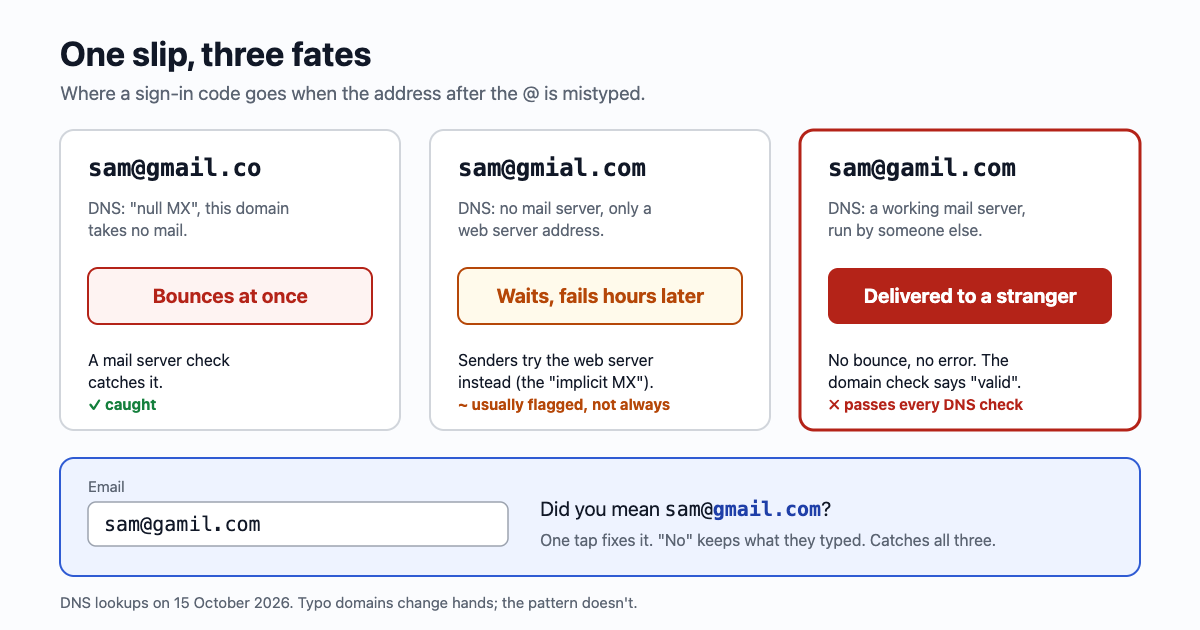
What the slips look like
- Two letters swapped: gmial.com, hotmial.com. The most common kind on a phone keyboard.
- A letter dropped or doubled: gmal.com, yaho.com, yahooo.com, outlok.com, iclod.com.
- The key next door: gnail.com (n sits beside m), gmaik.com.
- The ending: gmail.con, gmail.co, gmail.cm. There is no .con ending at all; .co is Colombia's, and gmail.co is a different domain.
- The part before the @: smaa@ instead of sam@. Nothing on the page can catch this one. Only a code or a link sent to the address can, which is why the last step of sign-up is still a confirmation (more below).
Why "does the domain take mail?" isn't enough
The usual check after the format is a DNS lookup: does the domain list a mail server (an MX record)? It is a good check, and it catches some typos. It misses the worst ones, because many typo domains are registered and some of them run mail servers. We looked up a few on 15 October 2026:
| Typed | What DNS says | What happens to your email |
|---|---|---|
| gmail.co, yahooo.com | A "null MX": the domain says it takes no mail | Bounces at once. A domain check flags it. |
| gmal.com, gmail.con | No such domain, or nothing at all | Bounces. A domain check flags it. |
| gmial.com, hotmial.com, yaho.com, outlok.com | No mail server, but a web server address | The mail rules say a sender with no MX should try the domain's own address instead (RFC 5321, the "implicit MX"). Your email waits, retries and usually fails hours later. |
| gamil.com, gnail.com, gmai.com, iclod.com | A working mail server | Delivered, to whoever runs that server. No bounce, no error, nothing in your logs. |
The last row is the one that matters. A sign-in code or a password reset link sent to sam@gamil.com reaches a stranger's machine. This is not new: in 2011 two researchers registered 30 look-alike domains of large companies and, over six months, received about 120,000 emails meant for someone else, including invoices and business secrets. Only one of the companies noticed the domain being bought.
Our own deep check shows the gap. It gives sam@gmail.co a score of 1 and sam@gmial.com a 35 ("likely invalid"), but sam@gamil.com gets 90 and "likely valid", because the domain really is set up to receive email. That answer is correct about the domain and useless about the person. Telling the two apart needs a different question: is this domain a near miss of a famous one?
"Did you mean": the small check that catches all four rows
Keep a short list of the domains your users actually have. Compare what was typed after the @ with each one, counting the edits needed to turn one into the other (a swap of two neighbours counts as one edit). If the typed domain isn't on the list and is one or two edits from a name that is, show a line under the field.
const KNOWN = ["gmail.com", "googlemail.com", "yahoo.com", "ymail.com", "outlook.com", "hotmail.com", "live.com",
  "msn.com", "icloud.com", "me.com", "mac.com", "aol.com", "proton.me", "protonmail.com", "gmx.com", "mail.com", "email.com"];

function distance(a, b) {  // edits between two strings; a swap of two neighbours counts as one
  const d = Array.from({ length: a.length + 1 }, (_, i) => [i, ...Array(b.length).fill(0)]);
  for (let j = 1; j <= b.length; j++) d[0][j] = j;
  for (let i = 1; i <= a.length; i++) {
    for (let j = 1; j <= b.length; j++) {
      d[i][j] = Math.min(d[i - 1][j] + 1, d[i][j - 1] + 1, d[i - 1][j - 1] + (a[i - 1] === b[j - 1] ? 0 : 1));
      if (i > 1 && j > 1 && a[i - 1] === b[j - 2] && a[i - 2] === b[j - 1]) d[i][j] = Math.min(d[i][j], d[i - 2][j - 2] + 1);
    }
  }
  return d[a.length][b.length];
}

function didYouMean(email) {
  const at = email.lastIndexOf("@");
  if (at < 1) return null;
  const domain = email.slice(at + 1).trim().toLowerCase();
  if (KNOWN.includes(domain)) return null;          // a real domain is never "corrected"
  let best = null, bestN = 3;
  for (const known of KNOWN) {
    const n = distance(domain, known);
    const allowed = known.length >= 9 ? 2 : 1;       // short names get one slip, longer ones two
    if (n <= allowed && n < bestN) { best = known; bestN = n; }
  }
  return best && email.slice(0, at + 1) + best;
}

didYouMean("sam@gamil.com");   // "sam@gmail.com"
didYouMean("sam@gmail.con");   // "sam@gmail.com"
didYouMean("sam@ymail.com");   // null: ymail.com is real and on the list
didYouMean("sam@acme.com");    // null: not near anything famous
To try it on an address or a whole sign-up export without writing any code, use the email typo catcher: it runs this function in your browser and lets you add your own domains to the list.
A few rules make the difference between a helpful line and an annoying one:
- The list holds the real near misses too. ymail.com, mail.com, email.com and me.com are one edit from bigger names and are real addresses. Leave them off and you will "correct" real people. Add the providers your own users have; the sign-up table will tell you after a month.
- Suggest, never change. The UK government's design guidance for email fields puts it plainly: warn users if you detect a common misspelling, "but allow them to proceed in case it's a genuine email address." Somebody does own gail.com.
- One tap to accept. "Did you mean sam@gmail.com?" as a button that fills the field. Bold the part that changes so the eye finds it.
- Check when the field loses focus, not on every key. Nobody wants "Did you mean" while they are halfway through typing "gma".
- Check again on the server. The same function runs in Node, so the API can return the suggestion too, for forms that skip your page (apps, bots, a curl call).
- Leave company domains alone. acme.co might be a typo of acme.com, or it might be the company. Without a list of famous names to compare with, there is nothing to say.
The field itself helps more than a second box
The old fix was a second "confirm your email" box. People copy and paste the first into the second, typo included, and the extra box slows down everyone who typed it right. The same guidance says to ask twice only if your own research shows it works. These do more:
<input type="email" autocomplete="email" spellcheck="false">. The phone shows the @ key, the browser offers the address it already knows (a saved address has no typos), and the spellchecker stops underlining or "fixing" the address.- Allow paste. Blocking it pushes people to retype, which is where typos come from.
- Show the address back on the next screen, large: "We sent a code to sam@gamil.com. Wrong address? Change it." That change link fixes the slips no check can see, including the ones before the @.
The last check is the email itself
Nothing on the page proves the address is right. A six-digit code or a link sent to it does: if the person can type the code, the address reaches them. So keep the account unconfirmed until that happens, and don't send anything else (the welcome email, the newsletter, the receipt) to an address nobody has confirmed. Mail to an unconfirmed address is mail to whoever owns the typo. Six digits, ten minutes covers the code email itself, and email bombing through sign-up forms covers why that confirm step also protects strangers from your form.
With email59, that step is two calls: /v1/verify/start emails a code and /v1/verify/check says whether the typed code is right. Addresses on a domain with no mail server, a null MX or a throwaway service are refused before anything is sent and cost nothing. A "Did you mean" line in front of it catches the gamil.com kind, which a mail server check can't.
The short version
- Most typos are after the @, and that part can be checked against a short list of famous domains.
- A mail server check catches gmail.co and gmal.com. It passes gamil.com, which delivers your email to a stranger.
- One or two edits from a famous name, and not on the list itself: show "Did you mean", let them say no.
- Put the real near misses (ymail.com, mail.com, me.com) on the list so they are never corrected.
type="email",autocomplete="email",spellcheck="false", paste allowed, no second box.- Show the address back with a change link, and send nothing else until the code is typed in.
Sources
- GOV.UK Design System, Email addresses pattern: input attributes, misspelling warnings, asking twice only if research shows it works
- RFC 7505, the "null MX" record, and the MX then A/AAAA fallback it describes
- RFC 5321 section 5.1, locating the target host (implicit MX)
- SecurityWeek (2011): the Godai Group doppelganger domain study, about 120,000 misdirected emails in six months
- Mailcheck, the open-source library that made "Did you mean" for email fields common
- DNS lookups of the typo domains in the table: dig, 15 October 2026. Results change as domains are bought and sold.
Gmail is a trademark of Google LLC; Yahoo, Outlook, Hotmail and iCloud are trademarks of their owners. email59 is not affiliated with any of them.