Account emails
The welcome email has one job
The welcome email arrives a minute after sign-up, while the person still has your app open. It has one job: get them to the first thing they came to do. What goes in, what to leave for later, when to skip it altogether, and the one rule that keeps it out of the promotions pile.
The welcome email is usually the first email a new app writes, and it tends to collect everything: a thank-you from the founder, a tour of eight features, a discount, links to three social accounts, a newsletter sign-up and a password reminder. It reads like a brochure, because it is one.
Think instead about who opens it. They signed up seconds ago. They know your name, they meant to do something specific, and either they're already doing it in the other tab, or something stopped them. The welcome email is for the second group. Postmark's guide to these emails says the same thing in one line: if you're confirming a new customer's email address, "make that the single action for this email."
First, decide if you need one
Many small apps already send an email at sign-up: the code or link that confirms the address. That email is opened, because the person is waiting for it. A welcome email one minute later is a second email about the same moment. Pick one of three set-ups:
| Set-up | When it fits |
|---|---|
| The code email is the welcome. No second email. | The app is simple and the person lands inside it after typing the code. Nothing in a later email would help them. |
| Code first, welcome after the code is typed. | There is a first step that takes longer than one visit: connect a bank, import contacts, invite a team. The welcome email holds the link back to it. |
| Welcome later, only if they stall. | Sign-up and first use usually happen together. An email the next day goes only to people who signed up and never did the first step. |
The set-up to avoid is a welcome email sent before the address is confirmed. A mistyped address belongs to someone else, and an unconfirmed one may have been typed into your form by a stranger. Catching the mistyped address covers the first; email bombing through sign-up forms covers the second.
Pick the one job
Ask what a new account does in its first session when it goes well. That's the job. Examples:
- A booking app: "Add the hours you're open, so people can book."
- An invoicing tool: "Send your first invoice. It takes about two minutes."
- A shared shopping list: "Invite the people you shop with."
- A developer API: "Here's your key. Send a test request."
One sentence, one button, and the button goes straight to that screen, signed out or not. If the person isn't signed in on that device, the sign-in page should send them back to the same screen afterwards.
What goes in, and what stays out
| Put in | Why |
|---|---|
| The app's name as the From name | They just signed up for it. A person's name or "noreply" makes them stop and think. |
| A plain subject: "Your Tally account is ready" | It says what the email is. "Welcome aboard! 🎉" says nothing a reader can search for later. |
| Which address the account uses | The one detail people look for when they come back months later. Postmark's checklist adds the sign-in page and the plan, if there is one. |
| The one next step, with one button | See above. |
| How to sign in and where to ask for help | A link to the sign-in page, and either a reply address that reaches a person or a help page. |
| Leave out | Why |
|---|---|
| The password, or any password | Email sits in inboxes, backups and forwarded threads for years. Postmark's guide: you "shouldn't email a password in any part of the process." |
| A sign-in link that works without a password and doesn't expire | Same reason. The button can open the app; it shouldn't be a key to the account. |
| The tour of every feature | Nobody needs feature eight before they've used feature one. The app can show it when it's needed. |
| Discounts, other products, a newsletter box | They turn the email into an ad. More on that below. |
| A design that only works as images | Many mail apps hide images until the reader allows them. Write it as text first; see every HTML email needs a plain-text twin. |
The line between welcome and advert
In the US, CAN-SPAM treats an email by its primary purpose. One that only confirms something the person already agreed to, or gives information about their account, is a "transactional or relationship" message and skips most of the rules for commercial mail. The FTC's guide adds two tests that catch welcome emails: if a reader of the subject line would expect an advert, or if the account part isn't mostly at the start, the email counts as commercial. Then it needs a working unsubscribe, a postal address and the rest.
Mail providers draw much the same line, only by behaviour rather than law. A welcome email full of offers looks like the other offers in the inbox and gets filed with them, and then the next email from you, the reset link, may be filed there too. Transactional or marketing has the whole line. The simple rule: if it's worth selling something, send a separate email later, to people who said yes to that kind of email.
An example
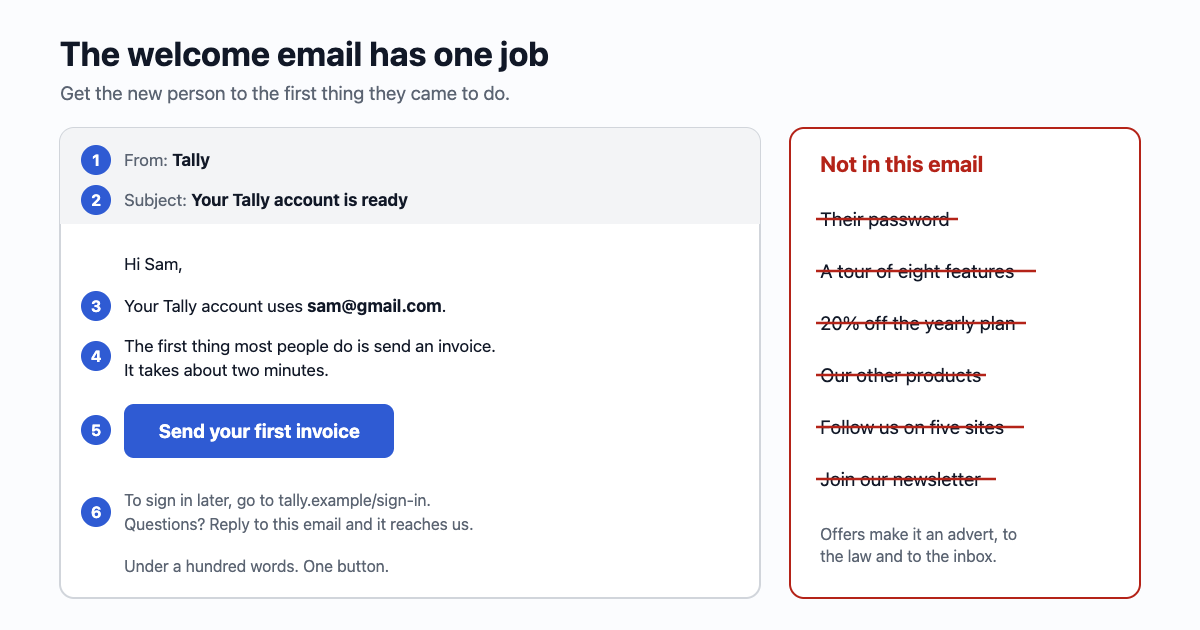
From: Tally
Subject: Your Tally account is ready

Hi Sam,

Your Tally account uses sam@gmail.com.

The first thing most people do is send an invoice.
It takes about two minutes:

  [ Send your first invoice ]

To sign in later, go to tally.example/sign-in.
Questions? Reply to this email and it reaches us.

Tally
Under a hundred words. Nothing in it is out of date in a year, which matters, because this is the email people search for when they forget which address they signed up with.
When to send it, and what comes after
- Straight away, within the minute, once the address is confirmed. A welcome email that arrives an hour later arrives after the person has gone.
- Once. If they sign up again with the same address, don't send another. Say on the page that the account already exists.
- Tips, check-ins and "we miss you" emails are a separate series. They are marketing in all but name: give them an unsubscribe link and stop them when the person has done the thing they were nudging towards.
Sending it with email59
One call to /v1/send, after /v1/verify/check has said the code was right. Set reply_to to your own address so "Reply to this email" really reaches you (Replies):
curl -s https://email59.com/v1/send \
  -H "Authorization: Bearer $EMAIL59_KEY" -H 'Content-Type: application/json' \
  -d '{"from":"yourapp","to":"sam@gmail.com","reply_to":"help@yourapp.example",
       "subject":"Your Tally account is ready",
       "text":"Hi Sam,\n\nYour Tally account uses sam@gmail.com.\n\nThe first thing most people do is send an invoice: https://tally.example/invoices/new\n\nTo sign in later, go to https://tally.example/sign-in.\nQuestions? Reply to this email and it reaches us.\n\nTally"}'
The short version
- One job: get the person to the first thing they came to do. One sentence, one button.
- If the code email already lands them in the app, you may not need a welcome email at all.
- Never before the address is confirmed. Never with a password or a sign-in link that doesn't expire.
- App name as the sender, a subject that says what it is, the address the account uses, how to sign in, where to get help.
- No offers, other products or newsletter boxes: they make it an advert, to the law and to the inbox.
- Tips and nudges are a separate series with an unsubscribe link.
Sources
- Postmark, Welcome email best practices: one action per email, account details but no passwords, the product's name in From
- FTC, CAN-SPAM Act: A Compliance Guide for Business (transactional or relationship content, primary purpose, the subject line and placement tests)
- GOV.UK Design System, Confirm an email address: what a confirmed address does and doesn't prove