Small business email
Email signatures for a small business: four lines, and the logo that arrives as an attachment
A small business signature has one job: tell the reader who wrote this and how to reach you, without looking like an advert. Four lines do it. The trouble usually starts with the logo: pasted into the signature, it reaches many readers as image001.png in the attachment list, a grey box with "Download pictures", or a file called noname on a Gmail reply. Here's what to put in the four lines, how to add a logo that shows up, and what UK and German law ask of a company's email.
The short answer: name, role, business, one phone number or link. A logo only if it's hosted on the web and linked by its address, about 300 by 80 pixels on screen; never pasted or dragged in. No quotes, no five social icons, no ten-line confidentiality notice. A UK limited company adds its registered name, number, place of registration and registered office.
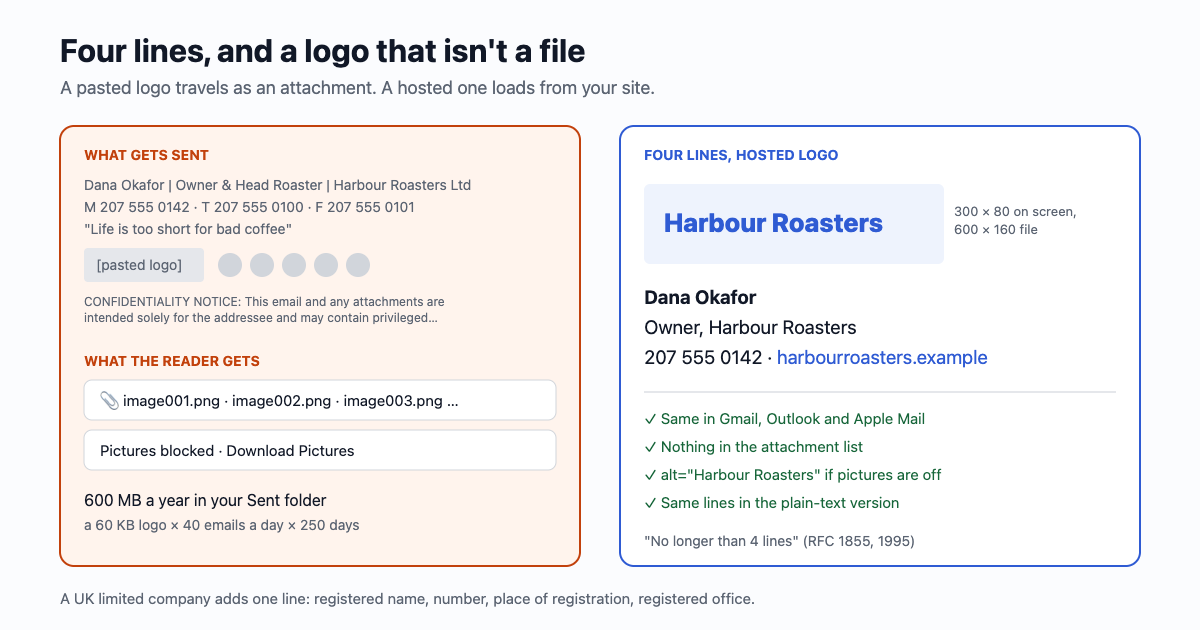
The four lines
Dana Okafor
Owner, Harbour Roasters
207 555 0142 · harbourroasters.example
That is three lines; a fourth can hold an address for a shop people visit, or a second contact if you really have one. Four isn't a whim: "If you include a signature keep it short. Rule of thumb is no longer than 4 lines" is RFC 1855, the internet's netiquette guide of 1995, and the old Usenet limit was 4 lines of at most 80 characters.
- Name as you sign it. First and last, the way customers address you.
- Role and business on one line. "Owner, Harbour Roasters" says who decides; "Bookings, Harbour Roasters" tells people they've reached the right desk.
- One way to reach you that isn't email. The number you answer, or the one page people need (the booking page, the shop). Not both a mobile and a landline and a fax.
- Leave out: quotes and slogans, a list of social icons (each is an image that can be blocked), "Sent from my iPhone", and long legal footers (below).
Why the logo arrives as an attachment
An email has no "picture in the signature". When you paste or drag an image in, your mail program attaches the file to the message and points to it from the HTML with a cid: address. Whether the reader sees a logo or a file depends on their mail program:
| What you did | What many readers see | Why |
|---|---|---|
| Pasted or dragged the logo into the signature (Outlook, Apple Mail, Gmail upload) | image001.png or the logo listed as an attachment; on Gmail replies sometimes a file called noname | The image travels as an inline attachment. Microsoft's own APIs still list such images with the attachments, marked isInline (Microsoft 365 developer blog, Oct 2025) |
| Linked a hosted image by its web address | The logo, once pictures are allowed | Nothing is attached; the image loads from your site |
| Hosted image, reader on classic Outlook for Windows | A blank box and "Download Pictures" for senders they haven't trusted | Classic Outlook blocks automatic picture downloads by default (Microsoft Support) |
| Image pasted as text inside the HTML (base64 data address) | Often nothing at all | Many mail programs strip data: images |
So host the logo: put the file on your website (or any address that stays put) and add it by URL. In Gmail it's Settings → See all settings → General → Signature → the image button → Web Address (URL). Google Drive works too, if the file is shared as "Anyone with the link"; work accounts sometimes can't share that way. Delete the file later and every signature you've ever sent shows a broken image.
The cost of not doing it adds up quietly. A 60 KB logo attached to every email, at 40 emails a day and 250 working days, is 10,000 copies, 600 MB a year in your own Sent folder alone; attachments are encoded as text in transit, which makes each copy about a third bigger again. On a free Google account that's 4% of the 15 GB shared by Gmail, Drive and Photos every year, for one logo (what fills that 15 GB).
Logo size
- On screen: Google recommends 70 to 100 pixels high and 300 to 400 wide for a Gmail signature image, at most 100 by 1,000. 300 by 80 sits inside that and still reads on a phone.
- The file: make it twice that, 600 by 160, and set
width="300" height="80"in the HTML, so it stays sharp on high-resolution screens. Save it as PNG for a flat logo, under about 20 KB (our rule of thumb; a flat two-colour logo at that size is usually 5 to 15 KB). - Gmail's limit is 10,000 characters for the whole signature, and images count toward it.
- Always add alt text with the business name, so a blocked image still says something:
alt="Harbour Roasters".
<p style="margin:0;font-family:Arial,sans-serif;font-size:14px;line-height:1.4;color:#222">
  <img src="https://harbourroasters.example/img/logo-600x160.png" width="300" height="80"
       alt="Harbour Roasters" style="display:block;border:0;margin-bottom:6px">
  Dana Okafor<br>
  Owner, Harbour Roasters<br>
  207 555 0142 · <a href="https://harbourroasters.example">harbourroasters.example</a>
</p>
Where to set it, and the replies
| Mailbox | Where | Worth switching on |
|---|---|---|
| Gmail (web) | Settings → See all settings → General → Signature → Create new; pick defaults for new emails and for replies and forwards | "Insert this signature before quoted text in replies", so it isn't buried under the thread. Each "Send mail as" address can have its own |
| Gmail app | Settings → your account → Mobile signature; used only for emails sent from the app, plain text | Set it to the same four lines, or Gmail uses the web signature |
| New Outlook and Outlook on the web | Settings → Accounts → Signatures | Separate defaults for new messages and replies; a one-line reply signature ("Dana, Harbour Roasters") keeps threads short |
| Classic Outlook | File → Options → Mail → Signatures | Stored on that computer; set it again on each one |
| Apple Mail (Mac) | Mail → Settings → Signatures | "Place signature above quoted text"; don't drag a logo in, that's the attachment problem |
Signatures start with a line of two dashes and a space, -- , a convention from RFC 3676. Gmail adds it for you, and mail programs use it to fold the signature away in long threads. Your text version of each email should carry the same lines as plain text, links written out (why every HTML email needs a plain-text twin).
One signature for a shared address
When two people answer from hello@, sign with the person and the shared desk: "Dana · Harbour Roasters". The customer knows who they talked to last time, and the next reply can come from either of you without a different footer. How two people share one address without answering twice: the shared business inbox.
What the law asks of a business email
- UK limited companies and LLPs (not sole traders or ordinary partnerships): the registered name on every business email, and on business letters, which emails count as, the part of the UK where it's registered, the registered number and the registered office address (Companies Act 2006 and the Company, LLP and Business (Names and Trading Disclosures) Regulations 2015). One line does it: "Harbour Roasters Ltd, registered in England and Wales no. 01234567, 14 Quay Street, Plymouth PL1 1AA".
- Germany, a GmbH: legal form, registered seat, registry court and register number, and every managing director by name (§ 35a GmbHG), in every business email since 2007.
- US: nothing for everyday business email. A commercial message, an email whose main purpose is to sell, needs a valid postal address under CAN-SPAM, with penalties up to $53,088 per email; receipts and replies to customers are exempt from most of it.
- The long confidentiality notice ("If you received this in error...") has little legal force: US courts have not treated a boilerplate footer as binding, and lawyers describe them as mostly unenforceable. Keep one line on emails that really are confidential, if any.
This is a summary for writing signatures, not legal advice for your company.
In an email59 mailbox
A business mailbox on email59 takes a plain-text signature of up to 6 lines and 400 characters, added to the text as you write, so it never turns into an attachment. Four lines fit with room to spare.
Sources: RFC 1855 (Oct 1995), RFC 3676 § 4.3 (Feb 2004), Jargon File "McQuary limit"; Google Gmail Help "Create a Gmail signature" and "Add an image to your signature" (Oct 2026); Microsoft Support "Create and add an email signature in Outlook" and "Block or unblock automatic picture downloads" (Oct 2026); Microsoft 365 Developer Blog on inline images (Oct 2025); Apple Mail for Mac User Guide (Oct 2026); ICAS and LexisNexis on UK trading disclosures; IHK on GmbH Pflichtangaben; FTC CAN-SPAM compliance guide (2024); Talkov Law and FindLaw on email disclaimers (2012). Storage: our own calculation.
Gmail, Outlook, Apple Mail and Google Drive are trademarks of their owners. email59 is not affiliated with them. This article is not legal advice.