Gmail cleanup
15 GB, three apps: finding out whether Gmail, Drive or Photos filled your Google storage
One 15 GB allowance is shared by Gmail, Drive and Photos, and the warning doesn't say which of them used it up. Here is how to read Google's storage page, what counts and what doesn't, and where to start clearing.
The message says your Google storage is full. It usually turns up in Gmail, because that's the app people have open, and so people start deleting email. An hour later the bar has moved by a hair, because the mail was never the problem. Six years of phone videos were.
A Google account comes with 15 GB, and that one figure is shared. Gmail, Drive and Photos all draw on it, along with a few things you may not think of as storage at all. The useful first step, before deleting anything, is to find out which of them is the big one. It takes about a minute.
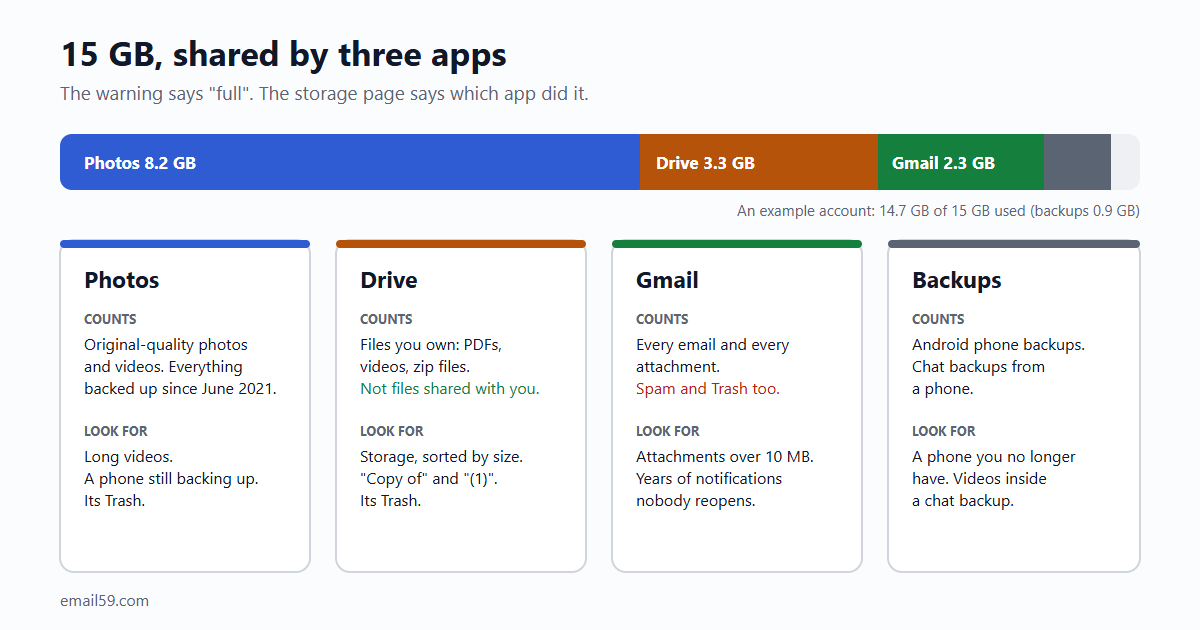
One page shows the split
Signed in to your Google account, open one.google.com/storage. You don't need a paid plan to see it. At the top is a bar, and under it a line for each app with a number: Google Drive, Gmail, Google Photos, and device backups if you have any.
Three numbers, and one of them is nearly always much bigger than the other two. That's the app to spend your time in. Write the three down, too; after a cleanup you'll want to know what moved.
- On a phone the same address opens in the browser.
- The numbers lag. Google says the figure can take 48 to 72 hours to catch up after you delete a lot. If you clear 4 GB and the bar doesn't move, wait before you delete more.
What counts in each app, and what doesn't
| App | Counts | Doesn't count |
|---|---|---|
| Gmail | Every email and its attachments, including Spam and Trash. | Nothing. There's no free corner. |
| Drive | Files you own: PDFs, pictures, videos, zip files. Docs, Sheets and Slides made or edited since 1 June 2021. What's sitting in Drive's Trash. | Files other people own and shared with you. Docs, Sheets and Slides not touched since before June 2021. |
| Photos | Photos and videos backed up in Original quality. Storage saver ones backed up since 1 June 2021. | Storage saver ("High quality") backups from before 1 June 2021. |
| Backups | Android phone backups (texts, call history, settings, app data) and WhatsApp backups on Android. |
Two lines in that table explain most surprises.
- "Shared with me" is free. Google: "Files in shared folders only consume the cloud storage quota of the original file owner, never the recipient." Removing shared files from your Drive tidies the list and frees nothing. Making your own copy of one does use your space.
- June 2021 is the line for Photos. Before it, compressed backups were free and unlimited; since then every photo counts. A phone that has been backing up for five years has been filling the 15 GB quietly, a few megabytes at a time.
If Photos is the big one
It often is, for anyone whose phone backs up by itself. And it's almost always video: a minute of phone video takes the room of dozens of photos.
- Find the videos. In Google Photos, search for "videos" and look for the long ones. The clip of a concert you'll never watch is worth more room than a thousand emails.
- Let Google shrink what's there. In Photos on a computer: Settings, Manage storage, then under "Recover storage" choose to convert existing photos and videos to Storage saver. Photos above 16 megapixels are resized to 16; "videos higher than 1080p will be resized to high-definition 1080p". On a phone screen you won't see the difference. If you print large or edit seriously, you will, and it can't be undone, so keep your originals somewhere else first.
- Empty Photos' Trash. Deleted photos sit there for 30 days and count the whole time.
- Check which phone is still backing up. An old phone in a drawer, a tablet the children use: each one with backup on keeps adding.
If Drive is the big one
- Sort by size. In Drive on a computer, click Storage in the left menu. Google: "Your files automatically list from largest to smallest." The top twenty lines are usually the whole problem: a video someone sent, a backup of an old laptop, an installer.
- Look for doubles. Drive has no duplicate finder. Sort by name and look for files ending in "(1)" or starting with "Copy of".
- Empty Drive's Trash. Same rule as everywhere: it counts until it's emptied.
- Look at backups. The storage page has a Backups section. A WhatsApp backup that includes videos can be several gigabytes on its own; in WhatsApp, under Settings, Chats, Chat backup, switching off "Include videos" and backing up again makes the next one much smaller.
If Gmail is the big one
Then it's rarely the letters. A text email is a few kilobytes; you'd need hundreds of thousands to fill a gigabyte. It's attachments, and it's the sheer count of machine-made mail over ten years.
- Empty Trash and Spam first. Google's own first step: "Until you permanently clear items in these folders, they count against your storage limit."
- The big ones. Paste
has:attachment larger:10Minto Gmail's search box. These you look at one by one; they're often photos and documents from people.older_than:2y has:attachmentfinds the old ones. - The many small ones. Old social notifications, delivery notices and no-reply mail add up to gigabytes without a single large email among them, and no size search finds them. That's what Gmail cleanup on email59 is for: it counts your mail by kind and by sender (date, sender, subject, labels and size; never the body) and moves the groups you tick to Trash. The by-hand way and the tool are both in Gmail storage full? Three kinds of old email you can delete without opening one.
- Then stop the refill. Clearing without unsubscribing means doing this again in two years: Delete, unsubscribe or filter.
One warning about Google's own cleanup page
The storage page leads to a cleanup tool, the storage manager (one.google.com/storage/management), that lists large files, large emails, and what's in each Trash. It's handy, and it's less forgiving than the apps themselves. Google's help says of it, for Drive and Gmail: "Items deleted are permanently deleted and can't be recovered." In Gmail itself a deleted email waits 30 days in Trash. If the tool offers "Move to trash" beside "Permanently delete", take the first, and delete there only what you've actually looked at.
How urgent is it?
- Today: a full account can't take new things in. Gmail stops, and Google's help says that mail sent to you goes back to the sender. You can't upload to Drive or back up photos. You can still sign in and read everything you have.
- Not for a long while: losing what's there. Google's rule is that content becomes eligible for deletion "when you have been over your storage quota for 2 years", and it says it will warn you at least three months before.
So the bounced mail is the real cost, and it starts at once. If the bar is red today, empty the three Trash folders and Spam first. That's often a gigabyte in two minutes, and it buys you the time to do the rest properly.
The short version
- 15 GB is shared.
one.google.com/storageshows how much each of Gmail, Drive and Photos uses. - Work in the biggest one. For most people with a phone that's Photos, and within Photos it's video.
- Files shared with you don't count. Spam, and every Trash, do.
- Drive: Storage in the left menu sorts by size. Gmail:
has:attachment larger:10Mfor the big ones, and a count by kind for the many small ones. - The number can take two or three days to catch up.
Sources
- Google One Help: how your Google storage works (what counts in each app, the June 2021 line, shared files, over quota for two years, the storage manager)
- Gmail Help: manage your storage in Drive, Gmail and Photos (what stops when full, Trash and Spam, search operators, sorting Drive by size, WhatsApp backups)
- Google Photos Help: choose the backup quality of your photos and videos (Storage saver, Recover storage)
- Gmail Help: search operators
- email59 Gmail cleanup
Gmail, Google Drive, Google Photos and Google One are trademarks of Google LLC. WhatsApp is a trademark of WhatsApp LLC. email59 is not affiliated with either.