Gmail
Undo Send and recall: what Gmail's 30 seconds can take back, and what Outlook's recall really does
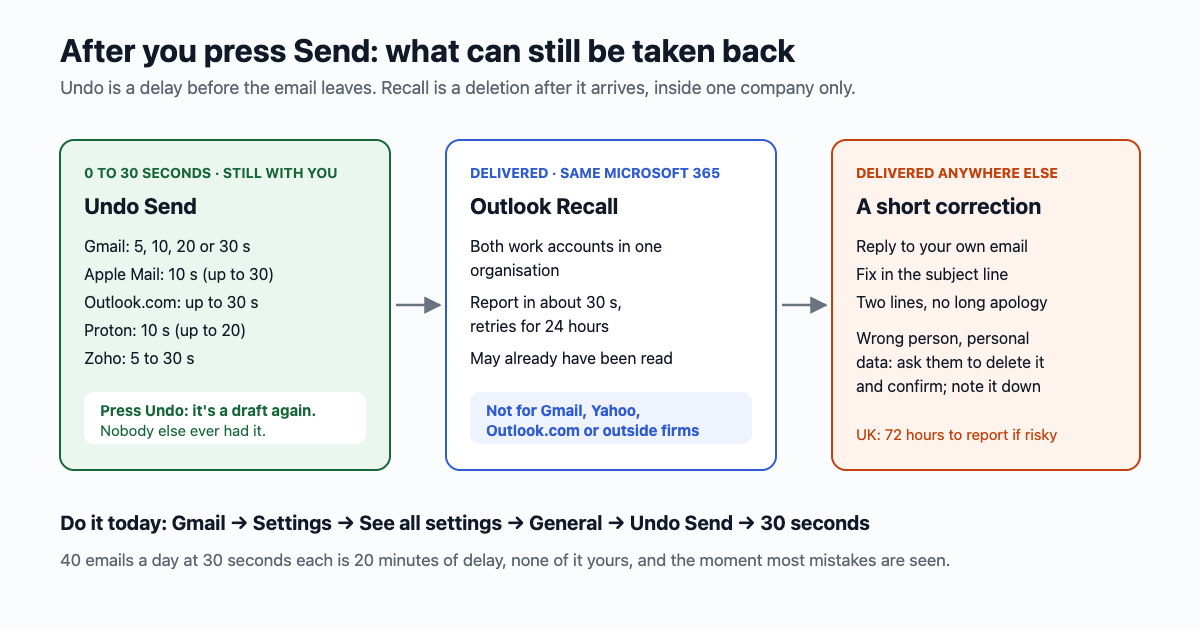
You pressed Send and saw the mistake a second later: the wrong person, the wrong attachment, "Reply all". Whether you can take it back depends on two very different things. Undo Send in Gmail, Apple Mail and Outlook.com never sends the email until a short timer runs out, so it only works in those seconds. Outlook's Recall tries to delete an email that has already arrived, and only inside one company's Microsoft 365. After that, what helps is a short second email.
The short answer: set Gmail's Undo Send to 30 seconds today, before you need it (Settings → See all settings → General → Undo Send). Once the timer has run out, nothing deletes an email from someone else's Gmail, Yahoo or Outlook.com. A work email to a colleague in the same Microsoft 365 company can be recalled; anything else needs a correction email, and if it carried someone's personal data, a request to delete it.
Undo Send is a waiting room
When you press Send with Undo Send on, the email doesn't leave. It waits for the number of seconds you chose, with an Undo button on screen, and is only handed over when the timer ends. Press Undo in time and it comes back as a draft; nobody else ever had it. Once the timer ends, Undo is gone, because the email is now on the recipient's mail server.
| Mailbox | Undo window | Default | Where to set it |
|---|---|---|---|
| Gmail (web) | 5, 10, 20 or 30 seconds | 5 seconds | Settings (gear) → See all settings → General → Undo Send → Save changes |
| Gmail app (Android, iPhone) | An Undo bar after sending; Google doesn't publish its length, and the web setting doesn't set it | – | No setting: press Undo straight away |
| Apple Mail (iPhone, iPad, Mac) | Off, 10, 20 or 30 seconds | 10 seconds | iPhone: Settings → Apps → Mail → Undo Send Delay. Mac: Mail → Settings → Composing |
| Outlook.com | Up to 30 seconds | – | Settings → Mail → Compose and reply → Undo send |
| Classic Outlook for Windows | No timer; a rule can hold all outgoing mail up to 120 minutes | Off | Rules → New rule → "defer delivery by a number of minutes" |
| Proton Mail | 0 to 20 seconds (0 is off) | 10 seconds | Settings → Undo send |
| Zoho Mail | 5 to 30 seconds, or an outbox delay of 1 second to 120 minutes | – | Mail settings on the web; not in the mobile app |
| Yahoo Mail | None: "It's not possible to recall an email once it's been sent" | – | – |
Two things the timer doesn't promise. When Google launched Undo Send in 2009 it said that closing Gmail during those seconds still sends the email, so don't close the tab hoping to stop it: press Undo. And a scheduled email isn't on a timer at all; open the Scheduled folder, pick it and press Cancel send, and it goes back to Drafts.
What 30 seconds costs you
Nothing you'll notice. Every email you send arrives 30 seconds later than it would have, and you can keep working while it waits. Sending 40 emails a day at 30 seconds each adds 20 minutes of delay spread across the day, and none of it is your time. What you get back is the moment most mistakes are spotted: the reply-all you see in the Sent list, the attachment that didn't attach, the "Hi Sarah" to Sara. Five seconds, Gmail's default, is barely enough to read the confirmation bar.
Outlook's Recall: a deletion request inside one company
Recall is different: the email has been delivered, and Outlook asks the recipient's mailbox to delete it. Microsoft's own conditions (support page, October 2026):
- Both of you need work or school Microsoft 365 accounts in the same organisation. Personal Outlook.com and Hotmail accounts can't recall. An email to a Gmail, Yahoo or any outside address can't be recalled.
- Read or unread: the support page still says recall removes the email from mailboxes "who haven't yet opened it". Exchange Online's cloud-based recall, rolled out from early 2023, works on the server and by default can also remove messages that were already read or moved to another folder; an administrator can switch that off. Either way, a recalled email may already have been read.
- Forwarded copies stay. If a rule or a person forwarded it outside the organisation, that copy can't be recalled.
- Encrypted messages (protected with Azure Information Protection) can't be recalled.
- The report: Outlook emails you a Message Recall Report, usually within about 30 seconds, and keeps trying for up to 24 hours. Microsoft now also lets an administrator accept recalls from other named Microsoft 365 organisations; most small businesses won't have it.
To try it, open the email from Sent Items: new Outlook and Outlook on the web show Recall message on the toolbar; in classic Outlook it is File → Info → Message Resend and Recall → Recall This Message. Before cloud recall, Microsoft's old recall worked about 40% of the time, by Office 365 for IT Pros' count; the new one is better, but only inside the company.
Too late: what to send next
Most wrong emails do no harm. A typo, a missing attachment or a wrong date needs one short follow-up, sent quickly, with the right thing in it:
Subject: Re: Thursday's delivery (correction: Friday 30 October)

Sorry, a slip in my last email: the delivery is Friday 30 October,
not Thursday. Everything else stands.- Reply to your own email, so the correction sits in the same thread and the reader sees both together.
- Put the fix in the subject, and keep the body to two lines. A long apology makes a small mistake look big.
- A missing attachment: "Here's the attachment" and the file. No apology needed.
- The wrong person: write to them alone. "This email reached you by mistake. Please delete it and don't forward it. Thank you." Then send the email again to the right person.
If the email carried someone else's personal data (a customer list, an invoice with an address, a medical note), it is a data breach under UK and EU law. The UK ICO's advice: try to recall it straight away, and if that fails, contact the recipient and ask them to delete it. Asking them to confirm by reply that they have deleted it is good practice. Note what happened, when and to whom. If it's likely to put the people at risk, the 72 hours to report it to the ICO start when you find out, not when you sent it. "Data emailed to the wrong recipient" has been the most common single type of incident reported to the ICO, around 16 to 18% of reports in 2023 and 2024.
How often it happens
In Tessian's 2020 survey of office workers, 58% said they had sent an email to the wrong person; in the 2022 edition, 40%. Gmail's autocomplete is the usual culprit: you type "Sa" and the address it fills in is the Sam from a project two years ago. Three settings that stop the most common ones:
- Undo Send at 30 seconds in every mailbox you use (table above).
- Remove old addresses from autocomplete: in Gmail, delete "Other contacts" you no longer write to at contacts.google.com → Other contacts.
- Bcc for groups, so a reply-all reaches only you. The whole how-to: one email to 40 people without showing everyone's address.
And if the mistake was the other way round, an email you deleted rather than sent: getting an email back from Gmail's Trash, and what happens after 30 days.
Sources: Google Gmail Help "Unsend Gmail messages" and "Schedule emails" (Oct 2026); Gmail blog "New in Labs: Undo Send" (Mar 2009); The Next Web (Jun 2015); Apple iPhone User Guide and Mail for Mac User Guide (Oct 2026); Microsoft Support "Recall or replace an email message that you sent", "Delay or schedule sending email messages in Outlook" (Oct 2026); Microsoft Learn "Cloud-based message recall" (updated Sep 2026); Office 365 for IT Pros (Feb 2023, updated Feb 2025); Proton support "Undo send" (Oct 2026); Zoho Mail help (Oct 2026); Yahoo Help SLN3595; ICO "Common data protection mistakes" and "72 hours: how to respond to a personal data breach" (Oct 2026); ICO incident trends via HCR Law (2024); Tessian "Psychology of Human Error" (2020, 2022).
Gmail, Outlook, Microsoft 365, Apple Mail, Proton, Zoho and Yahoo are trademarks of their owners. email59 is not affiliated with them.