Small business email
One email to 40 people without showing everyone's address: Bcc, mail merge or a list
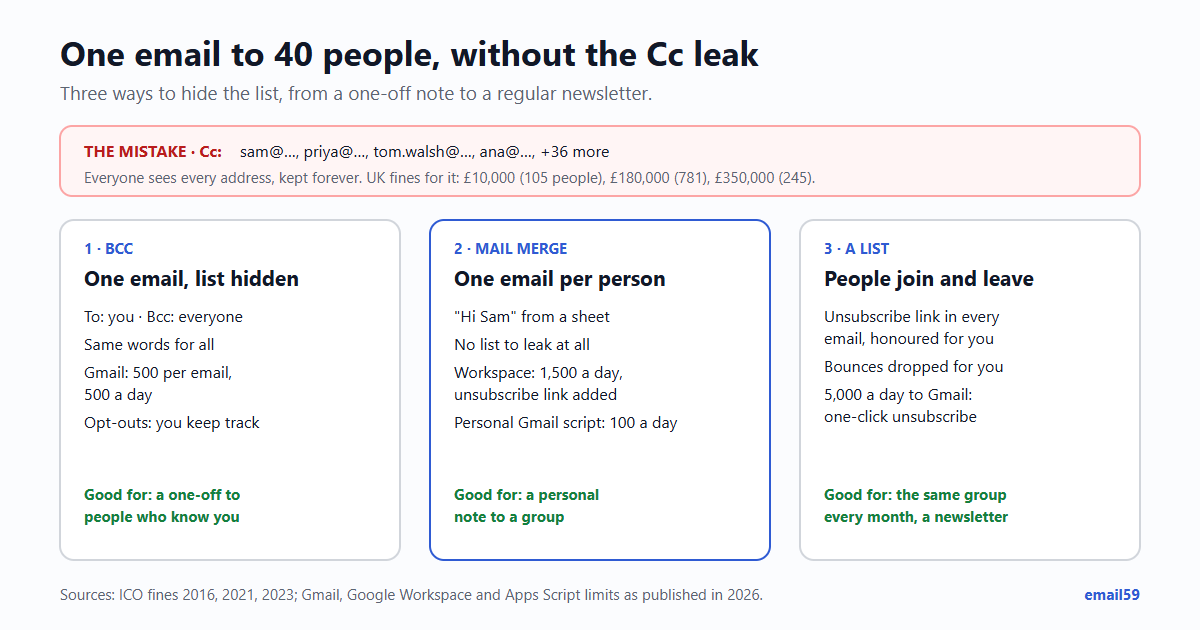
The club secretary writes to all 40 members about Saturday's match, pastes the addresses into Cc, and presses Send. Now 40 people have 40 addresses, with names attached, kept forever in their mailboxes and one reply-all away from a thread nobody asked for. It's the most common data leak in small organisations, and it has a fix for every size: Bcc for a one-off, mail merge for a personal note to each, a list once it becomes a habit.
The short answer: under about 50 people who know you, Bcc with your own address in To is fine. If you want each person to get their own email with their name, use mail merge. If you write to the same group regularly, or to people who didn't ask you personally, use a list with an unsubscribe link.
What a Cc mistake has cost
An email address with a name in it is personal data. Under the UK and EU GDPR, showing it to 40 strangers is a personal data breach: you have to write it down in your own breach record, and report it to the regulator within 72 hours of finding out unless it's unlikely to put anyone at risk. Most club emails never get near a fine. These three did, all from the UK regulator (the ICO), because of what the list itself said about the people on it:
| Fined | Who | What went wrong | People shown | Fine | Per person |
|---|---|---|---|---|---|
| May 2016 | 56 Dean Street, a London HIV clinic (NHS trust) | A patient newsletter with every address in To instead of Bcc (September 2015); 730 of the 781 addresses carried a full name. The trust had made the same mistake in 2010, with 17 patients. | 781 | £180,000 | about £230 |
| October 2021 | HIV Scotland, a charity | An Outlook email to 105 people in Cc (February 2020); 65 addresses identified a person. It had bought a mailing tool seven months earlier but not moved the list. | 105 | £10,000 | about £95 |
| December 2023 | UK Ministry of Defence | An email to Afghans eligible for relocation with addresses in To (September 2021); two people replied to all, one with their location. | 245 | £350,000 | about £1,430 |
The pattern in all three: no rule for group emails, so one person picked the box. The Ministry's fix afterwards was a second person checking any external email with many recipients before it goes. HIV Scotland's lesson is the cheaper one: the tool was already paid for; the list just hadn't been moved into it.
Bcc: fine for a one-off, with limits
How to do it properly in Gmail or Outlook:
- Put your own address in To. An email with an empty To line shows "undisclosed recipients", which looks like bulk mail to people and to filters.
- Put everyone else in Bcc. In Gmail, click "Bcc" at the right of the To line; in Outlook, click Bcc beside To, or turn it on under Options, Show Bcc.
- Look at the box before you press Send. Paste into Bcc, then check To and Cc are empty of anyone but you. This is the step that failed in every case above.
- Write the email so it makes sense to someone who can't see who else got it: "Hi all" rather than "Hi Sam and everyone".
Its limits, from the providers' own help pages:
| Account | People per email (To + Cc + Bcc) | Per day | Go over it |
|---|---|---|---|
| Personal Gmail | 500 | 500 emails | Sending stops for 1 to 24 hours |
| Google Workspace | 2,000 (at most 500 outside your organisation) | 2,000 emails; 10,000 recipients in total; 3,000 outside recipients | Sending stops for up to 24 hours |
| Outlook.com with Microsoft 365 | 500 | 5,000 recipients (1,000 you haven't written to before) | Lower for new accounts and accounts without a subscription |
The limits that don't show in a table:
- Everyone gets the same words. No names, no "you paid, thanks".
- Reply-all still has a surprise. A person in Bcc who replies to all doesn't reveal the others, but does reveal that they got it, to everyone in To and Cc.
- Bounces and "please take me off" land on you, one by one, and you have to remember them for next time.
- Long hidden lists look like spam. One email to 300 hidden people from a personal address is what spammers send too, and some of it will land in junk.
Mail merge: one email per person
Mail merge sends a separate copy to each person, so there is no list to leak at all, and each copy can say "Hi Sam" and "your membership runs to March". Replies come back as separate threads.
- Gmail's own mail merge is in Google Workspace Individual, Business Standard and Plus, Enterprise Standard and Plus, and Education Standard and Plus, not in a free personal Gmail. Up to 1,500 recipients a day, taken from your contacts or a Google Sheet, with columns as tags (
@firstname, or any column of the sheet). Gmail adds a unique unsubscribe link to the bottom of each email by itself. - On a personal Gmail, the usual route is a Google Sheet with a script or an add-on. Google's own script quota is 100 recipients a day on a personal account (1,500 on Workspace) and 50 per message.
- Word and Outlook have had mail merge for decades: Mailings, Start Mail Merge, E-mail Messages, then pick the column with the addresses. Each person gets their own email from your Outlook.
A worked example: a sports club with 1,200 members sends a season letter.
| Route | Limit that applies | To reach 1,200 |
|---|---|---|
| Personal Gmail, Bcc | 500 people per email, 500 a day | 3 emails of 400, and safest spread over 3 days; no names |
| Personal Gmail, Sheet + script | 100 recipients a day | 12 days |
| Workspace Business Standard, mail merge | 1,500 a day | One afternoon, each with a name and an unsubscribe link |
| A list tool | The tool's plan | One send, and next season's is one send too |
When you need a list
Bcc and mail merge are for writing to people. Once you're mailing the same group every month, or people who signed up on a website rather than people who know you, it's a list, and a list has rules:
- An unsubscribe link in every email, honoured without a reply or a password. In the US, CAN-SPAM asks for one in commercial email and for opt-outs to be honoured within 10 business days; in the UK and EU, marketing email needs consent or an existing customer relationship, and a free way to stop it. More on getting it right: the unsubscribe link.
- People join and leave on their own, so nobody keeps a spreadsheet of who said "stop".
- Bounces are dropped for you, so a dead address doesn't hurt the rest of the list.
- At 5,000 a day to Gmail addresses Google treats you as a bulk sender and asks for a one-click unsubscribe and authenticated mail: the 2024 rules.
Not sure which side of the line an email is on? A receipt or a booking change is one person's business; a newsletter or an offer is marketing. Transactional or marketing sorts the cases.
If you send from an app or a website you built, email59 does the list part for you: /v1/send with "category": "marketing" sends one email per person with an unsubscribe link, and refuses addresses that have already unsubscribed from you; /v1/campaigns sends one email to many people the same way. The docs have both. If you're the club secretary rather than the developer, an email59 mailbox gives the club its own address to send from, so the members' replies don't end up in your personal Gmail.
Before you press Send to a group
- Is anyone but me in To or Cc? If yes, and they shouldn't see each other, move them to Bcc.
- Does the list itself say something private (patients, debtors, a support group, a list of people moving abroad)? Then not Bcc at all: mail merge or a list tool, so a slip shows nothing.
- More than about 50 people, or the same group every month? Mail merge or a list.
- Does the email work for a reader who can't see who else got it?
- Is there a way to say "please stop", and will you remember it next time?
And if it already went out in Cc: send one short note asking people to delete it and not to reply all, write down what happened and who was on it, and decide within 72 hours whether it needs reporting. With an ordinary club list it usually doesn't; with a list like the three above, it does.
Sources
- Digital Health: 56 Dean Street fined £180,000 by the ICO (May 2016; 781 addresses, 730 with names; earlier mistake in 2010)
- Civil Society: HIV Scotland fined £10,000 (October 2021; 105 recipients in Cc, 65 identifiable, mailing tool not yet used)
- UKAuthority: ICO fines the Ministry of Defence £350,000 (December 2023; 245 people; reply-all with a location)
- Infosecurity Magazine: the MoD fine and its "second pair of eyes" check
- Gmail Help: sending limits (500 recipients per email, 500 emails a day, 1 to 24 hours)
- Google Workspace Admin Help: Gmail sending limits (2,000 a day, 10,000 recipients, mail merge 1,500)
- Gmail Help: send personalized emails with mail merge (editions, 1,500 a day, automatic unsubscribe link, separate copies)
- Google Apps Script quotas (email recipients 100 a day consumer, 1,500 Workspace, 50 per message)
- Microsoft Support: sending limits in Outlook.com (5,000 a day, 500 per message, 1,000 non-relationship)
- ICO: personal data breach reporting (72 hours, recording every breach)
- FTC: CAN-SPAM Act compliance guide (opt-out, 10 business days)
Gmail, Google Workspace, Outlook and Microsoft 365 are trademarks of their owners. email59 is not affiliated with them.