Gmail cleanup
Deleted it by mistake: getting an email back from Gmail's Trash, and what happens after 30 days
You cleared out a pile of email and, an hour later, the one with the booking reference is gone. If you deleted it in Gmail, it almost certainly isn't gone yet. It's in Trash, and it stays there for 30 days. Here is how to find it fast, how to put it back where it was, and what is still possible when the 30 days are up.
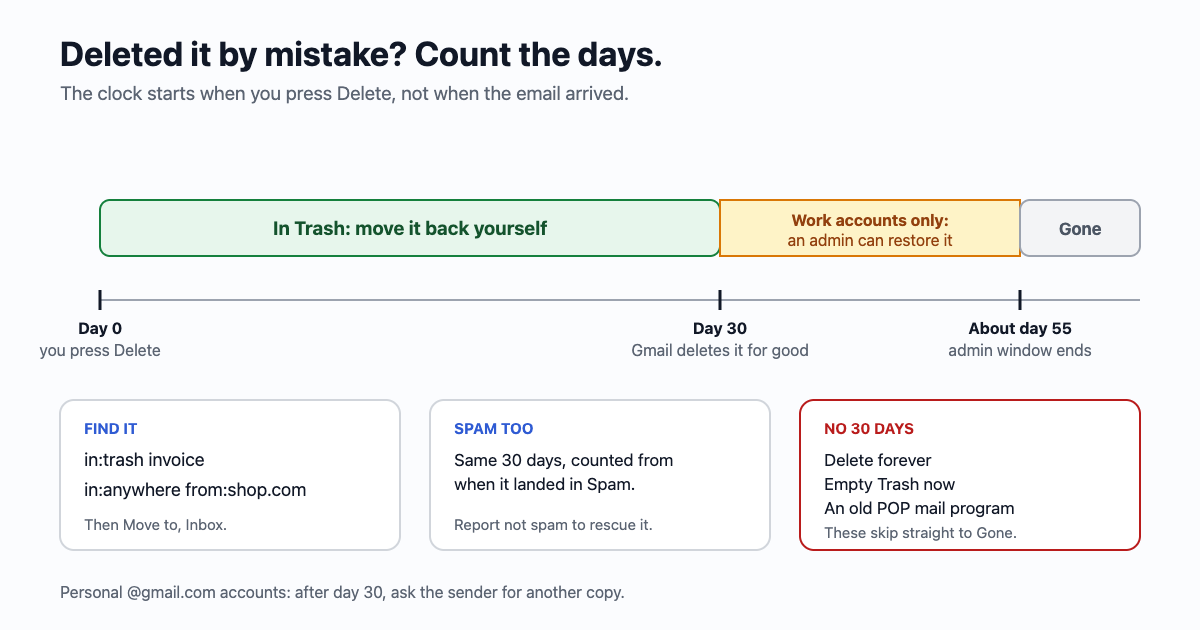
Deleting in Gmail is a two-step thing. The Delete button doesn't destroy anything; it moves the email to Trash. Gmail empties Trash on its own, one email at a time, 30 days after each one went in. Only then is it really deleted. So the question is never "can I get it back?" but "how long ago did I delete it?"
First, the quickest way back: Undo
Right after you delete, Gmail shows a small "Conversation moved to Trash" bar with Undo at the bottom of the screen, on a computer and in the phone app. It disappears after a few seconds or as soon as you do something else. If you just saw it vanish, don't worry: everything below still works.
Find it in Trash
- On a computer: in the left-hand list, click More, then Trash. Or type
in:trashin the search box at the top. - In the Gmail app: tap the menu (three lines, top left), scroll down to Trash.
- Narrow it down. Trash after a cleanup can hold thousands of emails. Add what you remember to the search:
in:trash from:airline.com,in:trash invoice,in:trash has:attachment,in:trash after:2026/09/01. The word search looks inside the email too, not only at the subject. - Not sure where it went? Search with
in:anywhereand a word from the email. That looks through every part of Gmail at once, including Spam, Trash and archived mail. On a computer you can also pick "Mail & Spam & Trash" in the search options.
If it turns up without the Trash label, it was never deleted: it was archived, and it's sitting in All Mail. That's a different button with a different outcome, explained in Archive is not delete.
Put it back
- Open the email (or tick it in the list), then use the Move to button (a folder with an arrow) and pick Inbox, or one of your labels if that's where it lived.
- In the phone app: open it, tap the three dots at the top right, Move to, then pick where.
- Moving it out is what stops the clock. Opening or starring an email in Trash doesn't. Leave it there and it goes on its day, even if you read it this morning.
- Labels: the labels you'd put on it usually stay with the email while it's in Trash, so once it's back it shows up under them again. If it was a whole conversation, the whole conversation moves together. It's worth a glance afterwards to check it's where you expect.
Spam has the same 30 days
Gmail clears Spam on the same schedule: every email in Spam is deleted for good 30 days after it landed there. If you're hunting for a reply that never arrived, look in Spam soon, and if it's there, open it and click Report not spam. That moves it to the inbox and teaches Gmail a little about that sender. A bank or a customer whose emails keep landing in Spam can be rescued for good with a filter set to "Never send it to Spam".
The buttons that skip the 30 days
Two buttons in Gmail delete straight away, with no Trash period at all:
- Delete forever, on an email that's already in Trash or Spam.
- Empty Trash now and Delete all spam messages now, the links at the top of those two folders.
Two more ways to lose mail quietly, both worth checking if emails vanish and you don't remember deleting them:
- A filter set to "Delete it". Settings, See all settings, Filters and Blocked Addresses. A filter you made years ago for one newsletter can be catching more than you meant. The emails it deleted are in Trash too, for 30 days.
- An old mail program using POP. A desktop program or old phone set up with POP can download mail and then delete it from Gmail. In Settings, Forwarding and POP/IMAP, make sure Gmail keeps its copy.
After 30 days
For a personal Gmail account (an address ending in @gmail.com), Google's own help says it plainly: once an email has been in Trash or Spam for 30 days it's permanently deleted, and you can't recover it. There's no paid service that can, either. Anyone offering to is selling something else.
What you can still try:
- The other person still has it. Every email has at least two copies: yours and theirs. Ask the sender to forward it again. For a receipt, a ticket or a statement, the company's website usually has it under your account.
- Somewhere else may have a copy. A phone or a desktop mail program that hasn't synced since, a forwarding address you once set up, or a Google Takeout download you made before.
- If someone else got into your account and deleted it, Google has a separate request on its "Gmail messages are missing" help page for exactly that case, available once you're signed in. It's for mail removed by a break-in, not by your own cleanup, and there's no promise it finds anything. Change your password and check your forwarding and filters first.
Work or school Google accounts: 25 more days, for the admin
If your address is on a company or school domain run on Google Workspace, there's one more chance. The organisation's administrator can restore a person's email for 25 days after Gmail deleted it from Trash. That's about 55 days from the day it was deleted. You can't do this yourself: ask whoever manages your company's Google accounts, and tell them roughly when you deleted it.
- The admin tool puts back everything deleted in a date range, not a single email you name, so expect a few other deleted emails to come back with it.
- After the 25 days, Google says the mail is gone for the admin and for Google too.
- If the company uses Google Vault and had a retention rule or hold on your mail, it can find and export a copy even later. Vault doesn't put it back in your inbox; it hands over a file.
Why a cleanup should move mail to Trash
This 30-day window is the reason the email59 Gmail cleanup only ever moves email to your Gmail Trash and never deletes it for good. Starred email is never moved. If a group you cleared had something in it you wanted, search Trash with the sender's address within 30 days, tick it and move it back. After a big cleanup, give it a few days of normal life before you press Empty Trash now, if you press it at all: Gmail will empty it for you.
If the reason you're cleaning up is that Google says your storage is full, emptying Trash does give space back straight away. Three kinds of old email you can delete without opening one covers which mail is safe to send there in the first place.
The short version
- Delete moves to Trash. It's deleted for good 30 days later, counted from when you deleted it.
- Find it:
in:trashplus a word orfrom:; orin:anywhereif you're not sure it was deleted at all. - Get it back: Move to, then Inbox or a label. Reading it in Trash doesn't stop the clock.
- Spam: the same 30 days. Report not spam to rescue it.
- No 30 days: Delete forever, Empty Trash now, and deletions by an old POP program.
- After 30 days: gone on personal Gmail. Ask the sender. Work accounts: an admin has 25 more days.
Sources
- Gmail Help: delete or recover deleted Gmail messages (Trash for 30 days, then permanently deleted)
- Gmail Help: Gmail messages are missing (Trash and Spam after 30 days, filters, POP, forwarding, recovery request after unauthorized access)
- Gmail Help: search operators you can use with Gmail (in:anywhere, after:, before:, has:attachment)
- Google Workspace Admin Help: restore a user's permanently deleted email (25 days after the 30-day Trash period, Vault)
Gmail and Google Workspace are trademarks of Google LLC. email59 is not affiliated with Google.