Small business email
Leaving your old Gmail for a business address without losing mail
For years the business ran on yourname.design@gmail.com. Now you have a proper business address and you want to move. The risk isn't the new address; it's the old one. Somewhere a bank, a tax office, a domain renewal and three customers still have the Gmail, and the day you stop reading it is the day one of them writes. Here's the order that moves you without losing a message.
The short answer is: don't switch in one day. Move in stages, accounts before people, and keep the old Gmail alive and checked for at least a year. Forwarding and an auto-reply cover the gap, but each has limits worth knowing before you rely on it.
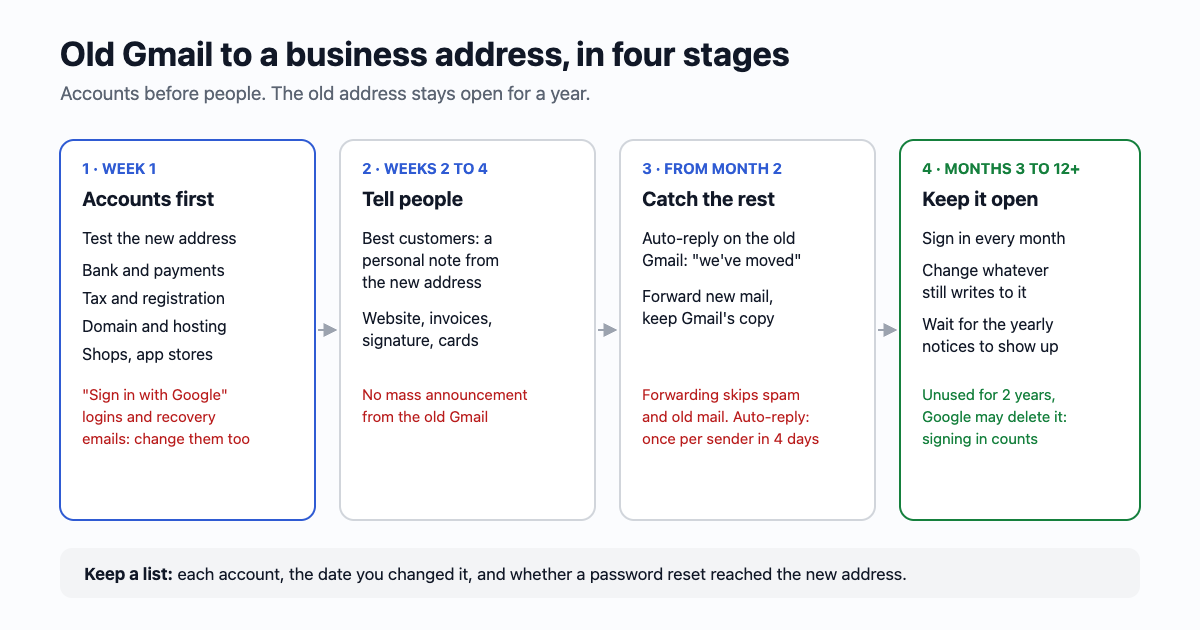
Stage 1: make the new address work, then move the accounts that matter
Before you tell anyone, send a few emails to the new address from a friend's Gmail and Outlook and reply to them. Check they arrive, check your replies don't land in their spam, and set up the signature with your name and the business. Only then start moving.
Start with the accounts, not the people. A customer who writes to the old address will try again or call you. A password reset, a tax notice or a domain renewal reminder won't. Go through this list, most important first:
- Money: business bank, card, PayPal or Stripe, accounting software, payroll. Many let you add a second email and make it the main one, so you can switch without a gap.
- Government and tax: the tax office's online account, business registration, any licence that sends renewal notices by email.
- Your domain and website: the registrar, the hosting, the DNS provider. If the domain renewal reminder goes to an address you stopped reading, the domain can lapse, and with it your new email.
- Where you sell: marketplaces, booking systems, app stores, social pages, Google Business Profile, ad accounts.
- Suppliers and tools: anything that invoices you or holds your files.
Two traps here:
- "Sign in with Google" accounts. If you log in to a tool with the Google button, the tool knows you as your Google account, not as an address. Changing the email in its settings may not change how you sign in. Before you stop using the old Gmail, add a password or a new login method in each of those tools, or ask their support how to move the account.
- Recovery addresses. Other accounts (your phone's account, a second email, a password manager) may list the old Gmail as their recovery email. Update those too, or a lost password next year will send the reset somewhere you no longer look.
Keep the list as you go: the account, the date you changed it, and whether you tested a password reset. That list is what you check in stage 4.
Stage 2: tell people, a few at a time
- Your best customers and suppliers first, one by one. A short personal email from the new address: "We've moved to hello@yourbusiness.com. The old Gmail still works for now, but please use this one from today." From the new address, so replying to it saves the right one in their contacts.
- Everywhere your address is printed: the website and contact form, invoices and quote templates, the email signature, business cards when you reprint, social profiles, directory listings.
- A line under your replies from the old Gmail: "New address: hello@yourbusiness.com." Every time you answer someone from the old account, they learn the new one.
- Skip the mass announcement to everyone in your contacts. A blast from a Gmail to hundreds of people looks like spam, gets treated like spam, and tells strangers you have a new address to try.
Stage 3: the auto-reply and forwarding, and their limits
After a few weeks, most of the people who matter know. Now set the old Gmail to catch the rest.
An auto-reply (in Gmail it's called the vacation responder: Settings, See all settings, at the bottom of the General tab). Something like: "Thanks for your email. We've moved to hello@yourbusiness.com, please write to us there. This message reached us and we'll answer it, but next time use the new address." Worth knowing:
- Gmail sends it once per person, then again only if they write after four days. People who write often won't get it every time.
- It doesn't answer email in Spam or from mailing lists, which is what you want.
- It has a start and end date. Leave the end date empty, or set it a year out.
- There's a "Only send a response to people in my Contacts" tick box. Leave it off: the person you need to reach may never have been saved as a contact.
Forwarding (Settings, Forwarding and POP/IMAP, Add a forwarding address). Gmail sends a confirmation code to the new address first, then copies each new email there. Its limits:
- Only new mail. Nothing already in the old inbox moves. Old mail stays where it is, which is a reason to keep the account.
- No spam. Gmail doesn't forward what it put in Spam, so a real email Gmail wrongly flagged is only in the old account.
- Forwarded mail can look suspicious to the new provider, because it arrives from Google's servers on behalf of someone else. Check the new mailbox's spam folder for a few weeks.
- Your replies go out from the new address. That's good: the conversation moves over with your first reply.
- Choose "keep Gmail's copy in the Inbox". Then the old account still has everything if the forward ever fails.
One option that is going away: reading another mailbox inside Gmail on the web with "Check mail from other accounts". Google started switching that off in January 2026, so plan to read the new mailbox where it lives (or through the Gmail phone app over IMAP, if your provider supports it).
Stage 4: keep the old Gmail for at least a year
- Sign in every month. Look at what still arrives there that didn't come from a person: each one is an account you missed in stage 1. Change it, and add it to your list.
- Google can delete an account that hasn't been used for two years. Signing in and reading mail counts as use. Don't let it drift.
- Once a year is the sign to look again, because yearly things (a tax notice, a domain renewal, an insurance renewal) only show up once a year.
- When it's truly quiet, keep it anyway. A free Gmail costs nothing to keep. Google says a deleted Gmail address can't be used by anyone in the future, so nobody can take it over, but any mail sent to it afterwards simply bounces, and the old emails go with it unless you downloaded them first with Google Takeout.
- Tidy it instead. Years of notifications and order emails make the monthly check slow. The email59 Gmail cleanup moves the old social, shop and no-reply mail to Trash in a few minutes, so what's left is the mail from people. Anything moved by mistake can be brought back for 30 days: here's how.
Where the new address comes from
If you have your own domain, the business address usually comes with your domain's email: Google Workspace, Microsoft 365, or the mail that comes with your host. If two of you will answer it, read One address, two people before you set it up.
If you don't have a domain yet but want to stop sending quotes from a personal Gmail, an email59 mailbox gives you a name at email59.com (two addresses, 5 GB each), read and written in the browser. Gmail can forward to it the same way as above, and the confirmation code arrives in it. It's not your own domain, so if you plan to get one soon, wait and move once. More on what a small business needs from email: email59 for small businesses.
The short version
- Week 1: test the new address. Move bank, tax, domain, payments and selling accounts first; fix "Sign in with Google" logins and recovery emails.
- Weeks 2 to 4: tell your best customers personally, then update the website, invoices and signature. No blast.
- From month 2: auto-reply on the old Gmail pointing to the new one; forward new mail, keeping Gmail's copy.
- Month 3 to 12 and after: keep the old Gmail, sign in monthly, change whatever still writes to it. Don't delete it.
Sources
- Gmail Help: automatically forward Gmail messages to another account (verification, spam not forwarded, filters)
- Gmail Help: send automatic replies (first message only, again after four days, not to Spam or mailing lists)
- Google Account Help: inactive Google Account policy (two years, what counts as activity)
- Gmail Help: delete Gmail from your Google Account (the address can't be used by anyone in the future)
- CaptainDNS: Gmail ends POP fetching from other accounts in 2026 (quotes Google's notice, January 2026)
Gmail, Google Workspace and Microsoft 365 are trademarks of their owners. email59 is not affiliated with them.