App emails
Your export is ready: emailing a link to a big file instead of the file
Someone in your app clicks "Export my data" or "Download report", and the file takes a few minutes to build. When it's ready, your app sends an email. The obvious move is to attach the file. The better one is to send a link. Why, what kind of link, what the email should say about the file, and the email almost nobody writes: the one when the export failed.
Export emails come up in more apps than you'd think: a CSV of last month's orders, a PDF statement, a zip of everything a person has stored (which the GDPR's right to data portability lets EU and UK users ask for), a backup before someone closes their account. They're also among the most sensitive emails an app sends, because the thing being delivered is the data itself.
Why a link beats an attachment
- Size. Gmail sends up to 25 MB; Microsoft's Outlook help gives 20 MB for internet accounts and 10 MB as the default for business Exchange accounts; company mail servers set their own. And an attachment travels as base64 text, which makes it about a third bigger than the file on disk: a 19 MB export is about 25 MB in the email. A report that fits today won't fit for your biggest customer next year.
- It sits in the inbox for ever. An attached customer list is now in the person's mailbox, their phone's cache, their backup and every place it gets forwarded. A link can expire; an attachment can't.
- Forwarding. "Can you look at this?" sends the whole file to someone who was never meant to have it. With a link behind a sign-in, the forwarded email is useless to them.
- Scanners. Company mail filters open, unpack and sometimes hold attachments, especially zips and spreadsheets with macros. A zip from an app the filter doesn't know is a good way to land in quarantine.
- Your sending costs and limits. Many sending services cap message size well below 25 MB, and large emails take longer to deliver. A link email is a few kilobytes.
Attach only when the file is small, not sensitive, and the person needs it offline: a one-page receipt PDF, for example (see the receipt email). For data exports, link.
Which kind of link
There are two common designs, and the choice depends on how sensitive the file is.
| Design | How it works | Use it for |
|---|---|---|
| Link to a page in your app | The link opens /exports/8f3a...; the page asks the person to be signed in and then downloads. The link alone gives nothing. | Anything with personal data, customer lists, full account exports. The default. |
| A one-time token link | The link itself carries a long random token that downloads the file without a sign-in, works for a limited time and, ideally, a limited number of downloads. | Reports for people who may not have a sign-in handy (an accountant), or files that aren't sensitive. |
Google Takeout, which exports a whole Google account, does a version of the first: the archive is available for about 7 days, can be downloaded 5 times, and Google may ask for the password again before the download starts. That's a good bar for a small app too.
If you use a token link, a few rules:
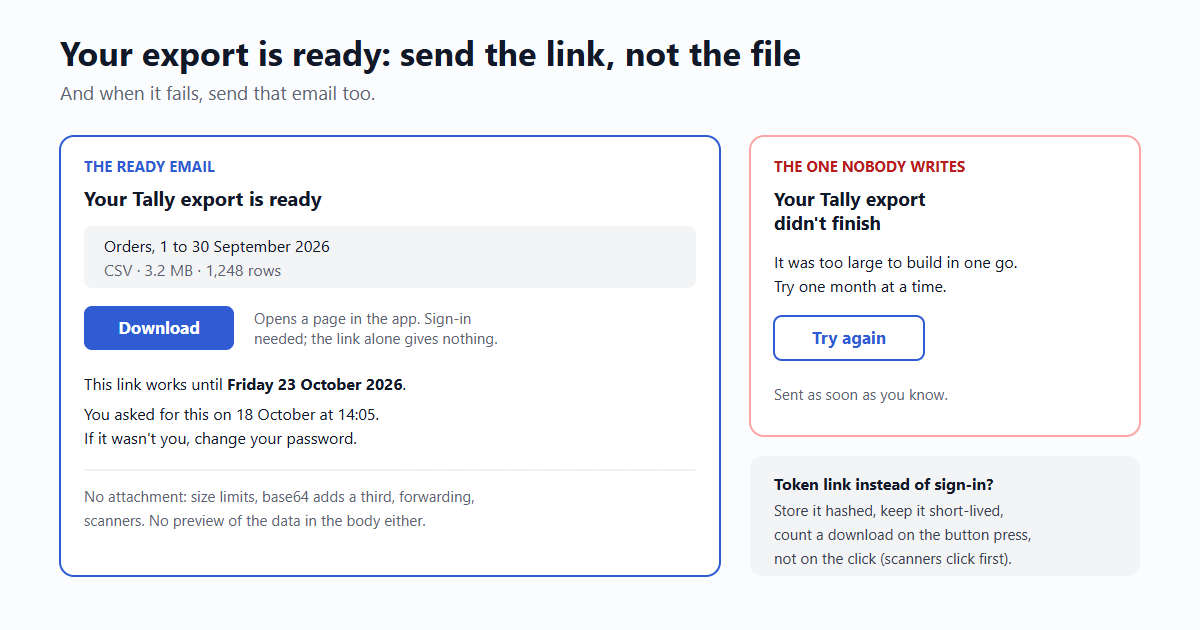
- Make the link open a page with a Download button, not start the download itself. Mail scanners click links before people do, and on a "first download only" link the scanner spends it (we tested scanner clicks in your magic link was clicked before your user saw it). Count a download when the button is pressed.
- Store the token hashed, like a password, so a database leak doesn't leak working download links.
- Keep the expiry short: a day to a week. Cloud storage signed links have a ceiling anyway: Amazon S3's presigned URLs last at most 7 days when made with the CLI or SDK, 12 hours from the console.
- Don't put the token behind a click-tracking redirect. It ends up in a third party's logs. Turn tracking off for this email.
What the email says
- Subject: Your Tally export is ready. Name the app; people request exports and forget.
- What's in the file: which data, which dates, the format, the size, how many rows or items. "Orders from 1 to 30 September 2026, CSV, 3.2 MB, 1,248 rows." People check this before they download, and it tells them at once if the filter was wrong.
- One button: Download, plus the link as text below it for mail apps that block buttons.
- The expiry as a date: "This link works until Friday 23 October 2026." Not "in 7 days": people read email late, and "7 days from when?" is a fair question.
- Who asked, and when: "You asked for this on 18 October at 14:05." If it wasn't them, that's a sign someone else is in the account: say what to do ("change your password").
- For a team account: say which team member asked. An admin who receives "your export of all customers is ready" deserves to know it was the intern.
- What it doesn't contain, when it matters: "Card numbers aren't included. Attachments over 50 MB are listed, not included."
Leave the data itself out of the email body. No "here are your top 10 customers" preview; that would put the sensitive part in the inbox after all.
The second email: when it failed
Exports fail: a timeout on a big account, a bad row, a full disk. The usual result is silence, and the person waits for an email that never comes, then writes to support. Send the failure email too:
- Subject: Your Tally export didn't finish.
- What went wrong, in plain words: "It was too large to build in one go" is enough. No stack traces.
- What to do next: a Try again button, a smaller range ("try one month at a time"), or "we're looking at it and will email you by tomorrow". Then do it.
- Send it as soon as you know. If your exports usually take five minutes, a job that has been running for an hour has failed; say so instead of waiting for a timeout that never fires.
And for exports that take longer than a minute or two, show on screen what happens next: "We'll email you at sam@example.com when it's ready, usually within 10 minutes." Then the email is expected and nobody clicks "Export" five times.
Sending it
The export email is transactional: one person, something they asked for, no marketing. With email59 it's one call; put the file details and the date in the text, and the link to your app's download page:
curl https://email59.com/v1/send \
  -H "Authorization: Bearer $EMAIL59_KEY" \
  -H "Content-Type: application/json" \
  -d '{"from": "tally", "to": "sam@example.com",
       "subject": "Your Tally export is ready",
       "text": "Orders from 1 to 30 September 2026, CSV, 3.2 MB, 1,248 rows.\n\nDownload (sign-in needed): https://app.tally.example/exports/8f3a\nThis link works until Friday 23 October 2026.\n\nYou asked for this on 18 October at 14:05. If it was not you, change your password."}'
If you send both HTML and text versions, keep the link and the date in both (why the text twin matters).
The short version
- Link, don't attach: size limits, base64's extra third, forwarding and scanners all favour the link.
- Behind a sign-in for anything personal; a short-lived, hashed token link otherwise, opening a page with a button.
- Say what's in the file: data, dates, format, size, rows.
- Expiry as a date, and who asked, when.
- When it fails, say so quickly, in plain words, with a way to try again.
Sources
- Gmail Help: attachment size limit (25 MB to send; larger files become a Drive link)
- Microsoft Support: send large files with Outlook (20 MB internet accounts, 10 MB Exchange default)
- RFC 2045 section 6.8: base64 (4 characters for every 3 bytes)
- Google Account Help: download your data (archive expires in about 7 days, 5 downloads, password asked again)
- Amazon S3: sharing objects with presigned URLs (7 days CLI/SDK, 12 hours console)
- ICO: right to data portability
Gmail, Outlook, Google Takeout and Amazon S3 are trademarks of their owners. email59 is not affiliated with them.