Getting started
Email codes for your app in two API calls
One call gets a key, one call sends the code. We ran both and show what came back, the email as it arrived, what you give up by skipping the domain setup, and when to take the longer road.
You're adding "sign in with a code" to an app. The sign-in part takes an afternoon. Then you reach the line that sends the email, and the afternoon ends: pick a provider, create an account, wait for it to be approved, add three DNS records to a domain you may not have bought yet, wait for those to verify, and only then send a six-digit number to yourself.
For a prototype, a hackathon build or the first twenty users, that's a lot of ceremony for one short email. email59 is our way around it, and this page shows the whole thing: two calls, with the real answers we got on 11 October 2026. It also shows what the shortcut costs you, because it isn't free of trade-offs.
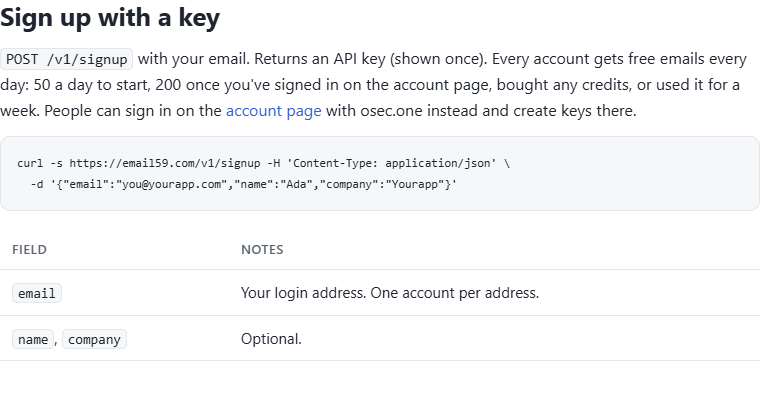
Call one: get a key
curl -s https://email59.com/v1/signup -H 'Content-Type: application/json' \
  -d '{"email":"you@yourapp.com","name":"Ada","company":"Yourapp"}'
What came back:
{"account_id":"c15abc2c7ee342a499a5b127e7250a76",
 "api_key":"e59_live_44RM...",
 "daily_limit":50,
 "full_daily_limit":200,
 "note":"Store the api_key now. It is shown only once. Send as: Authorization: Bearer <api_key>"}
That's the account. No form, no card, no review queue. Put the key in an environment variable straight away, because it's shown once. (We learned that the honest way while writing this: our first attempt piped the answer through a filter that hid the key, and we had to sign up a second address.)
/v1/auth.Call two: send the code
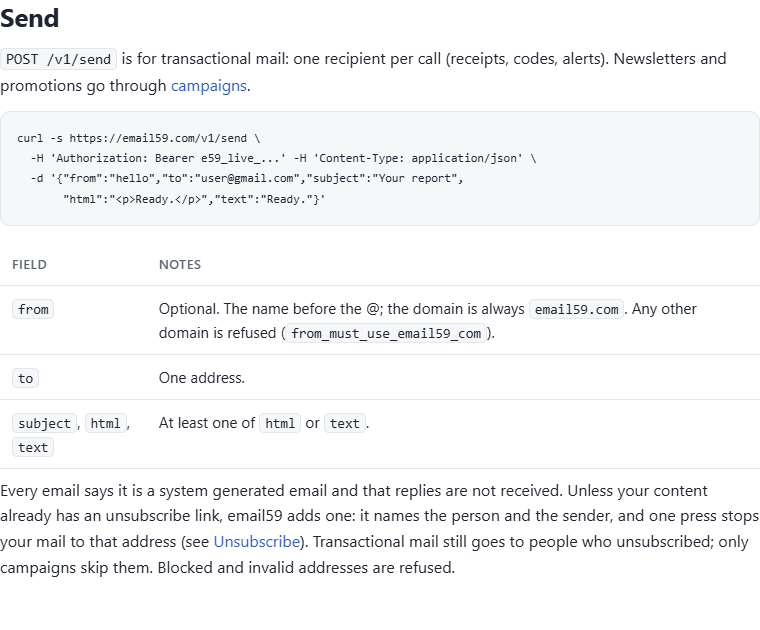
curl -s https://email59.com/v1/send \
  -H "Authorization: Bearer $EMAIL59_KEY" -H 'Content-Type: application/json' \
  -d '{"from":"tallyho",
       "to":"user@example.com",
       "subject":"919236 is your Tallyho sign-in code",
"text":"Your Tallyho sign-in code is 919236. It works for 10 minutes. If you didn'"'"'t ask for it, ignore this email."}'{"id":"0ef03654edd84f9cabcfc854bf32bdf6","status":"sent","sent_today":1,"remaining_today":49}The call took 1.2 seconds from our desk. from is only the name before the @, so this one went out as tallyho@email59.com. That's the trick that removes the DNS step: the mail leaves from a domain that is already set up and already has a sending history, so there's nothing for you to verify.
Here it is in a Gmail inbox a few seconds later. Inbox, not spam:
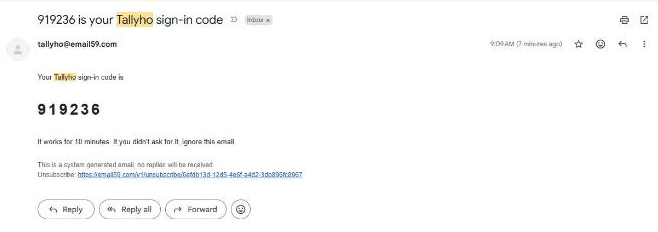
Look at the bottom of that screenshot, because it's the part you didn't write. Every email sent through email59 gets a line saying it's system generated and that replies aren't received, and an unsubscribe link unless your content already has one. On a sign-in code that link looks a little odd. It's the price of sharing a sending domain: the people on the other end need a way to tell us to stop, whoever the sender is. Transactional mail like a code still reaches someone who pressed it; only campaigns skip them.
The code itself is yours
email59 delivers the message. Making the code and checking it stays in your app, which is where it belongs. The short version in Node:
import { randomInt, createHash, timingSafeEqual } from "node:crypto";

const sha = (s) => createHash("sha256").update(s).digest();
const codes = new Map();   // use your database; a Map dies with the process

export async function startSignIn(email) {
  const code = String(randomInt(0, 1_000_000)).padStart(6, "0");
  codes.set(email, { hash: sha(code), expires: Date.now() + 600_000, tries: 5 });
  const r = await fetch("https://email59.com/v1/send", {
    method: "POST",
    headers: { Authorization: `Bearer ${process.env.EMAIL59_KEY}`, "Content-Type": "application/json" },
    body: JSON.stringify({
      from: "yourapp", to: email,
      subject: `${code} is your sign-in code`,
      text: `Your sign-in code is ${code}. It works once, for 10 minutes.`,
    }),
  });
  if (!r.ok) throw new Error(`email59 ${r.status}: ${await r.text()}`);
}

export function checkCode(email, typed) {
  const row = codes.get(email);
  if (!row || row.expires < Date.now() || row.tries <= 0) return false;
  row.tries -= 1;                                   // count the try before comparing
  const ok = timingSafeEqual(row.hash, sha(typed.replace(/[\s-]/g, "")));
  if (ok) codes.delete(email);                      // single use
  return ok;
}
Why six digits, ten minutes and five tries, and what else belongs in the message, is in what a sign-in code email needs to get typed in. One thing that article can't stress enough: limit how many codes one address can ask for per day, or your form becomes a way to flood a stranger's inbox.
/v1/send: five fields, one recipient per call.What you skip, and what you give up
This is a comparison of setup, not of price. The usual road is a transactional email provider with your own domain. The middle column is the sender that comes built into many auth platforms.
| Your domain on an email provider | An auth platform's built-in sender | email59 | |
|---|---|---|---|
| Before the first email | Account, often a review, SPF and DKIM records, verification | Nothing | One sign-up call |
| Needs a domain you own | Yes | No | No |
| Address people see | login@yourapp.com | The platform's address | yourapp@email59.com |
| Meant for real users | Yes | Usually testing only, with a low hourly cap | Yes, within a daily allowance |
| Your own wording | Yes | Templates | Yes, plus our two footer lines |
| Replies reach you | Yes | No | No |
| Sending reputation | Yours to build and keep | The platform's | Shared with other email59 senders |
| Opens, clicks, bounce webhooks | Yes | No | No |
| A program can sign itself up | Rarely | n/a | Yes, REST or MCP |
Four cells in our column say "no" or "shared". They matter more as you grow.
Take the longer road when
- The address is part of your brand. A bank-like product should send from its own domain. People are right to hesitate at a sign-in code from a domain they don't recognise, and putting your app's name in the subject only goes so far.
- You need replies. Mail to the sending address isn't delivered to you. If a customer answering "this wasn't me" has to reach a human, set up your own domain. More in where replies to your app's email should go.
- You send a lot. There's a free allowance every day (new accounts start lower, as the answer to call one shows) and credits beyond it; the numbers are on the pricing page. Past a few thousand codes a day you'll want your own domain and your own reputation anyway.
- You need delivery events. There are no open, click or bounce webhooks. The answer to
/v1/sendtells you the message was handed over, and that's all. - Somebody will ask who your processors are. email59 is a router: it passes your message to an established sending provider. That's one more company in the chain between you and the inbox, and we're a small one.
None of this locks you in. The send is one HTTPS call in one function. When you outgrow it, you change that function and nothing else.
If you use Supabase or an AI agent
- Supabase: its built-in sender stops at two emails an hour. You don't need the code above at all: point the Send Email Hook at email59 and Supabase's own confirmation, magic-link and reset emails go out through it. Steps in the quickest way past 2 emails an hour, and a ready Edge Function on GitHub.
- Agents: the same two steps exist as MCP tools (
auth, thensend_email), so an assistant can set up its own sender. See the MCP section of the docs. - Before you send: the deep email check catches mistyped and throwaway addresses, so you don't spend a code on an inbox that doesn't exist.
What we ran
Both calls were made with curl against the live API on 11 October 2026, to a new test account, and the email was read in a personal Gmail inbox. The key in the answer is cut short; everything else is as returned. One thing went wrong on the way and we'd rather say so: our very first sign-up call that morning came back as a 500 after the API had been idle, and worked on the next try. The cause was a database connection that had gone stale while nobody was calling. It was fixed the same day.
Sources
- email59 docs: sign up with a key
- email59 docs: send
- Supabase docs: auth rate limits (built-in email sender)
- NIST SP 800-63B: code length, lifetime and retry limits
- Node.js docs: crypto.randomInt and timingSafeEqual
Written by the people who run email59 (Biz59 LLC).