Supabase
Supabase stops at 2 emails an hour. Here's what's going on, and the quickest way past it
Your fourth sign-up gets "email rate limit exceeded". That's the built-in sender doing exactly what it says. Two ways out, one of them a short Edge Function.
You put the sign-up form live on a Friday evening. Three friends try it. The fourth person, a real stranger, gets a red toast: email rate limit exceeded. You check the Supabase logs and see a 429. Nothing is broken. Supabase is doing exactly what its docs say it will.
The built-in email sender in Supabase Auth sends 2 emails per hour, for the whole project. Not per user, per project. A confirmation email, a magic link and a password reset all come out of the same two.
Why the limit is so low
- The built-in sender is there so you can try Auth on day one. Supabase's own docs call it best-effort and "not meant for production use".
- It also only sends to addresses on your project's team. So even inside the two-an-hour budget, a stranger's confirmation email may never arrive. This is the part that confuses people most: your own tests work, your users get nothing.
- The limit can't be raised while you use the built-in sender. It becomes adjustable (Authentication, Rate Limits) only after you switch to custom SMTP or a Send Email Hook.
Apps generated by Lovable, Bolt or v0 with a Supabase backend hit this on their first real launch, because the generator turns on email confirmation and leaves the sender on the default. The GitHub discussion about it has been open for years and still gets new replies.
{"code": 429, "error_code": "over_email_send_rate_limit",
 "msg": "email rate limit exceeded"}
Way out 1: custom SMTP (the standard fix)
In the dashboard: Authentication, Emails, SMTP Settings. Paste the host, port, user and password from any provider that gives you SMTP credentials (Resend, Brevo, Postmark, Mailgun, Amazon SES and others). Then raise the email rate limit to something sensible.
- Good: no code. Supabase keeps using its own email templates.
- The catch: almost every provider wants you to verify a domain first (SPF and DKIM records, sometimes DMARC). That takes ten minutes if you've done it before and an evening if you haven't.
- Not us: email59 has no SMTP endpoint, so this route needs one of the providers above.
Way out 2: a Send Email Hook (no SMTP, no domain)
Supabase can hand every auth email to your own code instead of sending it. It POSTs a signed JSON payload (the user, a 6-digit token, a token hash and the email_action_type: signup, recovery, magiclink and so on) to an HTTPS endpoint, and your endpoint sends the email however it likes. Answer with a 200 and Supabase moves on.
The smallest version is a Supabase Edge Function that checks the signature and makes one HTTPS call to an email API. Here it is with email59, which needs no domain verification because mail goes out from yourname@email59.com:
// supabase/functions/send-email/index.ts
import { Webhook } from "https://esm.sh/standardwebhooks@1.0.0";

const hookSecret = Deno.env.get("SEND_EMAIL_HOOK_SECRET")!.replace("v1,whsec_", "");
const EMAIL59_KEY = Deno.env.get("EMAIL59_KEY")!;
const SUPABASE_URL = Deno.env.get("SUPABASE_URL")!;

const SUBJECTS: Record<string, string> = {
  signup: "Confirm your email",
  magiclink: "Your sign-in link",
  recovery: "Reset your password",
  invite: "You've been invited",
  email_change: "Confirm your new email address",
  reauthentication: "Your confirmation code",
};

Deno.serve(async (req) => {
  const payload = await req.text();
  try {
    const { user, email_data } = new Webhook(hookSecret).verify(
      payload, Object.fromEntries(req.headers),
    ) as any;

    const type = email_data.email_action_type;
    const link = `${SUPABASE_URL}/auth/v1/verify?token=${email_data.token_hash}` +
      `&type=${type}&redirect_to=${encodeURIComponent(email_data.redirect_to)}`;

    const res = await fetch("https://email59.com/v1/send", {
      method: "POST",
      headers: { Authorization: `Bearer ${EMAIL59_KEY}`, "Content-Type": "application/json" },
      body: JSON.stringify({
        from: "myapp",                      // sends as myapp@email59.com
        to: user.email,
        subject: SUBJECTS[type] ?? "Your code",
        text: `Your code is ${email_data.token}\n\nOr open this link: ${link}`,
      }),
    });
    if (!res.ok) throw new Error(`send failed: ${res.status}`);
  } catch (e) {
    return new Response(JSON.stringify({ error: { http_code: 500, message: String(e) } }),
      { status: 500, headers: { "Content-Type": "application/json" } });
  }
  return new Response("{}", { headers: { "Content-Type": "application/json" } });
});
Deploy it and give it its two secrets. The function checks the signature itself, so Supabase's JWT check is turned off for it:
supabase functions deploy send-email --no-verify-jwt
supabase secrets set SEND_EMAIL_HOOK_SECRET='v1,whsec_...' EMAIL59_KEY='e59_live_...'
Then in the dashboard: Authentication, Hooks, add a Send Email hook of type HTTPS, point it at the function's URL, and copy the secret it generates into SEND_EMAIL_HOOK_SECRET. Last, raise the email rate limit under Authentication, Rate Limits.
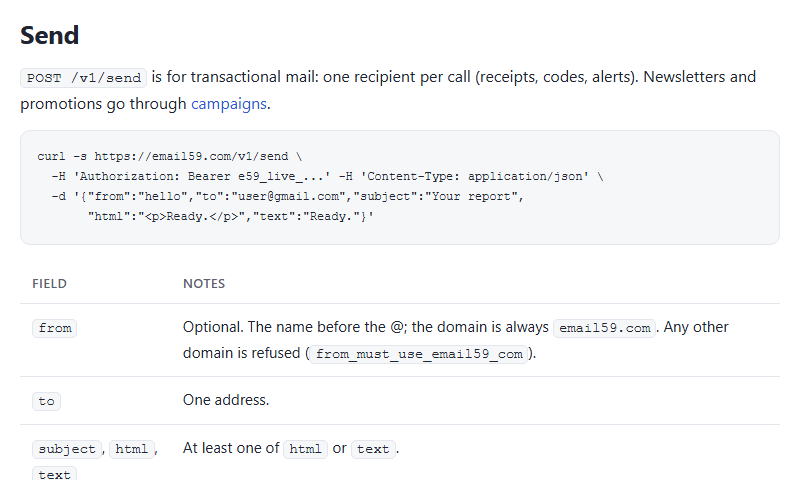
POST /v1/send, one recipient, a bearer key.Things that will bite you
- Be quick. Supabase waits only a few seconds for the hook. One HTTPS call is fine; don't render heavy templates or call three services in a row.
- Return an error when the send fails. If you always return 200, Supabase tells the user "check your inbox" and nothing is there.
- Email change can send two emails when "secure email change" is on (old address and new, with
token_newandtoken_hash_new). The sketch above covers the common cases; add the second send if you use it. - Plain text first. A code and a link in plain text work in every client and look less like marketing to spam filters.
- Know your ceiling. email59 gives 200 emails a day free, renewed daily, and credits you buy last until they're used. No subscription. If your launch could pass 200 sign-ups in a day, buy a $1 pack before you post it.
Which one to pick
- You already own a domain and have a provider: custom SMTP. Ten minutes, no code.
- You're shipping tonight, the domain isn't set up, or you'd rather not touch DNS yet: the hook. Move to your own domain later; the hook works with any HTTPS email API.
We're building a ready-made Supabase hook endpoint into email59, so you'll be able to paste a URL and a secret into the dashboard and skip the function. Until then, the function above does the same job.
Sources
- Supabase docs: Auth rate limits (2 emails per hour with the built-in provider)
- Supabase docs: custom SMTP (built-in sender is for non-production use, team addresses only)
- Supabase docs: Send Email Hook (payload, signature, example)
- GitHub discussion #15880: email rate limit exceeded
- email59 docs: POST /v1/send