Small business email
The contact form that emails you: making website messages arrive, and keeping the junk out
Your website has a contact form, and it's been quiet for a month. Maybe nobody wrote. Or maybe the messages went to spam, or to an address nobody reads, or the form service stopped after its free allowance. Most of the time the fix is one setting: who the form's email says it's from. Here is how to set that up, what the message should carry, and how to keep bots out without making real people solve a puzzle.
A contact form is a small machine: a visitor types into boxes on your site, and something (your website builder, a plugin, a form service or your own code) turns that into an email to you. The visitor never sends an email. Your site does. Keeping that in mind fixes most of the trouble.
Why "from the visitor" goes missing
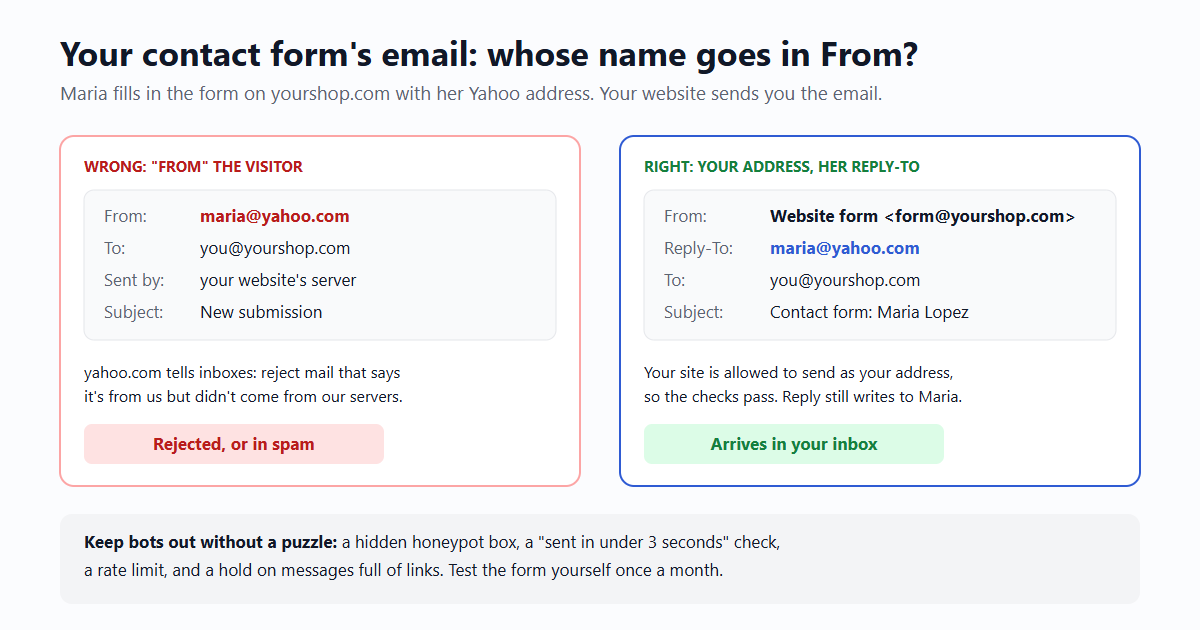
Many forms are set up so the email to you appears to come from the visitor: From: maria@yahoo.com. It looks convenient, because Reply goes straight to Maria. But your website's server isn't allowed to send mail as yahoo.com, and the receiving inbox can check that.
Domains publish a DMARC record that tells inboxes what to do with mail that claims to be from them but wasn't sent by their servers. We looked up a few on 18 October 2026:
| Visitor's address | The domain's published rule | What happens to a form email "from" them |
|---|---|---|
| @yahoo.com, @aol.com | p=reject | Inboxes that follow DMARC refuse it outright. |
| @icloud.com | p=quarantine | Straight to spam. |
| @gmail.com, @outlook.com | p=none for now | Often gets through, often lands in spam. Google's sender rules also say plainly: "Don't impersonate Gmail From: headers." |
So the same form works for some visitors and silently fails for others, depending on where their own email lives. That's the "it worked when I tested it" problem: you tested with your Gmail.
The fix: your address in From, theirs in Reply-To
The form's email should come from an address your site is allowed to send from: something like form@yourshop.com, or the address your form service or sending service gives you. The visitor's address goes in the Reply-To header. Every mail app honours it: you press Reply and your answer goes to Maria, not to the form address.
- From name: make it obvious in your inbox, e.g. "Website form" or "Yourshop contact form". You can put the visitor's name in it too ("Maria Lopez via website"), as long as the address part stays yours.
- Reply-To: the address the visitor typed. Check it looks like an address before you use it.
- To: a mailbox someone actually reads. Not the address the web designer used for testing four years ago.
WordPress form plugins, website builders and form services all have these two fields, sometimes under "mail settings" or "additional headers". If yours only offers "send from the visitor's email", switch it off. We wrote more about the Reply-To header and what mail apps do with it in Reply-to on a no-reply sender.
What the message should carry
The email you receive is the only record of the message, so make it complete enough to answer without going back to the site:
- Subject: something you can sort by, with the visitor's topic or name: Contact form: Maria Lopez, "Do you deliver to Hoboken?". Not "New submission" fifty times.
- The visitor's name and address in the body too, not only in Reply-To. Some phone apps hide headers.
- The page they wrote from, and the date and time with the time zone. "Sent from /catering at 14:05 New York time" saves a question.
- The message itself, as plain text, with line breaks kept.
- Nothing you don't need. Leave out the visitor's IP address unless you use it for spam checks, and don't ask for a phone number you won't call.
A copy to the visitor: yes, but careful
A short "we got your message" email is reassuring, and it confirms the visitor typed their address correctly. It's also the part spammers love: type a stranger's address into your form, and your site sends them an email. Do it a thousand times and your site is a spam cannon with your name on it. We covered the same attack on sign-up forms in Someone is signing up strangers to your app.
- Never put the visitor's message in the copy. Then a bot gains nothing by sending it: the stranger receives only your standard text.
- Keep it short: "Thanks, we got your message and reply within one working day. Yourshop." Your own name and address, no links beyond your site.
- Limit it: at most one copy per address per day.
Or skip the copy and show a clear "Thanks, we got it" page instead. For many small sites that's enough.
Keeping the junk out without a puzzle
Bots find every form on the web. Picture puzzles stop some of them and annoy every real customer. Try these first; together they stop most of the junk a small site gets:
- A honeypot field: an extra box hidden from people (with CSS, not
type="hidden") with an ordinary name like "website". People leave it empty; simple bots fill in every box. If it has anything in it, drop the message quietly and still show "thanks". - A time check: note when the form was loaded. A message sent less than three seconds later wasn't typed by a person.
- A rate limit: a handful of messages per visitor address per hour, and a ceiling per day for the whole form. A real customer never hits it.
- Simple content rules: many bot messages are mostly links. Hold anything with more than two or three links for a look instead of mailing it.
Add an invisible check from a captcha service only if these aren't enough. Most small sites never need to.
When the form host stops
Form services have free allowances. Formspree's free plan, for example, is meant for testing and stops at 50 submissions a month. Website builders change plans; a plugin stops working after an update; the person who set up the form leaves. When that happens, nothing tells the visitor, and nothing tells you.
- Test it once a month. Send yourself a message through the form, from a non-Gmail address if you have one. Put it in the calendar.
- Know where copies live. Many services keep submissions in a dashboard even when email fails. Find it before you need it.
- Show a plain address too. A "or write to hello@yourshop.com" line under the form is a backup for the day the form breaks.
Building it yourself
If your site has its own code, the form handler is a few lines: check the honeypot and time, then send one email. With email59 that's one call, with the visitor in reply_to:
curl https://email59.com/v1/send \
  -H "Authorization: Bearer $EMAIL59_KEY" \
  -H "Content-Type: application/json" \
  -d '{"from": "yourshop", "to": "you@yourshop.com",
       "reply_to": "maria@yahoo.com",
       "subject": "Contact form: Maria Lopez, Do you deliver to Hoboken?",
       "text": "From: Maria Lopez \nPage: /catering\nSent: 18 Oct 2026, 14:05 New York time\n\nHi, do you deliver to Hoboken on Saturdays?"}'
The email comes from your name at email59.com, which is allowed to send it, and Reply writes to Maria. Before the form goes live, a test key runs the same call without delivering anything, so you can check what the email will look like.
The short version
- From: your site's own sending address. Reply-To: the visitor. Never the visitor in From.
- The message: a sortable subject, name, address, page, time with time zone, the text.
- The copy to the visitor: optional, never containing their message, once a day at most.
- Junk: honeypot, time check, rate limit, link rule. A puzzle only if those fail.
- Every month: send yourself a test message, and keep a plain address under the form.
Sources
- Google: email sender guidelines ("Don't impersonate Gmail From: headers"; SPF or DKIM for all senders)
- RFC 7489: DMARC (p=none, quarantine, reject)
- RFC 5322 section 3.6.2: From and Reply-To
- Formspree plans (free plan: 50 submissions a month, for testing)
- DMARC records of yahoo.com, aol.com, icloud.com, gmail.com and outlook.com, looked up on 18 October 2026.
Yahoo, AOL, iCloud, Gmail, Outlook and Formspree are trademarks of their owners. email59 is not affiliated with them.