Small business email
The booking confirmation email: date, time zone, a calendar file and the way to cancel
A yoga class, a haircut, a call with a consultant, a kayak for Saturday: someone books, and the confirmation email is the only thing they'll look at until the day. It has to answer four questions without a click (what, when, where, who), get into their calendar at the right hour, and let them cancel without hunting for a password. Here's what goes in it, the calendar file and its quirks, and the two emails that follow.
Booking emails are some of the most-read emails a small business sends. People open them again on the morning of the appointment, on the bus, standing outside the wrong door. That's why the details have to be in the email itself, in plain text, not behind a "view your booking" link.
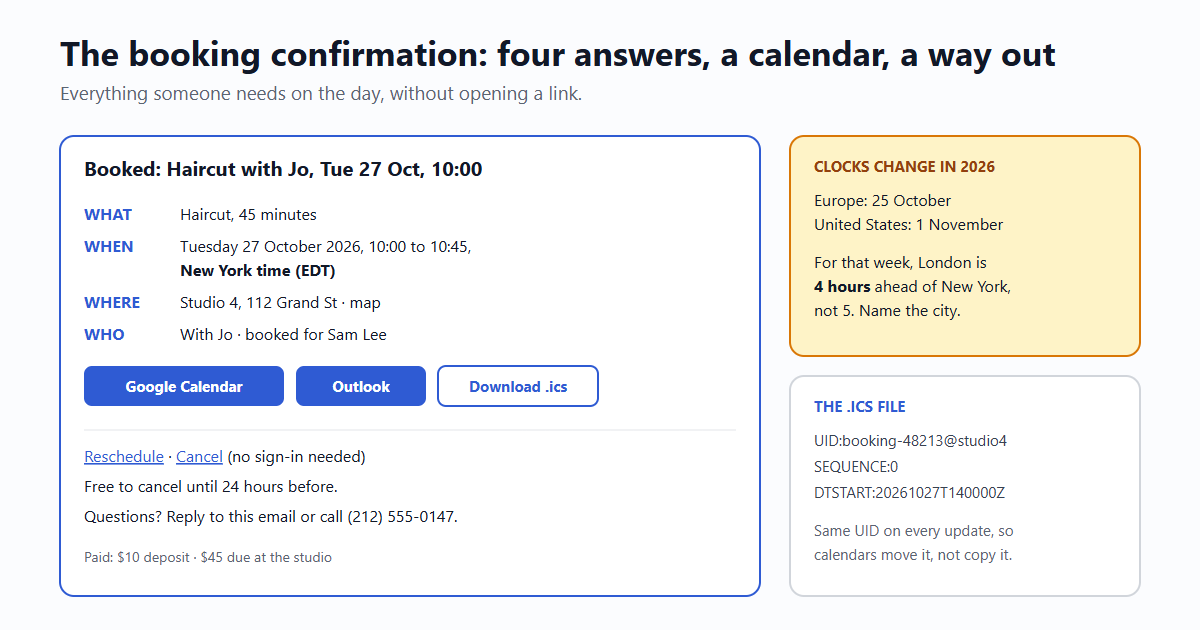
What the confirmation must carry
- Subject: the booking itself, so it reads from the inbox list: Booked: Haircut with Jo, Tue 27 Oct, 10:00. Not "Booking confirmation #48213".
- What: the service, how long it takes, and anything to bring or do first ("arrive 10 minutes early", "bring the booking code").
- When: the weekday, the full date and the start and end time, with the time zone in words: "Tuesday 27 October 2026, 10:00 to 10:45, New York time (EDT)". More on why below.
- Where: the full address and a map link, or for online bookings, the call link itself in the email, plus a phone number in case the link fails.
- Who: the person they'll see, and the name the booking is under, especially if someone booked for someone else.
- The money: what was paid, what's still due, and the cancellation policy in one line ("Free to cancel until 24 hours before").
- How to reach a human: a phone number or a reply address that someone reads. If your booking system sends from a no-reply address, set a Reply-To to the business.
The time zone, spelled out
"Tuesday at 10:00" is clear only if everyone is in the same place. For anything online, or for visitors from elsewhere, say whose 10:00. Write the city or region ("New York time"), and if the customer's own time zone is known and different, add theirs: "10:00 New York time, which is 14:00 your time in London". (Usually it would be 15:00; the next paragraph explains why not that week.)
Clock changes make this sharper than it looks. In 2026, Europe sets its clocks back on 25 October and the United States on 1 November. For that one week, London is 4 hours ahead of New York instead of 5. A recurring call booked "for 3 pm London" lands an hour off for anyone who did the sum in their head. Let software do it: store the time in UTC plus the business's time zone name (such as America/New_York), and convert for the email.
Avoid bare abbreviations on their own. "CST" is Central Standard Time in the US and China Standard Time in China, 14 hours apart. A city name is never ambiguous.
Getting it into their calendar
Three ways, and most booking emails offer all three:
| Method | How it works | Quirks |
|---|---|---|
| A .ics file | A small text file in the iCalendar format (RFC 5545). Opens in Apple Calendar, Outlook on the desktop, and most phone calendars; Google Calendar can import it. | Attached, Gmail and Outlook often show an "add to calendar" card. Linked from your site, it downloads and the phone asks which calendar. |
| Google Calendar link | calendar.google.com/calendar/render?action=TEMPLATE&text=...&dates=... opens a filled-in event for the person to save. | Times in UTC end with Z; without it, add ctz=America/New_York, or the person's own time zone is assumed. |
| Outlook link | outlook.live.com/calendar/deeplink/compose?... for personal accounts, outlook.office.com/... for work accounts. | Two different hosts, and no official documentation; test both. Times without Z are read in the signed-in person's time zone. |
The rules that make the .ics behave:
- A UID that never changes for this booking, like
booking-48213@yourshop.com. If you send an updated file after a reschedule with the same UID and a higherSEQUENCEnumber, calendars update the event instead of adding a second one. - Times in UTC (
DTSTART:20261027T140000Z), or with a time zone and its definition. UTC is the simplest that every calendar reads the same way. - Location and the call link in
LOCATION, and the reschedule and cancel links inDESCRIPTION, so they're in the calendar entry on the day. - Cancellation is an update too: the same UID with
STATUS:CANCELLEDremoves the event in calendars that support it. Say it in words in the email as well.
If the tool you send with can't attach files (email59 can't yet), put the .ics on your site and link it: yourshop.com/bookings/48213.ics, served as text/calendar. The add-to-calendar links work the same either way.
Reschedule and cancel without a sign-in
Most people who book a haircut don't have a password for the salon, and won't make one to cancel. If cancelling is hard, they simply don't come. Put two links in the confirmation, Reschedule and Cancel, that work on their own:
- Each link carries a long random token tied to this one booking. It only lets someone manage that booking, nothing else in an account.
- The link opens a page with a button; the cancellation happens when the button is pressed, never on the click. Mail scanners open links before people do, and a scanner must not be able to cancel an appointment (more on scanner clicks).
- Show the policy on that page before the button: "Cancelling now is free" or "This is within 24 hours; the deposit is kept".
- Send a short email after each change: "Cancelled: Haircut with Jo, Tue 27 Oct" or the new time, with a new .ics using the same UID.
The reminder the day before
One reminder cuts no-shows more than anything else you can add, and it's the same email again, shortened:
- Send it 24 hours before (or the evening before for morning appointments), in the customer's time zone, never at 3 am.
- Subject: Tomorrow: Haircut with Jo, 10:00. What, when, where, the reschedule and cancel links.
- One reminder is plenty for most businesses. A second one an hour before helps for online calls, where the link is the thing people need.
When the business cancels
Sometimes it's you: Jo is ill, the room flooded, the river is too high for kayaks. This is the email people remember, so send it as soon as you know and phone if it's within a few hours:
- Subject: Cancelled by us: Haircut with Jo, Tue 27 Oct. "By us" makes it clear nothing went wrong on their side.
- A short reason and an apology, without the full story.
- What happens to their money: refunded in full, by when, to which card. Or the credit kept, if they prefer.
- The quickest way to rebook: a link with the next free slots, or "reply and we'll fit you in first".
- The cancelled .ics (same UID,
STATUS:CANCELLED) so the slot leaves their calendar.
Sending them
If you build the booking flow yourself, each of these is a plain transactional email. With email59 it's one call; put a reply_to on it so replies reach the business:
curl https://email59.com/v1/send \
  -H "Authorization: Bearer $EMAIL59_KEY" \
  -H "Content-Type: application/json" \
  -d '{"from": "studio4", "to": "sam@example.com",
       "reply_to": "bookings@studio4.example",
       "subject": "Booked: Haircut with Jo, Tue 27 Oct, 10:00",
       "text": "Haircut with Jo, 45 minutes.\nTuesday 27 October 2026, 10:00 to 10:45, New York time (EDT).\nStudio 4, 112 Grand St, New York.\n\nAdd to your calendar: https://studio4.example/bookings/48213.ics\nReschedule: https://studio4.example/b/7Qk2.../change\nCancel: https://studio4.example/b/7Qk2.../cancel\nFree to cancel until 24 hours before."}'
The short version
- Subject: the booking itself, with day and time.
- Body: what, when with the time zone in words, where (or the call link), who, the money, a human to reach.
- Calendar: .ics with a fixed UID and UTC times, plus Google and Outlook links.
- Reschedule and cancel: token links to a page with a button, no sign-in, policy shown first.
- Then: one reminder the day before, an email after every change, and a fast, clear one when you cancel.
Sources
- RFC 5545: iCalendar (UID, SEQUENCE, DTSTART in UTC, STATUS:CANCELLED)
- Add-event-to-calendar docs: Google Calendar link parameters (dates, ctz)
- Add-event-to-calendar docs: Outlook on the web deeplinks (live.com and office.com, no official documentation)
- IANA time zone database (2026 clock changes: 25 October in the EU and UK, 1 November in the US)
Google Calendar, Outlook and Apple Calendar are trademarks of their owners. email59 is not affiliated with them.