Account emails
Your account will be deleted: the emails before, during and after someone leaves
Someone taps "Delete my account". Your app now owes them three emails at most, each with a narrow job: one before anything is removed, one if there's a grace period, and one when it's done. That last one is the last email you may send that address, so it has to be right. What each email says, what happens to the address on your stop lists, and what to do when the request didn't come from the owner.
Account deletion used to be a support ticket. Now the app stores require it as a button. Apple's guideline 5.1.1(v) says an app that lets people create an account must let them start deleting it inside the app; Google Play asks for the same plus a web page where people can request deletion without reinstalling the app. And under the GDPR, a person in the EU or UK can ask for their data to be erased, with an answer due within a month.
So most small apps will build this flow, and the emails around it are easy to get wrong in both directions: too few (the account vanishes with no record, and the owner never knew it was requested) or too many (a "we miss you" campaign to someone who asked to be forgotten).
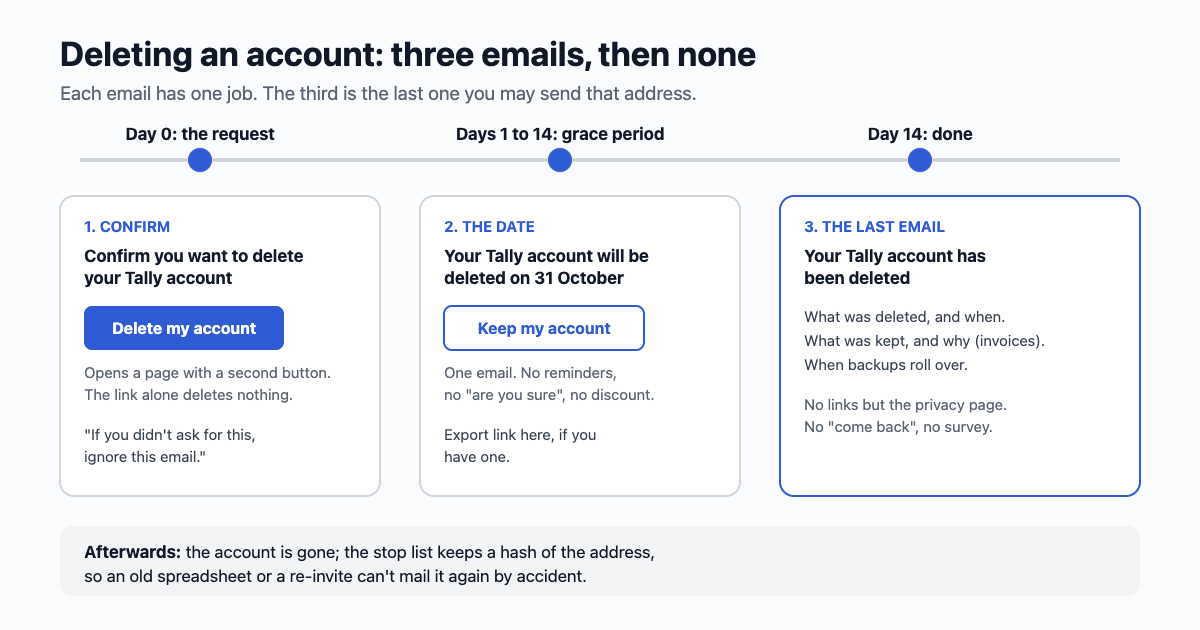
Before: confirm it's really them
Whoever pressed the button was signed in, which means they had the session. That isn't always the owner: a shared laptop, a phone handed to a child, a session stolen with a cookie. Deletion is the one action that can't be taken back, so check with the one thing only the owner should have: their email.
- Subject: Confirm you want to delete your Tally account. Say "delete", plainly. An unclear subject is how an owner misses that someone else started this.
- Body: which account (the address and, if useful, the username), what will be removed, what you're legally required to keep (invoices, usually), and when.
- One button: Delete my account. It opens a page on your site with a second button that does the deletion. Don't delete on the link itself: mail scanners open links before people do (more on that), and a scanner must never be able to delete an account.
- The way out: "If you didn't ask for this, ignore this email; nothing will be deleted. You may want to change your password." No action means no deletion.
- A short life: the link expires in an hour or a day, and only works once.
If the person proved who they are a moment ago (they typed a fresh sign-in code or their password on the delete screen), you can skip this email and go straight to the grace period. A code on screen is the same check, without a trip to the inbox.
During: the grace period and one undo link
A grace period is a kindness, not a requirement: Meta and many others hold a deleted account for 30 days before removing it for good. For a small app, 7 to 30 days is common. If you have one, send one email when it starts:
- Subject: Your Tally account will be deleted on 31 October. A date, not "in 14 days": people read email late.
- Body: the date, what happens then, and that nothing is needed if they meant it.
- One link to keep the account, again to a page with a button, never undoing on the click itself. Undoing is safe, but a scanner that undoes a deletion is still a scanner deciding for the person.
- Data they may want first: if your app has an export, link it here. This is the last time it helps.
Send no reminders, no "are you sure", no discount during the grace period. One email. People who asked to leave and get three emails about it don't come back; they report spam.
During the grace period the account should be switched off, not just flagged: no sign-in except to cancel, no marketing, no notifications to other people about this person, no public profile.
After: the last email
Once the data is gone, send one short email and then nothing more:
- Subject: Your Tally account has been deleted.
- Body: the date it was done; what was kept and why ("invoices for seven years, because tax law requires it"); how long backups take to roll over ("copies in our backups are overwritten within 35 days"); and that signing up again starts a new, empty account.
- No links except your privacy page. No "come back", no survey, no newsletter box. The person is gone.
Why is this the last one? Because the only reason you could email this address was the account. Once it's gone, a later email is mail to a stranger: no relationship, no consent, nothing to unsubscribe from. Keep it transactional (the line between the two): a statement of what happened, nothing to sell.
Some apps skip this email on the grounds that they no longer hold the address. Send it first, then remove the address. The owner deserves a record, and if the deletion wasn't theirs, this is how they find out.
What happens to the address on your lists
This is the part most deletion code forgets. The account row goes, but the address may sit in four other places:
| Where | What to do |
|---|---|
| Your marketing list or newsletter tool | Remove the person. If they ever unsubscribed, keep that unsubscribe record. |
| Your stop list (unsubscribes, complaints) | Keep it. The UK regulator says plainly that a "do not contact" record isn't marketing: you keep "just enough information" to respect the person's wishes. A hash of the lower-cased address is enough to check against later. |
| Your sending service's suppression list (bounces, complaints) | Leave it. It protects your sending reputation and holds only the address. |
| Logs, analytics, support tickets | Delete or anonymise per your privacy policy. Say in the last email what you keep. |
The stop list matters because people come back through side doors: an import from a spreadsheet, a teammate re-inviting them, a CSV from an event. A hash on the stop list means the address can't be mailed again by accident, without keeping the address itself in readable form.
When the owner isn't the one asking
Requests also arrive from outside the app: an email to support, a form on your website, a message from someone saying they're a relative. The rule is simple: you act on the account's own email, never on the address the request came from.
- Request from a different address: reply that you've sent instructions to the address on the account, then send email one there. If the owner confirms, go ahead. If not, nothing happens.
- A team account: a member can leave; only the owner can delete the team. If the owner leaves, the team needs a new owner first, or the deletion email goes to every admin, not to one person.
- The owner can't get into their email: that's a recovery problem, not a deletion request. See changing an account's email before you delete anything.
- Someone who has died: follow your support policy; ask for documents; keep it slow and respectful. Don't send the usual automated emails to the deceased person's address.
Sending them
All three are plain transactional emails sent from your app, one address each. With email59 that's one call per email:
curl https://email59.com/v1/send \
  -H "Authorization: Bearer $EMAIL59_KEY" \
  -H "Content-Type: application/json" \
  -d '{"from": "tally", "to": "sam@example.com",
       "subject": "Your Tally account has been deleted",
       "text": "We deleted your Tally account on 31 October 2026.\nWe keep your invoices for seven years because tax law requires it.\nCopies in our backups are overwritten within 35 days.\nIf you sign up again, you will start with a new, empty account."}'
Make the "deleted" email the last step before the address is removed, and log that it was accepted. If the send fails, retry; don't delete the address until the record of the email exists.
The short version
- Before: confirm by email with a button on a page, never on the link; "ignore this if it wasn't you".
- During: one email with the date and one undo link. Account switched off. No reminders.
- After: one short email saying what was deleted, what was kept and why. Then nothing.
- Lists: delete the person, keep a hash on the stop list.
- Others asking: act only on the account's own email.
Sources
- Apple App Review: guideline 5.1.1(v), account deletion
- Google Play Console Help: account deletion requirements (in-app path and web link)
- ICO: right to erasure (one month to respond)
- ICO: respect people's preferences (suppression lists, "just enough information")
- Facebook Help: permanently delete your account (30-day period)
- GDPR, Articles 12 and 17
Apple, Google Play and Meta are named for their public policies; email59 is not affiliated with them.