Servers
Your VPS can't send email, and it isn't your fault: port 25, tested on our own server
Most cloud hosts quietly drop outbound mail. We tested ports 25, 465, 587, 2525 and 443 from our own server and a home line. What is blocked where, and three ways to send anyway.
You rent a small server, install your app, and the password reset email never arrives. The mail log says Connection timed out, over and over, for gmail-smtp-in.l.google.com[142.251.x.x]:25. You check the firewall. You reinstall Postfix. Nothing changes, because nothing on your server is broken. Your hosting company drops that traffic before it leaves the building.
We run on a small cloud server ourselves, so we tested it instead of quoting a forum.
What we measured on our own server
On 12 October 2026 we opened a plain TCP connection from two places: our production server (a DigitalOcean Droplet in New York) and an ordinary home broadband line. No mail was sent. We only checked whether the door opens, with a six second limit.
| Connection to | Cloud server | Home broadband |
|---|---|---|
| Gmail's mail server, port 25 | timed out | timed out |
| Outlook's mail server, port 25 | timed out | timed out |
| smtp.gmail.com, port 465 | timed out | open in 0.07 s |
| smtp.gmail.com, port 587 | timed out | open in 0.06 s |
| A relay's port 2525 | open in 0.01 s | open in 0.03 s |
| An HTTPS API, port 443 | open | open |
Two things in that table surprised us. The server blocks more than the home line does: the usual advice, "use port 587 instead", fails on it too. And the block is silent. There is no refusal and no error page, only a timeout, which is why it looks so much like your own mistake.
Test yours in ten seconds
nc -vz -w 6 gmail-smtp-in.l.google.com 25
nc -vz -w 6 smtp.gmail.com 587
If the first line times out, your server can't deliver mail directly to anyone. If the second one also times out, it can't hand mail to most relays over SMTP either. A reply of succeeded or open means that port is fine and your problem is somewhere else (usually reputation; more on that below).
Who blocks what
These are the providers' own documents, read in October 2026. Policies change, so check the link for yours at the end.
| Provider | Blocked outbound | Can you get it opened? |
|---|---|---|
| DigitalOcean | 25, 465 and 587, on all Droplets | Their page offers no way; it tells you to use an email service |
| Google Cloud | 25 to anything outside your network | No. 465 and 587 are not restricted |
| AWS (EC2, Lightsail) | 25 | By request form, reviewed by AWS |
| Azure | 25, on most subscription types | Only on enterprise agreements. 587 to a relay is open |
| Hetzner Cloud | 25 and 465 | After a month and one paid invoice, by request. 587 is open |
| Vultr | 25 on new instances | By support ticket, "not guaranteed". 465 and 587 are open |
| Akamai (Linode) | 25, 465 and 587 on some newer accounts | By support ticket describing your use |
The reason is the same everywhere. A rented server with open port 25 is the cheapest spam cannon there is, and one customer who uses it that way gets the whole address range listed. The block protects the other customers. It isn't aimed at you, and arguing with support rarely changes it.
Getting port 25 opened is not the finish line
Say your provider agrees. Now you are sending from an address with no history, in a range that mail providers already distrust. You need a reverse DNS record that matches, SPF, DKIM and DMARC, and several weeks of careful sending before Gmail stops putting you in spam. We wrote that up separately in why nobody can run their own mail server anymore. For an app that needs to send a sign-in code today, it's the long road.
Three ways that work, shortest first
1. Send over HTTPS. Port 443 is the one port no host blocks, because it's the web. A sending API takes one request, and there's no mail software to install or keep patched. With email59 it looks like this:
curl -s https://email59.com/v1/send \
  -H 'Authorization: Bearer e59_live_...' -H 'Content-Type: application/json' \
  -d '{"from":"alerts","to":"you@example.com","subject":"Backup finished",
       "text":"The nightly backup completed in 4 minutes."}'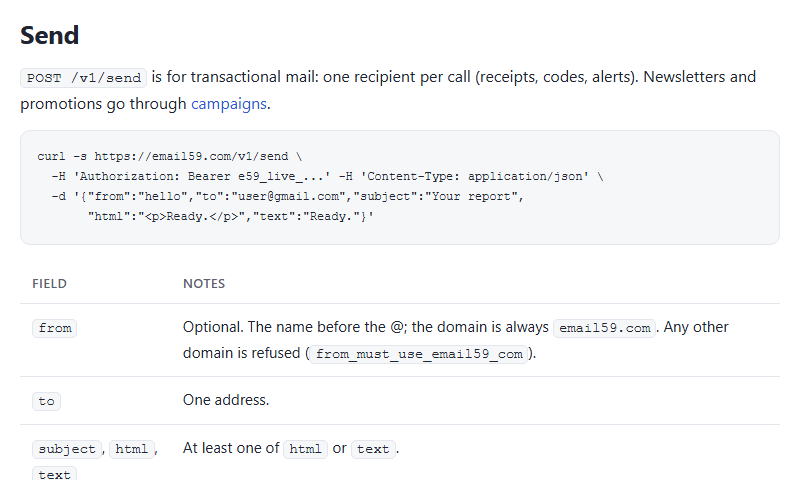
POST /v1/send. From our server the request reaches the API in under a tenth of a second.That same line works from a cron job, a shell script or a container, which makes it handy for the mail servers forget about: backup reports, disk warnings, failed-job alerts.
2. Relay over SMTP on a port your host leaves open. If your software only speaks SMTP (WordPress, Ghost, a CMS, an old billing system), point it at a provider's SMTP host instead of sending directly. Use 587 where it's open. Where it isn't, as on our server, many providers also listen on 2525 for exactly this reason. Run the test above with your provider's host name before you spend an hour on configuration.
3. Ask for port 25. Worth it only if you really are running a mail server for other people, on a provider that grants it. Have your reverse DNS and your reason ready before you write.
Where email59 fits, and where it doesn't
- Good fit: sign-in codes, receipts, alerts and reports from a server that can't send. You sign up with an email code, get a key and send. There is no domain to verify, because mail goes out from
yourname@email59.com. - Not a fit: mail that must come from your own domain, or software that can only speak SMTP. We don't offer either. For those, pick a provider with SMTP credentials and use route 2.
- Building on Supabase? Its built-in sender has a different limit, and we wrote that one up too.
Whichever route you take, keep the send in one function, send(to, subject, text). Then the next change of provider is a five line edit, not a migration.
Sources
- DigitalOcean: Why is SMTP blocked?
- Google Cloud: Sending email from an instance
- AWS: remove the restriction on port 25 from an EC2 instance
- Microsoft: Troubleshoot outbound SMTP connectivity in Azure
- Hetzner Cloud: server FAQ (mail ports)
- Vultr: Why is SMTP blocked?
- Akamai Cloud: Send email (port restrictions on newer accounts)