Small business email
The out-of-office reply: what it should say, and why it should not answer every newsletter
An out-of-office reply is read by two kinds of sender: the customer who needs to know when you'll answer, and every newsletter, shop and stranger who writes while you're away. The first needs a date and a name. The second shouldn't get anything, because a reply to a stranger confirms your address is read and tells them nobody is at the desk. Here's what to write, how often Gmail and Outlook actually reply, and how to keep the auto-reply away from lists.
The short answer: say the date you're back, who to contact meanwhile and nothing else. Don't mention where you are or that the house or shop is empty. In Gmail, tick "Only send a response to people in my Contacts"; in Outlook, send the full reply inside your organisation and a short one, or none, to contacts only outside it. Turn it off the morning you're back.
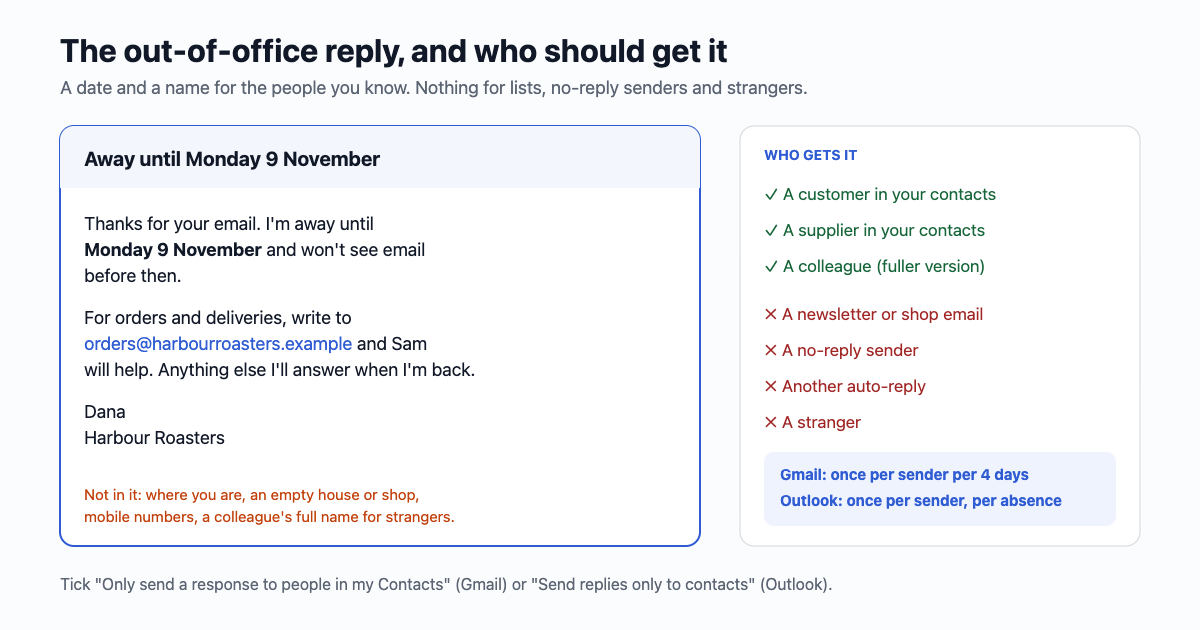
What it says
Subject: Away until Monday 9 November

Thanks for your email. I'm away until Monday 9 November and won't
see email before then.

For orders and deliveries, write to orders@harbourroasters.example
and Sam will help. Anything else I'll answer when I'm back.

Dana
Harbour Roasters- The return day as a date, with the weekday: "Monday 9 November". "Back next week" is wrong for everyone who reads it next week.
- The first day you'll answer, not the last day away. If you land on Sunday night, write Monday; if the first day back is for catching up, write Tuesday.
- One alternative: a shared address or a colleague's role, for the things that can't wait. For a one-person business, "for anything urgent about an order, call 207 555 0142" or "orders keep shipping as usual" if that's true.
- Nothing about the trip. "In Lisbon until the 9th", "on parental leave", "the shop is closed while I'm away" are all things a stranger can use.
- No promise to reply to everything. "I'll answer when I'm back" is enough; "I'll reply to every email" ties you to a backlog.
What it leaves out, and why
Out-of-office replies are a known source for invoice fraud. Proofpoint's advice to companies (2019) lists what not to put in one sent outside: direct and mobile numbers, colleagues' names and titles with their email addresses, and exact dates. A scammer who knows the owner is away for two weeks, and who the stand-in is, can write to the stand-in "as the owner" asking for an urgent payment. Two rules cover most of it:
- Outside senders get less. Outlook lets you write a separate "Outside my organisation" message; make it two lines without names. A short absence (a day or two) may not need an outside reply at all.
- Payment changes are confirmed by phone, at a number you already had, never one in the email asking for the change. That rule should hold while you're away and while you're not.
How often it replies to the same person
Each service has its own rule, and it decides how many auto-replies one regular correspondent collects while you're away:
| Responder | Rule for the same sender | A supplier who writes every day for 14 days gets | Skips |
|---|---|---|---|
| Gmail vacation responder | Once, then again if they write after 4 days have passed (or after you edit the message) | 4 replies (days 1, 5, 9, 13) | Mail in Spam; mail "addressed to a mailing list you subscribe to" |
| Outlook / Microsoft 365 automatic replies | Once per sender until you turn it off or change it; the list holds 10,000 senders | 1 reply | Mail filed as Junk |
| RFC 3834 recommendation (2004) | Not the same response to the same sender more than once in "several days"; 7 days recommended | 2 replies (days 1, 8) | Messages marked Auto-Submitted; MAY skip lists and addresses like owner-*, *-request, MAILER-DAEMON |
Gmail's vacation responder starts at 00:00 on the first day and stops at 23:59 on the last. Outlook's starts when you switch it on unless you tick "Send replies only during a time period". Both work on the account, so they reply even when your laptop is closed.
Why it shouldn't answer every newsletter
Gmail skips mail sent to a mailing list. But most newsletters and shop emails aren't sent to a list address; they're sent to you, one copy each, from a sender like news@shop.example. Microsoft says it plainly: an automatic reply to everyone outside "will send your automatic reply to every email you receive... including newsletters, advertisements, and potentially, junk email." Three things go wrong:
- You tell senders your address is real and read, and when you're away. For a spam sender, that's the point of sending.
- Your reply bounces off no-reply addresses, and the bounce lands back in your inbox, one for each.
- Two auto-responders can talk to each other. Your reply reaches a helpdesk that answers "We've got your ticket", which your responder answers... Gmail's 4-day rule and Outlook's once-per-sender rule stop it after a round or two; a home-made auto-reply (a script, a forwarding rule, an old server) may not.
The fix on your side is the contacts-only setting: in Gmail, "Only send a response to people in my Contacts"; in Outlook, "Send replies only to contacts" (classic: "My contacts only") on the outside tab, which Microsoft recommends. Add your regular customers and suppliers to your contacts before you go. Google Workspace accounts can also limit replies to people in your own domain.
The headers that tell a responder to stay quiet
If your business or app sends newsletters or notifications, these headers ask other people's auto-replies to skip them. RFC 3834 is the rule good responders follow: no automatic response to a message whose Auto-Submitted header is anything but no, and the response goes to the Return-Path, not the From or Reply-To.
| Header | What it means | Who reads it |
|---|---|---|
Auto-Submitted: auto-generated | Sent by a program, not a person | RFC 3834 responders: "SHOULD NOT" reply |
Precedence: bulk | One of many copies | Exchange suppresses out-of-office replies for it (Cornell IT); RFC 2076 calls the header non-standard |
X-Auto-Response-Suppress: OOF, AutoReply | Microsoft's own: no out-of-office or auto-reply, please | Exchange and Outlook |
List-Unsubscribe and List-Unsubscribe-Post | This is a list, and here's the way off it | Required by Gmail for senders of over 5,000 a day since February 2024; responders MAY skip mail with List-* headers |
And an auto-reply itself should carry Auto-Submitted: auto-replied (RFC 3834), so the other side's responder stays quiet too; if you build your own, in a script or a helpdesk, add it, and send it to the Return-Path address. More on the list headers: the unsubscribe link every newsletter is supposed to have.
Setting it up
- Gmail on a computer: Settings → See all settings → General → Vacation responder → "Vacation responder on", first and last day, subject, message, tick "Only send a response to people in my Contacts", Save changes. A banner across the inbox shows while it's on, with "End now".
- Gmail app on Android: Menu → Settings → your account → Vacation responder.
- New Outlook: View → View settings → Accounts → Automatic replies. Outlook on the web: Settings → Account → Automatic replies. Classic Outlook: File → Automatic Replies, with "Inside My Organization" and "Outside My Organization" tabs.
- Outlook with a Gmail, Yahoo or other IMAP account can't send automatic replies; set it in that provider's own settings.
Do people even read it?
Many people don't fully stop. In a 2023 survey of 2,300 workers in the US and Canada (Elvtr, reported by SHRM), 68% had worked during a holiday and 57% felt anxious if they didn't check email. An out-of-office reply that names who's covering is what lets you not check. When two people share one address, decide before you go who answers what (a shared business inbox without answering twice).
Sources: RFC 3834 (Aug 2004); RFC 2076; Google Gmail Help "Send automatic replies when you're away" (Oct 2026) and Workspace Updates (Sep 2010); Microsoft Support "Send automatic out of office replies from Outlook" (Oct 2026); Microsoft Learn "Understand and troubleshoot OOF replies" (updated Jan 2026); Microsoft [MS-OXCMAIL] 2.1.3.2.20; Cornell IT "Auto-reply exceptions"; Google email sender guidelines (2024); Proofpoint (Aug 2019); SHRM (Aug 2023).
Gmail, Google Workspace, Outlook and Microsoft 365 are trademarks of their owners. email59 is not affiliated with them.