Gmail
'Be careful with this message': what Gmail's warning banners mean and which ones to act on
Gmail says it stops more than 99.9% of spam, phishing and malware, about 15 billion unwanted emails a day. The few it isn't sure about reach you with a banner on top: yellow, red or grey, a sentence or two, sometimes a button. Some of those banners mean "this is a trap". Others mean "a small business forgot a DNS record". Here is how to tell them apart, what to press, and what never to press.
The short answer: a red "This message might be dangerous" banner means don't click, don't reply, report it. A yellow "Be careful with this message" means Gmail couldn't confirm who sent it: check the sender another way before you act on it. A grey "Why is this message in spam?" is an explanation, not an alarm. And if you are the sender, two of the three are fixable on your side in an afternoon.
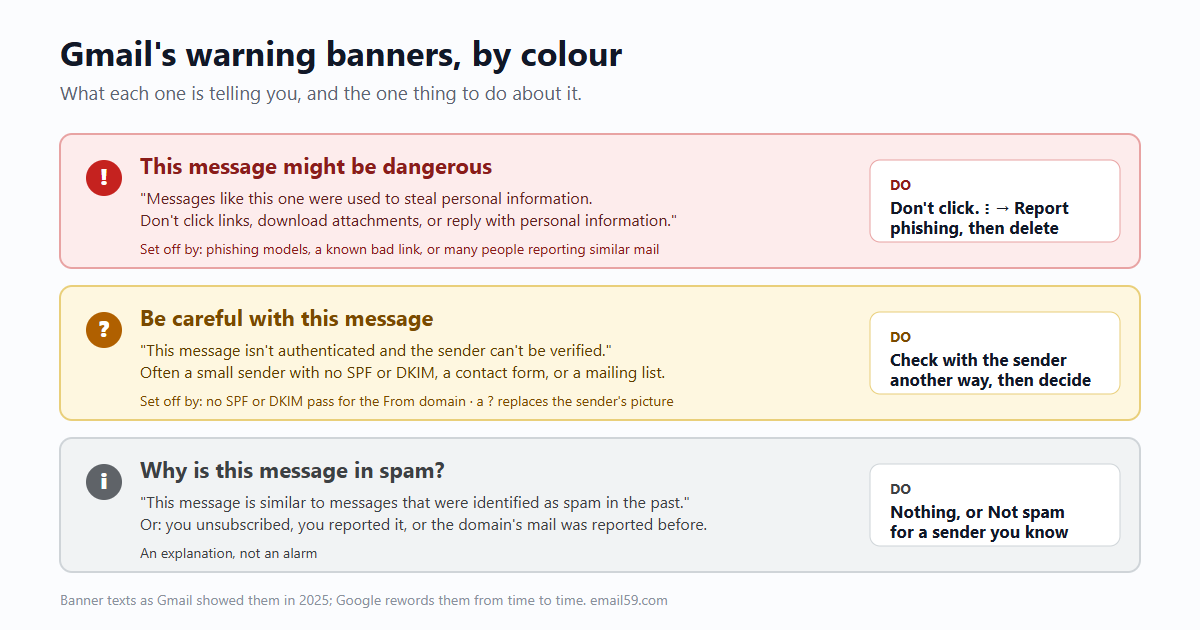
Every banner, what set it off, and what to do
Google doesn't publish one list of its banner texts and it rewords them from time to time. The wordings below are the ones Gmail showed in 2025, collected from real messages by the deliverability writer Al Iverson, and the reasons are from Google's own help pages.
| What the banner says (2025 wording) | What set it off | False alarm? | What to do |
|---|---|---|---|
| This message might be dangerous. "Messages like this one were used to steal personal information. Don't click links, download attachments, or reply with personal information." | Gmail's phishing models matched the message to known scams | Rare | Don't click or reply. ⋮ → Report phishing, then delete |
| This message might be dangerous. "It contains a suspicious link that was used to steal people's personal information." | A link in it points somewhere already used for phishing | Rare: a real sender sharing a hacked site's link | Same. If you expected this email, ask the sender by phone or a new message |
| This message might be dangerous. "Many people marked similar messages as phishing scams." | Other Gmail users reported near-identical messages | Uncommon | Same |
| Be careful with this message. "This message isn't authenticated and the sender can't be verified." (older wording: "Gmail could not verify that it actually came from example.com") | Neither SPF nor DKIM passed for the sender's domain; a ? replaces the sender's picture | Often: small businesses with no email records, website contact forms, old office servers, some mailing lists | Don't act on any request in it (pay, sign in, change bank details) until you've checked with the sender another way |
| Images hidden: "Display images below" | Gmail thinks the sender or message is suspicious, so it won't load pictures, even if you set "Always display external images" | Often | Only press it for a sender you know. Loading images tells the sender you opened it |
| Why is this message in spam? "This message is similar to messages that were identified as spam in the past." | Content and sender looked like past spam | Sometimes | Nothing, or Report not spam if you know and want this sender |
| Why is this message in spam? "…because previous messages from example.com were marked as spam." | The sending domain's reputation with Gmail is poor | Sometimes: a shop that mails too often | Same |
| Why is this message in spam? "You unsubscribed from this mailing list…" | You did unsubscribe, and they kept sending | No | Leave it. Report not spam only if you want them back |
| Why is this message in spam? "It seems to be an auto-reply to a message that pretended to be sent from your email address." | Someone sent spam forging your address; you got the bounce or out-of-office | No, but it isn't about you | Delete. If you own a domain, publish DMARC (below) |
| "This message was blocked because its content presents a potential security issue." | An attachment Gmail never accepts: .exe, .js, .iso, .msi, .bat, .lnk, .vbs, password-protected archives with archives inside | Sometimes: an IT person sending a tool | Ask for a download link from a site you trust instead |
Two you may have seen are not Gmail's. "You don't often get email from…" and "…appears similar to someone who previously sent you email, but may not be that person" are Microsoft Outlook's. A Google Workspace (work or school) account adds its own: an External label and a warning when you reply to people outside your organisation, plus whatever your admin turned on, such as warnings for look-alike domains, spoofed employee names and links behind URL shorteners.
The ten-second check behind the yellow banner
Before you decide, look at what Gmail itself verified. On a computer:
- Open the message and click the small down arrow under the sender's name.
- Look for mailed-by and signed-by. If both show the sender's own domain (
bank.comfor mail frombank.com), the message really came from that domain. - If one shows another name (
mailchimpapp.net,shopifyemail.com), the sender used a service and hasn't set it up for their own domain. Common and usually honest, but the domain in From is unproven. - If there's a ? where the sender's picture should be, nothing was verified. Google's own advice: "If a message you get from a trusted source isn't authenticated, contact the person or company who sent you the email."
"Contact them" means a phone number or address you already had, never the one in the email. The money-moving scams (a new bank account for an invoice, a gift-card errand from "the boss") work because the reply goes straight back to the scammer.
Reading the full report: Show original
Gmail on the web, open the email, ⋮ next to Reply, Show original. The top of the page has three lines that settle most questions:
| Line | Pass means | Fail or missing means |
|---|---|---|
SPF: PASS with IP 209.85.220.41 | The server that delivered it is on the sending domain's list | An unlisted server sent it: a forger, or a forwarder (forwarding breaks SPF by design) |
DKIM: 'PASS' with domain example.com | The message carries a signature from example.com and wasn't changed on the way | No signature, or the message was altered (mailing lists that add a footer do this) |
DMARC: 'PASS' | SPF or DKIM passed for the domain in From, the one you see | The From domain is unproven. If the domain has a strict policy, Gmail rejects or spam-folders it |
The Gmail app on a phone doesn't reliably offer Show original; open gmail.com in the phone's browser instead. If the raw headers are a wall of text, paste them into our header reader: it picks out the three results, says which domain each one passed for, and whether that matches the From line. Nothing you paste leaves the page.
Why speed matters more than the colour
Verizon's 2024 Data Breach Investigations Report timed people in phishing simulations. The median person who fell for one clicked the link 21 seconds after opening the email and typed their details 28 seconds after that: under a minute from open to handing over a password. Only 20% of people reported the simulated phish, and only 11% of those who clicked reported it afterwards.
So the useful habit is not reading banners closely; it's not acting on any email that asks for a sign-in, a payment or a change of details within that first minute, banner or not. A clean message with no banner can still be a scam from a domain the scammer owns: paypa1-support.example can pass SPF, DKIM and DMARC for itself.
The buttons, and what each one tells Google
- Report phishing (⋮ menu): moves it out of your inbox and sends Google a copy, which is how "many people marked similar messages" banners start for everyone else.
- Report spam: moves it to Spam; Google receives a copy of the email and any attachments. Use it for junk, not for newsletters you signed up for (unsubscribe from those instead; see delete, unsubscribe or filter).
- Report not spam / Looks safe: puts this message back in the inbox and teaches your filter. It doesn't verify the sender. Press it only for a sender you've confirmed.
- Display images below: loads the pictures and tells the sender the email was opened. On a suspicious message, don't.
If the banner is on email you sent
If customers say your invoices arrive with "Be careful with this message", the fix is on your side and it's the same three records Gmail checks. Since 1 February 2024 Google requires SPF or DKIM from everyone who sends to Gmail, and SPF, DKIM, DMARC and one-click unsubscribe from anyone sending more than 5,000 messages a day, with a spam complaint rate kept below 0.10% and never reaching 0.30%. From November 2025 Google said it was "ramping up" enforcement, with temporary and permanent rejections for mail that doesn't comply.
| What you fix | Which banner it removes | Effort |
|---|---|---|
| DKIM for your domain, in every service that sends as you (Google prefers DKIM over SPF) | "Isn't authenticated", the ? avatar, the "via" name | Two or three DNS records per service |
| SPF listing those services | The same, as a fallback when DKIM breaks | One DNS record (one only: two SPF records break both) |
DMARC, starting at p=none | Forged mail in your name (and the auto-reply backscatter it causes) | One DNS record, then reading reports |
| Sending less often, and only to people who asked | "Previous messages from example.com were marked as spam" | Weeks: reputation recovers slowly |
Records don't fix content: Google says a message can pass all three and still get a warning if it looks like phishing or the domain's reputation is bad. More on that side in why good email still lands in spam and the 2024 sender rules.
The blue checkmark next to some senders' names is BIMI with a Verified Mark Certificate. It needs DMARC at p=quarantine or p=reject, a registered trademark for the logo, and a certificate that costs roughly $1,350 to $1,500 a year from the issuers directly (a Common Mark Certificate from about $990 shows the logo without the tick). It's for brands that are already being impersonated; a small business gets far more from DKIM, which is free.
A worked example: the supplier's new bank details
A bookkeeper gets "Updated remittance details for invoice 4471" from accounts@harbourroasters.example, a supplier the business pays every month. Gmail shows the yellow banner and a ? avatar.
- Down arrow under the sender: no mailed-by, no signed-by. Nothing verified.
- Show original:
SPF: SOFTFAIL, no DKIM line,DMARC: 'FAIL'. The supplier's own mail from last month showed all three passing (search for it and compare). - Reply-To, in the raw headers, is a different address at a free mail provider.
- The bookkeeper phones the number on last year's paper invoice. The supplier hasn't changed banks.
The banner did its job, but steps 1 to 3 took two minutes and the phone call settled it. If last month's message had shown the same failures, the banner alone would have said nothing; the change in the request would still have been the warning sign.
A Gmail that's buried in years of notifications makes it harder to notice the one odd message. Our Gmail cleanup moves old social, shop and no-reply mail to Trash without opening a single body, so what's left is mail from people.
Sources
- Google: new Gmail protections for a safer, less spammy inbox (3 October 2023; 99.9%, nearly 15 billion unwanted emails a day)
- Spam Resource: Gmail's nine reasons your mail went to spam, with the banner texts (13 October 2025)
- Gmail Help: check if an email is authenticated (question mark, mailed-by, signed-by, mailing lists)
- Gmail Help: report spam, and the reasons Gmail gives
- Gmail Help: report phishing
- Gmail Help: images in suspicious messages are not shown
- Gmail Help: file types Gmail blocks
- Gmail Help: trace an email with its full headers (Show original)
- Google: email sender guidelines (1 February 2024, 5,000 a day, 0.10% and 0.30%)
- Google: sender guidelines FAQ (enforcement from November 2025)
- Google Workspace Admin Help: warnings for external recipients
- Google Workspace: advanced phishing and malware protection settings
- Microsoft Learn: Outlook's first-contact and impersonation safety tips
- SecurityWeek on the Verizon 2024 DBIR (21 seconds to click, 28 to enter data, 20% reporting)
- Google Workspace Admin Help: BIMI, VMC and CMC requirements
- Google Workspace Updates: the blue checkmark (3 May 2023)
Gmail, Google Workspace and Outlook are trademarks of their owners. email59 is not affiliated with them.