Sign-up
One mailbox, many addresses: Gmail's dots and plus signs, and what your sign-up form should do about them
Gmail ignores dots and delivers name+anything@gmail.com to name@gmail.com, so one person can sign up for your app a hundred times with one mailbox. That's sometimes fine and sometimes a free trial claimed a hundred times. When to treat those addresses as one person, why you must never rewrite the address you send to, and a small function for the comparison key, in JavaScript and Python.
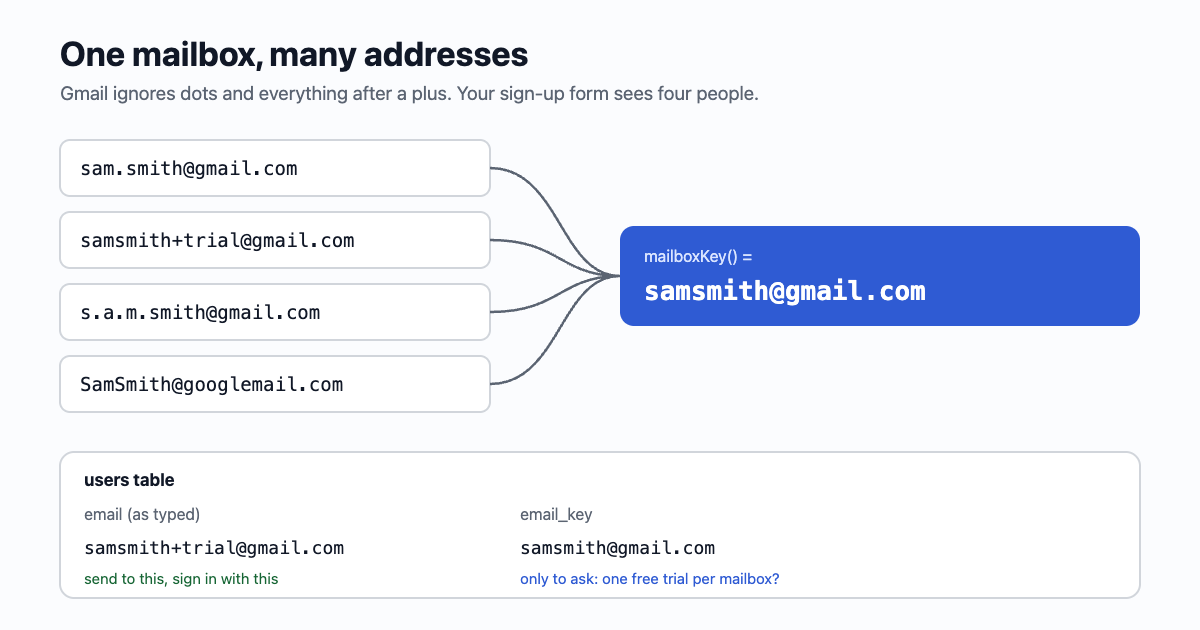
These four addresses all deliver to the same inbox:
samsmith@gmail.com
sam.smith@gmail.com
s.a.m.smith+trial@gmail.com
SamSmith@googlemail.com
Google's help page says it in one line: "If someone accidentally adds dots to your address when emailing you, you'll still get that email." The plus sign works the same way: anything after it is a tag the owner can filter on, and the mail lands in the main mailbox. To a sign-up form that checks for an existing account with WHERE email = ?, those are four strangers.
When it matters, and when it doesn't
Most of the time, nothing needs doing. Someone with two accounts in your notes app is a person with two accounts. It matters when you give something away per person:
- Free trials and free allowances. "14 days free" or "100 free credits" per sign-up, claimed again with
+2,+3,+4. - Referral rewards. Inviting yourself as a new user, over and over.
- "One per customer" offers, votes, waitlist positions, contest entries.
- Bans. A banned account comes back with a dot in a new place.
And it doesn't matter, or works against you, for everything else. People use plus tags on purpose: sam+yourapp@gmail.com lets them filter your email into a folder, and tells them who leaked their address if spam arrives on it. Blocking the plus sign punishes careful people, and many sign-up forms still do it by accident with a pattern that doesn't allow +. It is a valid character in an address.
The rule: compare with a key, send to the address
Don't rewrite what people type. Store it as typed, send to it as typed, show it as typed. Next to it, store a comparison key: a second column with the address folded down to the mailbox it reaches. Use the key only to ask "have we seen this mailbox before?".
Why not just save the folded version? Three reasons:
- The owner may filter on the tag. Strip it, and your receipts land in their inbox instead of the folder they set up.
- Outside Gmail, dots matter.
sam.smith@company.comandsamsmith@company.comcan be two people. Google says so even for its own work and school accounts: in those, "dots do change your address." - They'll sign in with what they typed. A login form that has to know your folding rules is a bug waiting.
The comparison key
The rules, kept deliberately small:
- Lower-case everything. The part before the @ is case-sensitive in the standard, but no big provider treats it so.
googlemail.combecomesgmail.com: same mailboxes.- At the providers in the list, drop everything from the first
+. These providers don't let anyone register a username with a plus in it, so folding can never join two real people, whatever they do with the tagged mail. - At Gmail only, drop the dots.
- Any other domain: lower-case only. You don't know its rules, and guessing joins strangers.
// The comparison key: which addresses reach the same mailbox. Store it beside the address; never send to it.
const PLUS_TAGS = new Set(["gmail.com", "googlemail.com", "outlook.com", "hotmail.com", "live.com", "msn.com",
  "icloud.com", "me.com", "mac.com", "proton.me", "protonmail.com", "pm.me", "fastmail.com"]);

function mailboxKey(address) {
  const s = String(address).trim().toLowerCase();
  const at = s.lastIndexOf("@");
  if (at < 1) return s;
  let local = s.slice(0, at);
  let domain = s.slice(at + 1);
  if (domain === "googlemail.com") domain = "gmail.com";
  if (PLUS_TAGS.has(domain)) local = local.split("+")[0];
  if (domain === "gmail.com") local = local.replace(/\./g, "");
  return local + "@" + domain;
}

mailboxKey("S.a.m.Smith+trial@googlemail.com"); // "samsmith@gmail.com"
mailboxKey("sam.smith+news@outlook.com");       // "sam.smith@outlook.com"
mailboxKey("sam.smith@company.com");            // "sam.smith@company.com"
The same in Python:
PLUS_TAGS = {"gmail.com", "googlemail.com", "outlook.com", "hotmail.com", "live.com", "msn.com",
             "icloud.com", "me.com", "mac.com", "proton.me", "protonmail.com", "pm.me", "fastmail.com"}


def mailbox_key(address: str) -> str:
    """Which addresses reach the same mailbox. Store it beside the address; never send to it."""
    s = address.strip().lower()
    local, at, domain = s.rpartition("@")
    if not at or not local:
        return s
    if domain == "googlemail.com":
        domain = "gmail.com"
    if domain in PLUS_TAGS:
        local = local.split("+")[0]
    if domain == "gmail.com":
        local = local.replace(".", "")
    return f"{local}@{domain}"
To see what it does to your own sign-ups before you write any code, paste them into the same mailbox finder: it runs this function in your browser, groups the addresses that share a mailbox and gives you each address with its key as CSV.
Run your existing users through it once to fill the new column, then compute it on every sign-up and email change. In SQL, the shape is:
ALTER TABLE users ADD COLUMN email_key text;
CREATE INDEX users_email_key ON users (email_key);   -- not UNIQUE: see below

-- at sign-up, before granting a trial:
SELECT 1 FROM users WHERE email_key = $1 AND trial_used;
Keep the index plain, not unique. Turning duplicates into a hard error blocks the person who really did lose access to an old account, and blocks your own testing (next section). Use the key where it counts: one trial, one referral reward, one free allowance per mailbox. Let the second account exist, without the gift.
Other providers have other rules
| Provider | Plus tags | Dots |
|---|---|---|
| Gmail (gmail.com, googlemail.com) | Delivered to the main mailbox | Ignored |
| Google Workspace (a company's own domain on Google) | Delivered | Matter: a different address. And you can't tell from the domain that it's Google, so the key leaves it alone. |
| Microsoft 365 (a company's own domain on Microsoft) | On by default; an admin can switch it off | Matter |
| Outlook.com, Hotmail, iCloud | Reported to work, not documented as clearly; send yourself a test. The key folds them anyway, because a plus can't be part of a username there | Matter |
| Fastmail, Proton Mail | Delivered (Fastmail also accepts anything@name.fastmail.com) | Matter |
| Yahoo | Not plus: up to 500 "disposable addresses" with a hyphen, each set up in advance | Matter |
Yahoo's disposable addresses and Fastmail's subdomain addresses can't be folded by a rule: from the outside, they look like ordinary addresses. That's fine. The key is there to stop the cheap trick, not every determined person; for that you'd need payment details or a phone number, which is a different trade-off.
Plus tags are a testing tool too
The same trick that games a trial makes testing easy: you+signup1@gmail.com, you+signup2@gmail.com and so on, every one a new user to your app and every email in your own inbox. Two things to watch:
- If your app enforces one trial per key, your own tests hit it. Keep a short allow-list of your team's addresses, or use test keys that never send (email59's test keys keep each email for you to read instead of delivering it; more on catching mail in development).
- A
+in a web address means a space. A link like/verify?email=sam+trial@gmail.comarrives assam trial@gmail.com. Encode it (encodeURIComponentin JavaScript,urllib.parse.quotein Python), or better, keep addresses out of links and use a token.
The short version
- Gmail ignores dots and plus tags; Microsoft 365, Proton and Fastmail document plus tags too.
- Store and send to the address as typed. Never strip the tag from what you mail.
- Keep a comparison key beside it and check it only where you give something away per person.
- Fold only the providers you know; leave every other domain lower-cased and nothing more.
- Don't reject
+at sign-up, and encode it in links.
Sources
- Gmail Help: dots don't matter in Gmail addresses (and do in work or school accounts)
- Microsoft Learn: plus addressing in Exchange Online
- Fastmail Help: plus addressing and subdomain addressing
- Proton Support: plus addressing (aliases)
- Yahoo Help: disposable email addresses
- RFC 5233: sub-address extension
- RFC 5321, section 2.4: the local part may be case-sensitive
Gmail is a trademark of Google LLC; Outlook and Microsoft 365 of Microsoft; iCloud of Apple Inc.; Proton, Fastmail and Yahoo of their owners. email59 is not affiliated with them.