Links
Your links got longer: what click tracking does to the links in an app's email
You wrote https://yourapp.example/reset?t=8f2c into the email. The person received a link three lines long on a domain they've never heard of. That's click tracking: what it does to every link, why it suits a newsletter better than a password reset, and how to check what your own emails arrive with.
Most sending services can count clicks. To do it, they don't watch your links; they replace them. Every link in the email is swapped for one on the service's own redirect domain, carrying an id. When someone clicks, the service records the visit and sends the browser on to the address you wrote. Postmark describes it plainly: it scans the HTML and plain-text parts for links, swaps each for a wrapped version, records the IP, browser, link id and time, then redirects. SendGrid's settings page says click tracking "rewrites all the links and URLs in your emails."
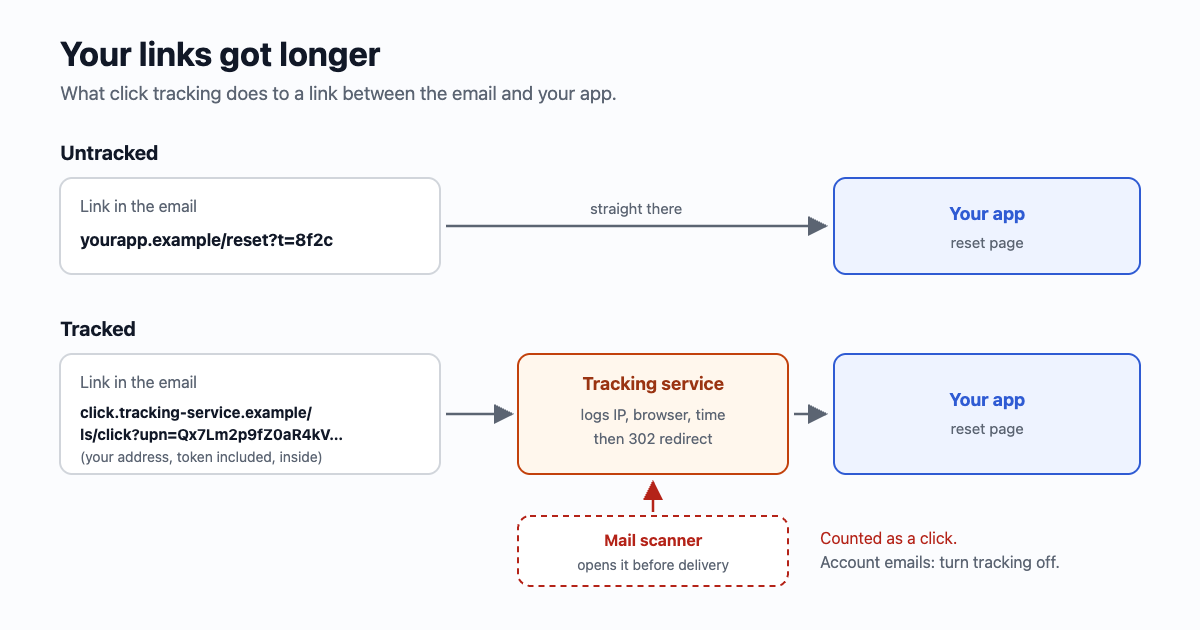
What changes when links are wrapped
| What changes | Why it matters for an app's email |
|---|---|
| The address on hover is someone else's domain | People are taught to hover before they click. A reset email from "Tally" whose button points at an unknown domain looks like the phishing they were warned about. |
| The original address, token included, is held by the tracking service | For a newsletter link that's harmless. For a password reset or sign-in link, the secret part of the URL now sits with a third party, encoded in the wrapped link or in its records. |
| Every visit is counted, including the ones nobody made | Company mail scanners open links before delivery. They pass through the redirect like anyone else, so "clicked" often means "scanned". Our link scanner test shows who opens a link before a person does. |
| Your email carries the tracking domain's reputation | On a shared tracking domain, spam filters see the same link domain in your mail as in every other sender's on that service. Most services let you use your own subdomain instead (SendGrid calls it link branding), which takes a DNS record and a certificate. |
| Links in the text part become long and unreadable | In HTML the long link hides behind a button. In plain text the reader sees every character. SendGrid leaves plain-text links alone unless you tick a separate box; check what yours does. |
| App links stop opening the app | A phone opens an app only for that app's own domain. SendGrid's docs on universal links say the app receives the encoded tracking link and has to resolve it itself, and that you should mark which links are app links. |
| The link depends on one more service | If the tracking domain is slow, blocked by a company filter, or retired, the link fails even though your site is fine. |
When it's worth having
For a newsletter or a product announcement, click counts tell you which story people cared about, and nothing secret is in the links. That's what the feature was built for. For the emails an app sends one person about their own account, it's mostly cost:
- Sign-in links, resets, email confirmations and invitations: turn tracking off. The token shouldn't pass through anyone else, and scanner "clicks" make the numbers meaningless anyway. See your magic link was clicked before your user saw it for what scanners do to single-use links.
- Receipts and account notices: turn it off. People forward these and keep them for years; a link that redirects through a service you might leave is a link that breaks later.
- Marketing email: fine, ideally on your own tracking subdomain, and read the numbers knowing that some clicks are machines.
Most services let you switch it per message, so you don't have to choose for the whole account. In Postmark it's "TrackLinks": "None" on the message; in SendGrid's send API it's tracking_settings.click_tracking.enable: false.
Measure the thing, not the click
An app already knows whether the email worked: the reset was completed, the address was confirmed, the invitation was accepted. That's a better number than a click, and it comes from your own database, with no scanners in it. If you want to know which email a visit came from, add a plain parameter to your own link, ?src=reset-email, and read it on your side. No redirect, no third party.
Check what your emails really arrive with
- Send one of your real emails, a reset or a sign-in link, to your own address.
- Hover the button, or open the message source ("Show original" in Gmail, "View source" in most others) and find the link.
- Copy it and ask for the headers without following the redirect. Use a test link, not one you still need: some sign-in links are spent by the first visit.
An answer from your own server means the link arrived as you wrote it. Acurl -sI "https://the-link-from-the-email" | grep -i -E '^(HTTP|location)'301or302with aLocationpointing at your address means it was wrapped. - Do it for the text part too: the two parts can be treated differently.
Also check at a company address if you can. The mail system at the other end can wrap links on arrival; Microsoft's Safe Links does this for many work mailboxes. That's the reader's IT department, not your sender, and you can't switch it off, which is one more reason your links should survive being opened by a machine.
With email59
email59 has no click reports, and it doesn't switch click tracking on when it hands your email over for delivery: the links in the html and text you post to /v1/send are passed on as you wrote them. If you want to see it for yourself, the four steps above take two minutes with your own address and a live key (a test key stores the email instead of delivering it). To know whether your emails did their job, count the resets completed and the addresses confirmed in your own app.
The short version
- Click tracking replaces every link with a redirect through the sending service, which logs the visit.
- For account emails it costs more than it tells you: odd domains on hover, tokens passing through a third party, scanner clicks counted as people, broken app links.
- Turn it off per message for sign-in, reset, confirmation, invitation and receipt emails. Keep it, on your own subdomain, for marketing if you want it.
- Measure completed actions in your app; tag your own links with a parameter if you need the source.
- Check one real email with
curl -sI: your server answering means unwrapped.
Sources
- Postmark, How does Link Tracking work? (links swapped for wrapped versions, IP, browser, link id and time recorded, then a redirect)
- Postmark developer guide, Tracking links (TrackLinks per message, HTML and text)
- SendGrid, Tracking settings ("rewrites all the links and URLs", plain text off unless ticked, link branding)
- SendGrid, Universal links (the app receives the encoded link and has to resolve it)
- Microsoft Learn, Safe Links in Microsoft Defender for Office 365 (links rewritten and checked on the receiving side)
Postmark, SendGrid and Microsoft are named for their public documentation; email59 is not affiliated with them.