 email
emailShop emails
The refund email: how much, to which card, and why it takes 5 to 10 days to show up
A receipt gets filed. A refund email gets read twice: once when it arrives, and again a week later when the customer opens their banking app, doesn't see the money, and wonders if you were telling the truth. The second reading is the one to write for. Here's what the email says, why the money takes 5 to 10 business days to show (and longer on some cards), what the payment provider keeps when you refund, and the two follow-ups: "where's my refund?" and the rare refund that comes back.
The short answer: say the amount, the card or account it's going to (brand and last four digits), the date you issued it, and the date range it should appear as real dates, not "5 to 10 business days". Say what wasn't refunded on a partial refund. Give a reference, and say what to do if it's late. Send it the moment you issue the refund, from the address the customer already knows.
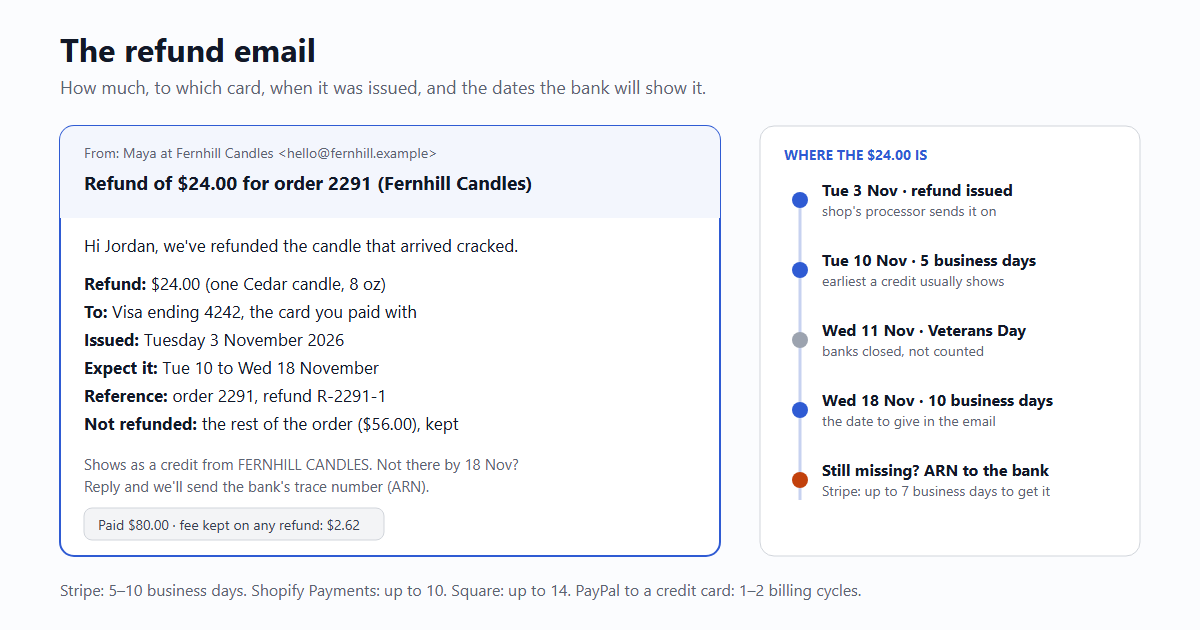
The email
Subject: Refund of $24.00 for order 2291 (Fernhill Candles)

Hi Jordan,

We've refunded the cedar candle that arrived cracked in order 2291.
Sorry about that one; no need to send it back.

Refund:        $24.00 (one Cedar candle, 8 oz)
To:            Visa ending 4242, the card you paid with
Issued:        Tuesday 3 November 2026
Expect it:     between Tuesday 10 and Wednesday 18 November
               (5 to 10 business days; your bank sets the pace)
Reference:     order 2291, refund R-2291-1
Not refunded:  the rest of the order ($56.00), which you're keeping

It will show as a credit from FERNHILL CANDLES, the same name as the
original charge. If it isn't there by 18 November, reply to this
email and we'll send you the trace number to give your bank.

Maya
Fernhill Candles · hello@fernhill.example- The amount in the subject. "Refund of $24.00 for order 2291" answers the only question the customer has before they open it, and it's what they'll search for later.
- Where it's going, by name. "Visa ending 4242, the card you paid with." People have three cards and a PayPal account; they will check the wrong one. Stripe, Square, Shopify Payments and PayPal all send refunds back to the original payment method, so this line is never a choice, just a fact to state.
- Issued, as a date. The clock for everything after (the bank's posting, a complaint, a chargeback) runs from the day you sent it. "We've processed your refund" without a date is useless in a week.
- Expect it, as two dates. Count business days from the issue date and skip bank holidays. From Tuesday 3 November 2026, five business days is Tuesday 10 November; ten is Wednesday 18 November, not Tuesday 17, because Veterans Day (11 November) is a bank holiday in the US.
- Not refunded, on a partial refund. If the customer keeps part of the order, or you refund the item but not the express shipping, say so with the figure. A partial refund with no explanation reads like a mistake, and a mistake reads like a reason to dispute the charge.
- The name on the statement. The credit shows under your statement name (Stripe calls it the statement descriptor), which is often not your shop name. If it's "FHC*ORDERS", say so.
- What to do if it's late, with the date that counts as late. That one line turns the "where is it" email into a reply instead of a dispute.
The receipt for the original payment carries the card brand and last four too, and the same statement name; if your receipts don't yet, the receipt email covers what goes in one. If the refund follows a parcel that came back to you, the shipping side of that is in the order-shipped email.
How long each provider says it takes
The figures each payment provider publishes, as of October 2026. "Business days" skip weekends and bank holidays; a billing cycle is the card's monthly statement period (PayPal puts it at 28 to 31 days).
| Provider | Customer sees the refund | Your time limit to refund | Fees on the original payment |
|---|---|---|---|
| Stripe | About 5–10 business days after you issue it | Not stated | Not returned |
| Shopify Payments | Pending up to 2 business days, then up to 10 business days to the customer | Not stated | Not returned (since 2020) |
| Square | 2–7 business days at Square, then 2–7 at the bank: up to 14 business days | 1 year from the payment | Not returned |
| PayPal, to PayPal balance | Same day | 180 days from the payment | Not returned; no fee to refund |
| PayPal, to bank account | Usually up to 5 business days, some up to 30 days | 180 days | Not returned |
| PayPal, to debit card | Usually up to 5 business days, some up to 30 days | 180 days | Not returned |
| PayPal, to credit card | 1–2 billing cycles | 180 days | Not returned |
After PayPal's 180 days, money can only go back as a new payment, with its own fee. For Shopify, the fee rule is from Shopify staff answers since the March 2020 change. The PayPal credit-card line is why a refund email for a PayPal order should never promise "5 to 10 days": a customer who paid with a credit card through PayPal may only see it on next month's statement.
Why it takes 5 to 10 days when the button took one second
The money doesn't move when you click Refund. Your processor sends a credit through the card network to the bank that issued the customer's card, usually in the next settlement batch, and the bank then posts it to the account. The last step is the only one with a clock in US law: under Regulation Z, a card issuer that accepts a credit from a merchant has to post it to the customer's account within 3 business days of receiving it (12 CFR 1026.12(e)(2)). The rest of the 5 to 10 days is the trip there: your provider's processing, the network's clearing, and weekends.
- Refunded the same day: often no credit at all. If you refund before the original charge has settled, Stripe and others send it as a reversal: the pending charge simply disappears from the statement and no separate credit appears. Customers looking for a "+$24.00" line think it's missing. Add one line for refunds issued within a day: "If the charge still shows as pending, it will drop off instead of showing as a credit."
- Debit cards feel slower. The original charge took money out of a current account at once; the refund comes back on the bank's posting schedule, so the gap is felt more than on a credit card.
- An expired or replaced card usually still works. Stripe's documentation says the issuer normally credits the replacement card, or sends the money another way if there isn't one. That's why a refund email doesn't need to ask whether the card is still open.
Partial refunds, and the fee you don't get back
None of the four providers above returns its processing fee when you refund. So a refund always costs you a little more than the amount you send back. With the published US list rates (Stripe 2.9% + 30¢ for a domestic card; PayPal Checkout 3.49% + 49¢), an $80.00 order works out like this:
| $80.00 order | Fee you paid | Full refund: you send back | You're down | Partial refund of $24.00: you're down |
|---|---|---|---|---|
| Stripe (2.9% + 30¢) | $2.32 + $0.30 = $2.62 | $80.00 | $2.62 | $24.00, and the $2.62 stays paid |
| PayPal Checkout (3.49% + 49¢) | $2.79 + $0.49 = $3.28 | $80.00 | $3.28 | $24.00, and the $3.28 stays paid |
Plus whatever you paid the carrier, which the customer never sees. What that means for the email:
- Don't take the fee off the refund unless your policy said so first. In the UK you can't at all: GOV.UK says a trader must refund within 14 days of getting the item back, must refund standard delivery, and "cannot deduct any fees" unless the item was used or damaged. The Consumer Contracts Regulations also require the refund on the same means of payment, unless the customer agrees otherwise.
- In the US, the deadline that bites is for orders you can't ship. Under the FTC's Mail, Internet, or Telephone Order Merchandise Rule, when an order is cancelled because you can't ship it, a card payment has to be refunded within 7 working days. An "out of stock, refunded" email should go out the same day as the refund, with the same lines as above.
- Shops that cancel a lot of orders soon after checkout can authorise first and capture later (Stripe and Shopify both suggest it): cancelling an uncaptured payment costs nothing and the hold just drops off.
"Where's my refund?": the reference that ends the conversation
Card refunds carry a network reference, most often the Acquirer Reference Number (ARN), a 23-digit number the customer's bank can look up. Stripe shows it on the refund in the Dashboard and in the API (destination_details.card.reference, sent with refund.updated), but it can take up to 7 business days after the refund to arrive, and there's none for a reversal. So it rarely makes it into the first email; it belongs in the reply when someone asks on day 10:
Subject: Re: Refund of $24.00 for order 2291 (Fernhill Candles)

Hi Jordan,

Sorry it's not showing yet. Our side is done: the $24.00 refund to
your Visa ending 4242 left us on Tuesday 3 November.

The card network's reference for it (the ARN) is
74123456789012345678901. If you call the number on the back of your
card and give them that number, they can see exactly where the
credit is and when it posts.

If your bank says it hasn't arrived by Friday 27 November, tell me
and I'll chase it from our end.

Maya
Answer in the same thread, with the amount and date again so the customer doesn't have to scroll. Give the bank a few more days (it has 3 business days once the credit reaches it), then name a date when you'll step in. PayPal tells buyers to contact the seller if a refund is still pending after 5 business days, so expect these emails on PayPal orders too.
When a refund fails
It's rare, but it happens: Stripe lists expired_or_canceled_card, lost_or_stolen_card, declined and others as reasons, and the money can take up to 30 days to come back to your balance. Stripe sends refund.failed, and from then on it's on you to pay the customer another way. Don't go quiet for those 30 days; tell them as soon as you know:
Subject: Your $24.00 refund came back: how should we send it?

Hi Jordan,

The $24.00 refund for order 2291 that we sent to your Visa ending
4242 on 3 November was returned to us by the card's bank. That
usually means the card was closed or replaced.

The money is with us, not lost. Reply with whichever is easiest:

  1. a payment link: we send $24.00 to an email address you choose
  2. a $24.00 store credit on your account (it doesn't expire)

We won't ask for your card or bank details by email.

Maya- Say plainly that the money is with you. "Your refund failed" alone sounds like you kept it.
- Offer ways that don't need card or bank numbers in an email. Asking for bank details by email is exactly what the scam version of this email does.
- Keep the subject close to the first refund email's, so the two sit together in their inbox.
Sending it from your app
Send the refund email from the refund event, not from the button in your admin page, so refunds made in the Stripe Dashboard get one too. Webhooks can arrive more than once; mark the refund as emailed in the same statement that checks it:
# Stripe webhook: one refund email per refund, even if the event comes twice
if event["type"] == "refund.created":
    refund = event["data"]["object"]
    row = db.fetchrow(
        "UPDATE refunds SET emailed_at = now() "
        "WHERE stripe_refund_id = $1 AND emailed_at IS NULL "
        "RETURNING order_id, amount_cents, card_last4",
        refund["id"])
    if row:                      # None = already sent
        send_refund_email(row)   # POST /v1/send, below
Then one call to /v1/send, with reply_to set to an inbox you read so "reply to this email" reaches you (Replies):
curl -s https://email59.com/v1/send \
  -H "Authorization: Bearer $EMAIL59_KEY" -H 'Content-Type: application/json' \
  -d '{"from":"yourapp","to":"jordan@gmail.com","reply_to":"hello@fernhill.example",
       "subject":"Refund of $24.00 for order 2291 (Fernhill Candles)",
       "text":"Refund: $24.00 (one Cedar candle, 8 oz)\nTo: Visa ending 4242, the card you paid with\nIssued: Tuesday 3 November 2026\nExpect it: between Tuesday 10 and Wednesday 18 November\nReference: order 2291, refund R-2291-1\n\nNot there by 18 November? Reply to this email."}'
Stripe can also email customers about refunds itself (the Email customers for refunds setting, for charges made on a Stripe customer with an email address). Pick one sender. Two refund emails with different wording, one with dates and one without, is how a simple refund turns into a support thread.
The short version
- Subject: "Refund of $24.00 for order 2291".
- Amount, card brand and last four, date issued, and the expected dates counted in business days, holidays skipped.
- On a partial refund, what wasn't refunded and why.
- The statement name, and the date after which they should reply.
- Day 10: reply in the thread with the ARN. Refund failed: say the money is with you and offer two ways to pay it.
- Send it from
refund.created, once.
Sources
- Stripe, Refund and cancel payments: 5–10 business days, reversals, fees not returned, original payment method, failure reasons, up to 30 days for failed refunds, ARN up to 7 business days
- Shopify Help Center, Shopify Payments refunds: pending up to 2 business days, up to 10 business days to the customer
- Shopify Community (staff answer): original Shopify Payments fee no longer returned on refunds, from March 2020
- Square Support, Issue refunds: 2–7 + 2–7 business days, one-year window, processing fees not refunded
- PayPal Help, Where is my refund?: timings by payment method, contact the seller after 5 business days
- PayPal, Business fees: no fee to refund, original fees not returned
- PayPal Help, How do I issue a refund?: full or partial refunds within 180 days of the payment
- CFPB, Regulation Z 12 CFR 1026.12(e)(2): issuer credits a refund within 3 business days of receiving the credit statement
- 16 CFR Part 435, Mail, Internet, or Telephone Order Merchandise Rule: a prompt refund for card payments is within 7 working days
- GOV.UK, Accepting returns and giving refunds: 14 days, standard delivery, no fee deductions
- Consumer Contracts Regulations 2013, regulation 34: timing and same means of payment
- OPM, Federal holidays: Veterans Day 2026 on Wednesday 11 November
Fee rates are the published US list rates in October 2026 and differ by country and contract. Visa, Stripe, Shopify, Square and PayPal are named for their public documentation; email59 is not affiliated with any of them.