 email
Kid-safe email
Kid-Safe Email for Families and Schools: What Gets Filtered and What Stays
Most email services treat every inbox like an open door. Anyone can send a child swearing, explicit messages, suspicious attachments, or confusing sales spam. email59 is one of the first email services built from the ground up to be kid-safe by default.
You do not need to configure complex mail server rules or buy expensive parental control plugins. The protection runs automatically on every email coming in and every message going out.
How inbound mail is cleaned
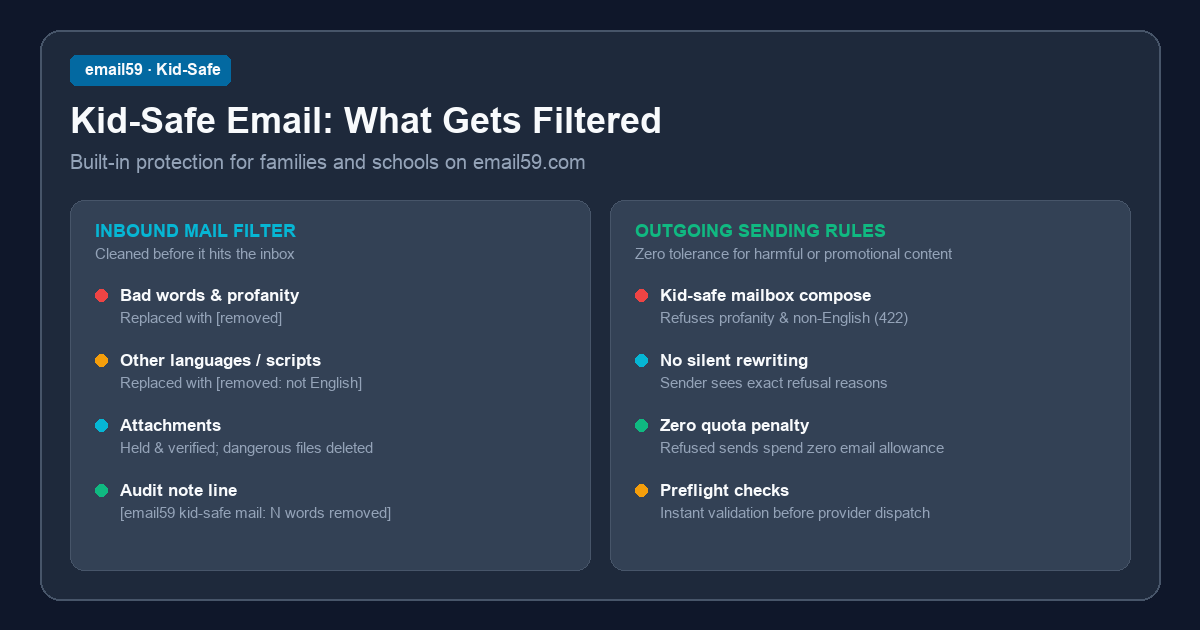
When an email arrives at a kid-safe mailbox, our filter scans the subject line, the plain-text body, and the HTML content before you or your child open it:
- Profanity and explicit words become [removed]. Our filter catches bad language, slurs, sexual terms, and violence across common word endings.
- Tricks and disguises do not work. Common evasions like
sh1t,f*ck, spaced letters likef u c k, and suggestive emoji are folded and redacted. - Non-English text becomes [removed: not English]. Foreign scripts (Cyrillic, Arabic, Asian characters, Devanagari) and foreign language passages are removed to stop foreign spam traps and unvetted content.
- Useful details stay intact. Names, street addresses, phone numbers, tracking numbers, and links are left alone so real school and family updates work properly.
The audit note line
Nothing is silently erased without letting the reader know. If words or passages were redacted, a clear notice appears right at the top of the message:
[email59 kid-safe mail: 2 words and 1 passage not in English removed]This note tells parents, teachers, and students exactly what happened, while keeping the inappropriate content out of sight.
Attachments are checked before opening
Attachments are one of the biggest risks for younger users. Here is how email59 handles attached files:
- Files arrive on hold. When an attachment first arrives, its status is marked as
being_checked. It cannot be downloaded immediately. - Automated safety review. Images, PDFs, and document text are reviewed for safe content.
- Clean files are released. Safe homework sheets and photos appear in the inbox after a brief verification check.
- Dangerous or unreadable files are removed. Executables, archives, encrypted files, and files that fail inspection are permanently deleted, leaving a note:
Removed: filename (could not be checked).
Outgoing mail is checked too
Safety is a two-way street. When a student or family member writes an email from a kid-safe mailbox, the outgoing text is checked before sending:
- We do not silently edit outgoing messages. If someone types bad language or foreign text, the send is refused immediately with an error notice.
- Clear feedback. The sender sees why the message could not be sent (such as
content_not_allowedwith reasonnot_kid_safe), so they can rewrite it appropriately. - Zero allowance used. A refused send does not use up any of your daily email quota.
Set up kid-safe email in seconds
Whether you are setting up email for your family or a classroom, email59 keeps the inbox clean, friendly, and focused on real communication.