 email
emailThe email59 app
The email59 app or the Zoho Mail app: which one for Zoho mail on your phone
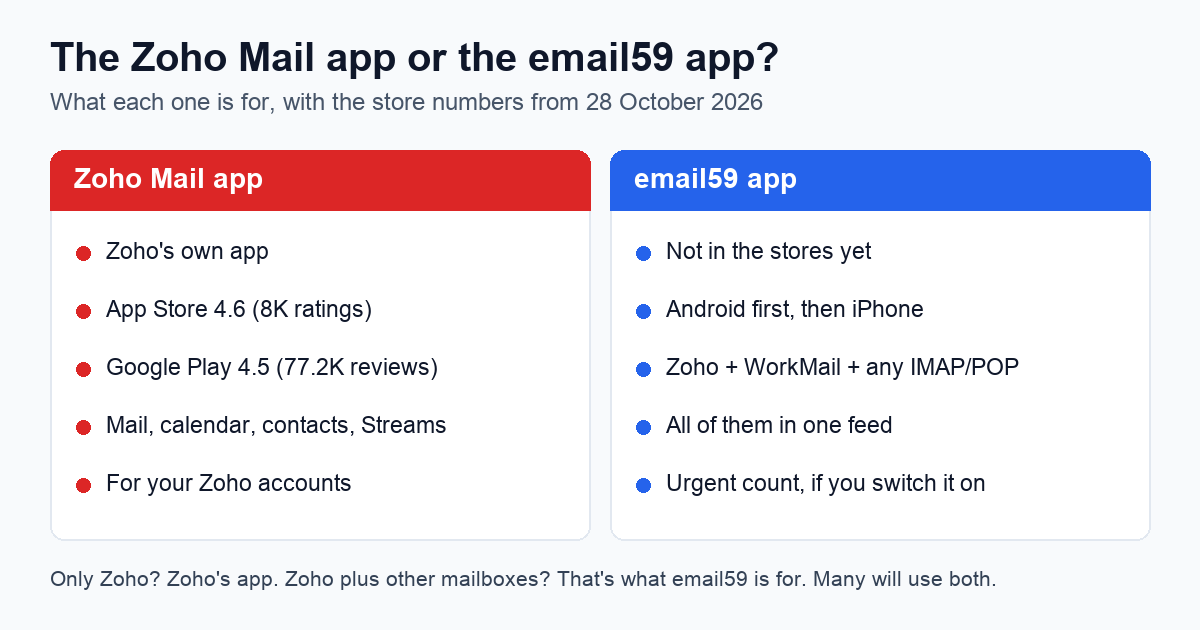
If all your mail is at Zoho, use Zoho's app. It is good, it is free, and it does calendar, contacts and team chat as well as mail. The email59 app is for a different person: someone whose Zoho mailbox is one of several, at different providers, who wants them in one place on the phone and wants to know which mails can't wait. Here is the honest split, with the store numbers we checked today.
The two apps at a glance
| Zoho Mail app | email59 app | |
|---|---|---|
| Made by | Zoho, the mail provider itself | email59, a separate company that doesn't host your Zoho mail |
| In the stores | Yes: App Store 4.6 from 8K ratings; Google Play 4.5 from 77.2K reviews, 5M+ downloads | Not yet. Android first, then iPhone. No ratings yet |
| Price | Free app; Zoho's paid plans add features and storage | Free to read and send; the urgent count is $4 a month and off unless you start it |
| Which mailboxes | Your Zoho accounts, in one unified inbox | Zoho, Amazon WorkMail and any IMAP or POP mailbox, in one feed. Outlook later, through Microsoft's own sign-in |
| Beyond mail | Calendar, contacts, Streams (team chat), shared mailboxes, offline writing | Mail first. It doesn't replace Zoho's calendar, contacts or Streams |
| Signs in to Zoho with | Your Zoho login | IMAP or POP with your password, or an app password if two-step sign-in is on |
| Alerts | Custom alerts for chosen senders and folders | With the urgent count on: a push only for mail it marks urgent, across all your mailboxes |
Where Zoho's app is the better pick
- Only Zoho mailboxes. Zoho's app already shows several Zoho accounts in one inbox. Adding a second app gains you little.
- You use more of Zoho than mail. Calendar invites you answer from the inbox, contacts, Streams and shared mailboxes all live in Zoho's app. The email59 app reads mail over IMAP or POP and sees none of those.
- You're on a newer free Zoho plan. Zoho's recent free accounts get no IMAP or POP at all, so no outside app can read them, ours included. Zoho's app is the only phone option there.
- You want something rated today. Zoho's app has years of reviews behind it. Ours has none until it ships.
Where the email59 app helps
Zoho next to everything else. When we read through what people ask Zoho's app for, the request that came up most was adding Gmail and Outlook accounts. Zoho's Google Play listing describes its unified inbox as one view of your Zoho accounts. The email59 app starts from the other end: it is a feed of every mailbox you connect, Zoho, Amazon WorkMail or any other IMAP or POP mailbox, with Outlook coming once Microsoft's sign-in is set up for it. Each mail shows which mailbox it came to, and you reply from that address.
An urgent count you switch on. Zoho's app doesn't tell you how many of the new mails across all your accounts actually need you today. email59 can, if you want it: it's a $4 a month subscription, nothing is switched on until you start it, and it judges each mail from the sender, the subject and the first couple of lines; the full mail isn't fetched or stored for it. With it on, your phone buzzes for urgent mail only, not for every newsletter.
Zoho's fast side, used. Zoho's IMAP servers tell a connected app about new mail and about changes (a read, a delete, a move) as they happen, instead of waiting to be asked. The email59 app listens for that, so a mail you deleted on the laptop should drop off the phone shortly after. Slow read and delete states are a complaint we found about Zoho's app too. We haven't timed the two side by side yet, so we don't claim to be faster; we'll publish the numbers when we have them.
What Zoho needs before email59 can read it
Zoho's app signs in with your Zoho login. Any other app, ours included, reads Zoho over IMAP or POP, and Zoho wants three things first. The app asks two questions (a personal Zoho address or your own domain, and which region your account lives in) and fills in the servers; if the login fails it shows these steps.
- Turn on IMAP (or POP) in Zoho Mail's settings. It's off until you do.
- Make an app password if you use two-step sign-in, or if you sign in to Zoho with Google, Facebook or your company's single sign-on. Your normal password won't work over IMAP then.
- Tick the folders you want to see in Zoho's folder settings. Only ticked folders show over IMAP.
The servers, if you set it up by hand in any mail app. Personal accounts use the plain names, accounts on your own domain use the pro ones, and the ending follows your account's region. Zoho shows the exact names for your account under Settings, Mail Accounts, Server Configuration Details.
| Region | IMAP (993, SSL) | POP (995, SSL) | SMTP (465, SSL) |
|---|---|---|---|
| USA | imap.zoho.com / imappro.zoho.com | pop.zoho.com / poppro.zoho.com | smtp.zoho.com / smtppro.zoho.com |
| Europe | imap.zoho.eu / imappro.zoho.eu | pop.zoho.eu / poppro.zoho.eu | smtp.zoho.eu / smtppro.zoho.eu |
| India | imap.zoho.in / imappro.zoho.in | pop.zoho.in / poppro.zoho.in | smtp.zoho.in / smtppro.zoho.in |
Zoho also runs data centres in Australia, Japan, Canada and Saudi Arabia with the same pattern of names. The email59 app has the three regions above built in; for the others, pick "Other" and type the names from Zoho's settings page.
What stays the same in either app
Some things are Zoho's, whichever app you read it in, and we won't pretend otherwise:
- Spam filtering happens at Zoho. The email59 app doesn't filter better than Zoho does.
- Attachment size: Zoho's mail server takes messages up to about 51 MB. No app gets around that.
- Sending limits are Zoho's, and Zoho doesn't publish a current daily figure, so we don't promise one either.
- The From address has to be your Zoho address or one of its aliases. Zoho refuses anything else.
Using both
Nothing stops you keeping Zoho's app for calendar and Streams and using the email59 app for the mail feed. Both read the same mailbox, so a mail you read or delete in one shows as read or gone in the other. If you do, turn off Zoho's mail alerts or ours, so the phone doesn't buzz twice.
Join the email59 app waitlist We start with Android; iPhone comes next. One email when it's ready to install, nothing else.
Sources: the Zoho Mail - Email and Calendar pages on the App Store (US) and Google Play, read in a browser on 28 October 2026 (ratings, downloads, listed features); Zoho's help pages on IMAP access and SMTP; our own IMAP and SMTP greeting checks of Zoho's EU, India and Australia servers on 25 October 2026 (IDLE, MOVE, CONDSTORE, 51 MB message size); store reviews, forum posts and an unofficial review summary for what people ask of Zoho's app, read on 25 October 2026.
Zoho, Zoho Mail and Streams are trademarks of Zoho Corporation. App Store is a trademark of Apple Inc.; Google Play is a trademark of Google LLC. email59 is not affiliated with any of them.